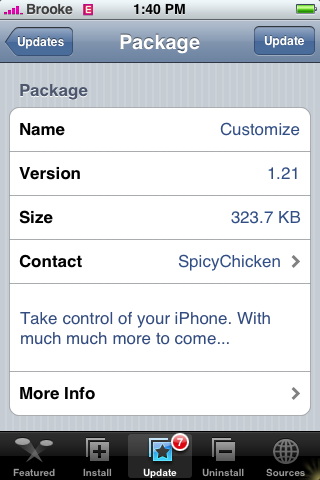
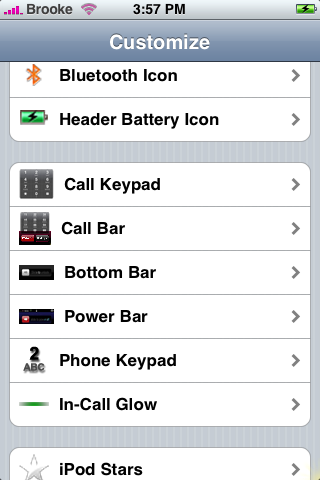
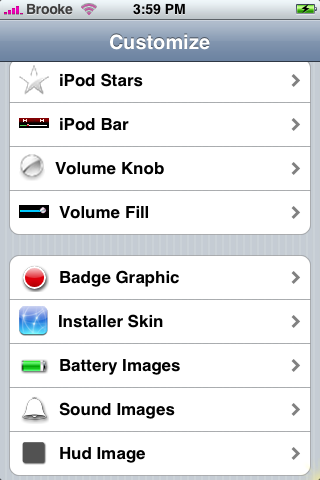
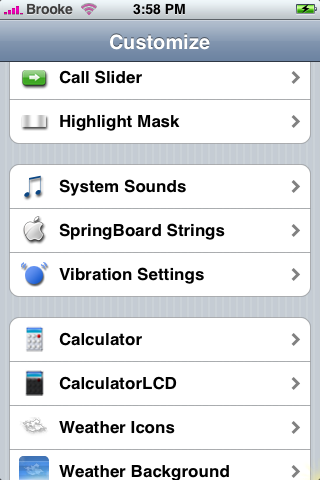
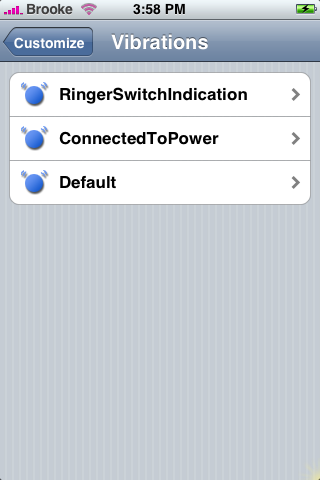
 The update to Customize version 1.21, available in the Installer.app, adds quite a few new features! You now have the ability to change your Call Keypad, Call Bar, Bottom Bar, Power Bar, iPod Bar, Volume Knob, Volume Fill, Installer Skin and the ability to change your Vibration Settings. However…we have found that if you previously installed Shai’s Addons for Customize that included many of the beta functions that are now part of version 1.21…the update to Customize will not show up in the Installer.app! See the screenshots below:
Also, Spicky Chicken will no longer be supporting the Manual Reording option of the app:
“I will no longer be supporting icon rearrangements. I will leave the Display Order functions as they are. This is because it seems Apple has taken up the charge, and 1.1.3 looks pretty exciting.”
You are still able to use the Manual Reording feature in Customize, they are just not going to go to all the work to keep it updated because it is now a stock feature with firmware 1.1.3.

 Loading...


 Loading ...
awsome!!!! this is the first app i would install. can you download keypads and other things directly from the iphone? does it come with some stuff?
#1
You can download Customize theme packs in Installer.app
should i uninstall the add-ons before i upgrade??
so, if i update i will not be able to change the order anymore with jailbroke 1.1.2?
that is the best feature!!!!
cassandra, you will still be able to reorder the applications. It’s no longer a supported feature, meaning when you upgrade to 1.1.3 it may not work (but 1.1.3 supports it natively, hence their decision to no longer support it)
You should look into the Categories app though. I prefer creating 6 categories and arranging all the apps within those to having 5 pages of apps.
i am not moving to 1.1.3 until i am positive i can keep a jailbroke pod next to me.
@Anonymous…Yes, you should uninstall the add-ons before you update! I did. Not sure what would happen if you didn’t but if it were to
break, it would be real bad (restore probably).
Can you post which sources have customize theme packs.. i couldn’t tell from the source page initially
thanks,
aze
I installed the Customize update and I can still rearrange icons. Maybe they’ll take it away in the next update.
never mind my last comment.. the sub folder is now showing in the install tab..
STE Packaging has a Themes (Customize) sections with different “image sets”.
does anyone know what the vibration feature does? what does it change exactly?
i updated today and the ipod bar, and volume fill functions are showing up with incomplete icons. i reinstalled it with the same problem. anyone experiencing the same thing?
Thank you for the mention.
It is highly recommended that you uninstall the Customize Beta Addons v1.21.x prior to updating customize. You don’t have to as installing customize will overight the beta addons package anyhow. When v1.21.0 of the beta addons is released you can find it under “Shai’s Apps” in your installer.
If you need more sources add http://ride4.org/shai.xml to your installer sources, then look for a package called “All Sources.” That will auto-install over 30 sources for you.
As far as icon reordering its exactly as said above. The option will not be removed, just no longer developed. For the exact reason that 1.1.3 supports reordering natively so there’s no need for another app.
Miguel- Please goto installer -> Themes (Catagories) and install CheemaPack. It’s over 3MB and contains all the images to support the new functions added in customize v1.21
If you don’t see CheemaPack make sure you have my source installed.
http://ride4.org/shai.xml
it takes really-really long time to refresh with your source pack, anyway, good to have them :)
Just beware that if you do install “All Sources” it will take much longer to refresh sources, especially on Edge. I have Shai’s source installed as well as “All Sources” & the “CheemaPack”. Make sure you have room to install it. It is 3MB but if you have BossTool installed it should be no problem. I’m gonna do a review of CheemaPack with a list of what comes with it so you know if you like the styles and addons :) Thanks Shai!
anyone know what the VIBRATION feature does in customize?
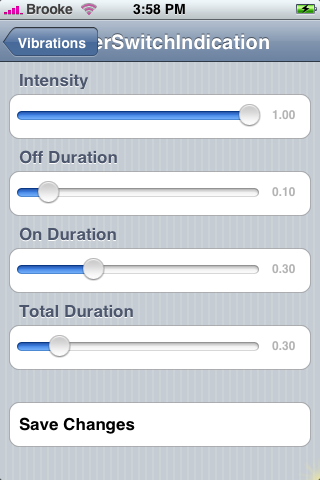
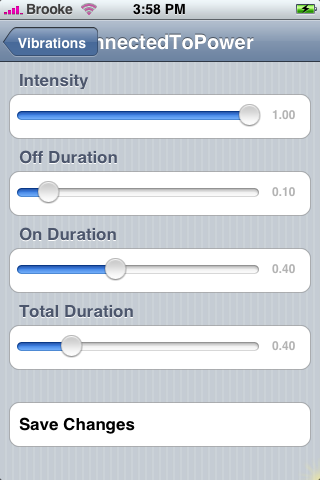
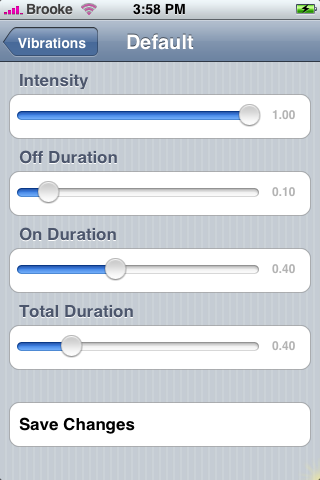
The vibration feature allow you to change your vibration settings…the screenshots above show you what the options are for the vibration settings…you can change your Ringer Switch Indication, your Connected to Power and your Default vibration settings…the screenshots show what you can change with each setting.
shai: thanks for the tip and the source works great!
brooke
thanks, but looking at the sceen shot and my iphone (downloaded already) i still dont understand what “exactly” it does…any help there would be greatly appreciated…
I never see the “Customize 1.21 icon in my iphone, i also uninstall and re-install many time. it support the 1.1.2? or have some bug?
I just went through the process of jailbreaking my previously 1.1.2 version of my iPhone to the new version 1.1.3. Everything seems to have worked correctly, however when my icons were erased and I went to reinstall them, I went to reinstall Customize and it gives me an error message: “This version of Customize requires Firmware 1.1.[12].”
Does anyone know if there will be an update to Customize 1.21 for the 1.1.3 crowd?
@John M….I bet we see one soon…for both Customize and SummerBoard!
Hi, I upgraded my iPhone to 1.1.3. Now I tried to use Customize in order to “make” the contacts icon visible (Addressbook.app). This worked for 1.1.2, but not for 1.1.3.
Any idea how to “enable” contacts to see and use the icon / application in the sprongboard? I want to use contacts directly without tapping phone then contacts.
When will Customize become compatible with the new 1.1.3 Jailbreak?
Hopefully soon! No exact date yet.
@digger_de …The easiest way to get the Contacts icon on your SpringBoard is through Customize…I would wait until they have an update…which is today!
Great news!
THX
wait, the customize update for 1.1.3 is coming out today?
Ok…Ste Packaging has updated Customize 1.21 so that it is able to be installed on version 1.1.3. “At the dev’s request, I added the ability to install on 1.1.3.” So, Customize version 1.21 should now work on 1.1.3. Someone try it and let us know!!
Brooke. I installed customize 1.21 at 1.1.3. but i cannot open it…it goes back to the main menu. I tried to reboot the iphone but still the same error. Did i missed something? I would highly appreciate your help on this. Many thanks.
@digger_de…check out THIS link to create a Contacts icon on your SpringBoard.
Is there an option to change the carrier logo, and if there is, is there a Rogers (canada) logo that I can select?
and, does it work with summerboard? (i forgot to ask)
Customize does have the option to change the carrier logo. You would have to install some of the Customize Themes from the Installer.app to see if there is one for Rogers…so far, I have never seen one for Rogers. Also, are you asking if you can have both Customize and SummerBoard installed at the same time? If so, yes…it is no problem to have them both Installed (however, SummerBoard does not work on 1.1.3 yet).
Yep, thats exactly what I was asking, Thanks!
Does anyone know why I can’t get anything from customize to work on my jailbroken 1.1.3 iphone?
@Trumpetfool04….well, technically there is not a Customize updated specifically for 1.1.3. Ste said that he made Customize 1.21 so that it is able to be installed on 1.1.3. Did you try that version of Customize?
Hello!..HOW I CANT CHANGE THE CALL KAYPAD????? CAUSE I DONT HAVE ANY CHOICES FOR CHANGE IT.I WANT IT WITH THE HELLO KITTY. I HAVE SEE PPL WITH THAT.
I installed This Version of Customize… I changed the vibration settings and no my Vibbrator isnt Working, How can i fix this?
@Brooke, thank you! digger
How can I get customize 1.21 to work on firmware 1.1.2. I dont want to update to 1.1.3 yet and customize wont install on 1.1.2
Any help please I got to get my favorite app working again.
i have this problem with Customize 1.21 on 1.1.3.. it seems that it doesn’t work for me.. i have also Summerboard and the themes i have installed is not there in the list for changing the themes.. Please help me on this..
@Omni…Have you gotten Customize to work?
@Boklog…This Customize does not work on 1.1.3…you want the Customize app that is through the iPod Touch Fans source. It is still titled Customize but it is version 1.21 (custom), 2. Not all of the features work but most do. Also, the themes do not work because they are put in the wrong folder for 1.1.3. You can SSH in and move them from the var/root/Applications/SummerBoard/Themes folder to the var/mobile/Applications/SummerBoard/Themes folder and they will work. Also, when you add themes manually…you will want to put them in the var/mobile/Applications/SummerBoard/Themes folder.
Also, I forgot…there is a version of SummerBoard for version 1.1.3. It is SummerBoard 3.1-1. Have you tried installing that?
how come i left my iphone downloading Cheemapack for over 15 hours and it still hasnt downloaded. and i have the best internet connection
Thanks Brooke for answering my questions… yeah, i got that SummerBoard 3.1-1… now i have to try working on SSH… its my first time doing this… hope it works…
Hi Brooke,
I have a jailbroken iphone running 1.1.3 and can’t get the Customize app to work. (So sad — who ever thought a grown woman could obsess so much over a few Hello Kitty images?) I understand there is an adjustment I can make via SSH that will make it work, but haven’t been able to verify and am a little leery of just diving in. Can you please point me to a tutorial or any other information?
Many thanks,
JWo
I have installed manually the source modmyifone.com/installer.xml but when I go to installer to look for the customize package 1.21 custom 2 it’s not there. What do I do?
there is a customize for 1.1.4 on iGuy.dk
@AJ can you post a link please
For first time I’ve jailbroken my iPhone when it was on version 1.1.3. I have installed Costumize version 1.21 directly and also apps for it.
But it does not work on my phone! When I launch the icon that chicken appears and nothing else happens. On all videos, I have watsched after the chicken there appear some tools to modify different things on the iPhone. So in my case the spicy chicken stays there and nothing else happens, after 30 sec. the iPhone exits costumize alone and nothing changes.
Can u help me?
Can anyone help me changing the boaring black background of my 1.1.3 iphone using customize 1.21?