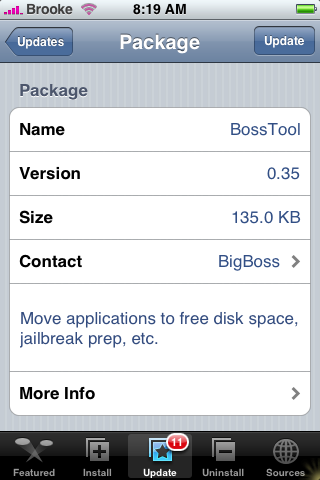
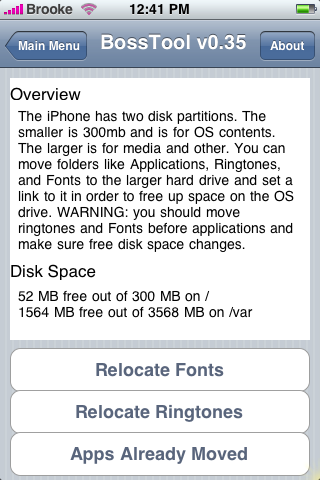
 The update to BossTool 0.35 makes it compatible with version 1.1.3. So, for all of you who upgraded to 1.1.3 and miss having BossTool installed…here you go! If you have already installed BossTool, and you are not on 1.1.3,…you can still update with no problem. The update does change the Relocation features…instead of being able to relocate your Wallpaper, Ringtones and Applications it now gives you the option to relocate your Fonts, Ringtones and Applications. If you have already installed BossTool and used it to relocate your apps…it will show that you have already moved your Apps and will not allow you to select that option. If you relocated your Wallpapers the first time you installed BossTool…the shortcut will stay even though it is no longer an option. If this is your first time installing BossTool…read THIS post before installing!! BossTool is available in the Installer.app through the ModMyiFone.com source. Below are the screenshots:

 Loading...


 Loading ...
Ok i got a question, if I downgraded to 1.1.1 or do another restore, will it clean everything up and return me to Root and APPS so I can do a clean install from scratch, anyone??
You can put your iPhone into recovery mode and then do a full restore to 1.1.1, it will delete the shortcut…but, it will leave a copy of the Applications folder in the root/private/var folder and you will have SSH in and delete it from there.
why isnt bigboss source repo not listed as one of your trusted sites with all the cool apps being released ?
I installed BossTool 0.35 and moved my fonts and ringtones only so far and went from 30mb of free space to 118mb of free space from doing that. I know this is probably a silly question, but if we can’t change the font on our iphone (or at least I thought we couldn’t), why are there so many fonts on it to be moved? Am I missing something? Sorry, I’m very new to all this…
Hello,
I had a question, once I move all my Apps using BossTool (v0.35) and when I add a new App will it automatically place it into that new relocated folder?
Thanks,
Heba
@Heba…it just creates a shortcut…so, no matter what apps you add it will just shortcut it to the new folder…which means, that it will automatically move them, you will not need to run BossTool again after you add more apps. Does that answer your question?
@Cassy…I just got a message from BigBoss and he said he changed it to relocate the fonts (instead of the wallpaper) because fonts take up A LOT more space than Wallpapers. On my iPhone, fonts take up between 86-87MB of space!
One unexpected consequence of doing this after going up to 1.1.3 is that you get all of your old apps back from 1.1.2.
@Slip…when you upgrade…it removes the shortcut but leaves the Applications folder in the root/private/var/. So, when you ran it again on 1.1.3 it probably just shortcut right back to that folder and readded all your old apps. After you upgraded…you could have deleted the Applications folder in the root/private/var/ and then I don’t think it would have done that.
NOTE: you can only just “go in and delete” the root/private/var/Applications file if the shortcut has been removed…if you did not upgrade to 1.1.3 but want to remove BossTool…here is a post about it.
First of all sorry for my English, i’m Russian. I also have question, i upgraded my BossTools 0.34 to BossTools 0.35, in 0.34 i haved moved all items(Wallpapers, Ringtones, Applications), and now i have new option relocate Fonts, okay i done it, now i have 135mb of 300mb free thx, but my question is.. what i shall do with Wallpapare, i don’t see option Wallpaper is alredy moved.. and it’s all ok ? because.. why you removed Wallpapare from list of move items ? is something wrong ? please answer.. you know iPhone in Russian is illegal.. so i don’t wanna it’s broke or something.. thx for your time.
@la2noob…it just leaves the Wallpaper shortcut even though you don’t see the option anymore…it is no problem at all.
Ok thx ^_^
I recently moved my fonts with Boss on jailbroken 1.1.3.
The phone crashed and will not boot up. it just spins on the apple logo..
Any suggestions?
did you fix it ?
i have the same problem
i restored but it not the same
i have the new version 1.1.4 but it dont have its features like making new slide and adding icons to your home screen.
what happened to yurs?
Hello i used the new bosstool on my 1.1.3 to relocate the ringtones, but now the existing ringtones that i had are disappeared and i cannot put new ringtones using the “iPhoneRingtoneMaker”
is there anything wrong with permissions?
@Andreas…you could making sure all the permissions are 0755.
I run chmod 0755 on the Ringtone directory
But when I used total comander with the T-PoT plugin to upload files in the Ringtone directory , there is no writable access.
Boss Tool+Categories= Trouble???
i have a feeling this equation isnt good news…i installed categories before bosstool..
Previously bosstool didnt empty much space on relocating apps, and i had a ton of them installed. i had categories installed then…
then i did a restore and installed all apps except catgories. and then bosstool cleared almost 160 mb space!!
I have the modmyifone source installed on my iPhone but can’t find the BossTool application anyware. Why? Can I find it somewhere elase? Thanks.
Mail and iradio open then close before fully loading after I ran Boss tools to relocate fonts
Hi, same problem as lapuraverdura, i have the modmyifone source installed but still cant find the BossTool on the Installer????
BossTool is also available in the BigBoss source – sleepers.net/iphonerepo.
I’ve got the same problem as ken. Mail crashes after I moved the fonts. But also typing on my iPod touch became slow and don’t hit back space cuz if won’t stop.
Hi, I downloaded BossTool v.0.35 and tried to relocate fonts and applications, but the ‘timer’ (the thing that looked like clock) took a spin and stopped, nothing seemed changed. What can I do ?
And before I run BossTool, I removed all 3rd party applications, I still have 3MB left out of 266MB on /, while 2GB free out of 7.4GB on /var. The figures expected are rather different ??
Question? Ok so i relocated everything app’s,ringtones, etc etc. Now when i try and open up BossTool i get a blank screen, Any reason for that?
K another question? After i relocated my apps some of them aren’t showing up on the springboard. Is there a way to see these apps and better yet use them. I see them in the application folder when i SSH. But no where else.
I can’t relocate fonts, but ringtones and applications can do. I don’t know why?
I installed Status style 2.2 tonight and did not install. I think it is somnething to do with BossTool can anyone help ?
John
Yeah StatusStyle 2.2 didn’t work for me either…check out THIS post. The previous version worked fine and I had BossTool installed then too…so, I’m not sure if that has anything to do with it or not. I know the developer of StatusStyle worked with BigBoss to help him develop StatusStyle…so, I would think that they would not conflict with each other.
Hi,
I recently relocated fonts through boss and now i installed the books app and can not view any of the books I dled is there anything i can do about this?:?
HELP! ! ! !
Mine is the 1.1.1, after I have used this soft to move FONTS, the phone can’t start again! It ALWAYS stay in the rebooting picture, displaying a white APPLE logo…
I’m a user from China, where nobody seems to know how to deal with this situation…
you have to put the iphone is recovery mode and restore in itunes
google “put iphone in recovery mode” for instructions
Anybody know if this is compatible with 1.1.4? If so, any problems?
Hi I just installed Bosstool V0.35 on my jailbroken 8GB ipod, but it seems that it doesn’t work, coz I can’t move anything. Can you please help me with that.
Thank you
BossTool will crash your iphone in case you installed previously caterpillar and moving its fonts.
Install BossTool first – move fonts, then install caterpillar 1.1.1 + crack 2.2
I can confirm that having caterpillar and installing Bosstool after will crash your iphone and it will not be able to boot up due to lack of any fonts I presume (that caterpillar uses). I’m at work but I’m guessing that the only solution will be to recover when I get home which sucks. So beware guys, Bosstool and caterpillar don’t mix!
I am using iphone 1.1.4. I used boss tool to free some space for applications. So when I restarted my iphone it got stuck. Now I have the apple logo and a circular progress bar and it keeps restarting. What can I do? is there a way to undo my changes ?
did you fix it ?
i got the same problem wat did you do ?
You will have to restore your OS using itunes and re-install your applications.
I suggest never use Boss tools again, Pls go to a professional IT shop or the place you got your phone to do it for you.
Is it worth using this to free space or is it recommended not to be done?
Hi.. this is my first thread. I have an iphone OTB 1.1.2 jailbroken using xsim.. it was working fine until I used bosstool v0.35 even though it freed the space. I have openSSH and BSD system installed.. but after using bosstool I cannot receive any calls. The screen shows the callers name but no ‘slide to answer’ option. Can anyone please help! Thanks
Shan
I am using iphone 1.1.4. I used boss tool to free some space for applications. So when I restarted my iphone it got stuck. Now I have the apple logo and a circular progress bar and it keeps restarting. What can I do? is there a way to undo my changes ?
[Reply]
11111111111111111111111111
Thanks
hello ive got the same problem as 12123 !!!
It stuck on the screen with an apple sign! What can i do now?
I moved the Fonts and had the same problem as some of you on 1.1.4. After rebooting I just had the apple logo with a progress graphic…
I fixed it accessing the phone by SSH (needs to have openSSH installed). You have to go to the new folder “/private/var/Fonts” and see that all the fonts are inside one other “Fonts” folder, just enter that second folder and move all the fonts to the parent directory. For the ones that are trying to avoid one restore and don’t know linux commands just do the following:
# cd /private/var/Fonts/
# mv Fonts/* .
# reboot
It worked for me! I advice everyone with some basic linux knowledge to install openSSH for using to fix these kind of problems
will it help if I unistall caterpillar, move apps and reinstall? Will the phone still crash?
HELP! I want bosstool really bad too, but im on 1.1.4. and I CAN’T dowload bosstool 0.35
I know 1.1.4. can use bosstool 0.34, but i can’t find it anywhere.
PLZZZ Help me :S
Macs, you’re definitely my lifesaver lol I sat in front of my comp trying to figure out a way for an hr more and now ur solution worked.
I have a Jailbroken iphone (1.1.4). Last night I moved Ringtones and Fonts using BossTool after which the phone fails to starts. When I power on the iphone it just shows me Apple logo and a wheel. Its keeps on restarting again and again and does not show anything beyond that. Please tell me how to I get back to original state. Or If I need to restore then how do i do it. If restoring is the answer would Jailbroken status would be preserved? Thanks in advance to you lovely people.
Take it to a shop they will do it for you.
I realy would like to say that never ever use this application on your iphones, it completely damages the OS and you have to restore it back and unlock it and all your data, apllications and custom ringtones will go away. I used it last week and my beautiful phone for the 1st time froze on boot up and In had to take it to a shop to do full recovery and took my a day to re-install the applications and create my ringtones etc.. who realy wrote this program? Fire him on spot.
Boss makes some very usefull programs but this one itself is the most dangerous virsu I have ever seen.