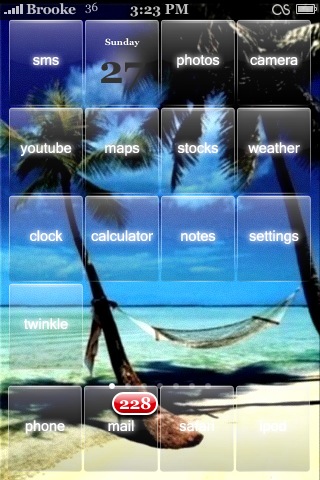
I just installed the Reveal theme from the iSpazio source and I really like it so, I thought I would show it to everyone!! I’m huge on clear icons and have collected a few good sets over the months. I used to use the Ethereal theme a lot (see THIS post for a screenshot) but, I think Reveal may have just passed it up! As with all clear icon packs, having the correct wallpaper is key. I have a few favorites wallpapers that I tend to rotate through but, only three of them work well with this theme (see screenshots below). And, as with all themes, it doesn’t contain an icon for every app…though it does have quite a few! Overall, I think I will keep it around for a while!



 Loading...


 Loading ...
Heyy u made a review on one of my favorite themes… =]
niceeeeeee
Brooke by the way…what is that symbol u have next to the battery on the upper right hand corner?? just curious..looks kinda cool
That is the MobileScrobbler icon.
thanks =]
No Problem! :)
Hi everyone,
Has anyone tried these icons with…..maybe the vWallpaper application? I think it would be cool since you can really see the video-Wallpaper. Please let me know.
I agree…..I think this is the perfect theme to go along with using vWallpaper. It’s my current setup on my phone. The theme is so simple, yet elegant and nice to look at. My favorite so far!
it works with vwallpaper
wow I’m not too big on clear themes since most of them are horrible but this one is exceptional!
this is by far my fave smb theme and I will keep it for a long time
Very Nice,but the weather icon dos not work for me?! Any idea?
Yeah, weather icon’s the same here.
for the weather icon , there is a fix… you only need to change the info.plist file into “/applications/weather.app” but i don’t know if i can link this file to download. brooke or doug.. let me know :)
everything works fine for me and I made a video wallpaper that transitioned 20 backrounds in 2 minutes and SSH’ed into the phone. So its a mixture of the three wallpaper applications. :-) thanks for clear themes.
Where’s the theme??
Can’t find it. Added iSpazio Source yet
pete , add the source then go into the “themes (summerboard)” category of the installer.
btw the theme is from appletree. i like it too :D thanks for the review. if you need some icons missing, write a comment there ***.spaziocellulare.com/ispazio/en/2008/04/28/reveal-13-update/ ( i don’t know if i can link it –> if i cannot please remove the link) i will be glad to update the theme with these new icons
I have ispazio source but it does not show up in my summerboard themes???HELP!
The source I have is …repo.ispazio.net and it still does not show up…
im having the same problem. ive got the source but it doesnt show up anywhere?!?
Did you guys check the All Packages list? It should be there.
iSpazio, you haven’t taken it out have you?
I SSHed the theme into my phone but not all the icons show up as a theme icon. Like sms, smartrss, and restart. The permissions are set at 0755. Anybody have any ideas on how to fix this?
Yes, this is a theme by TheAppleTree.
You can see more of her work at her website: http://www.whitneystcharles.com/ , or in any of the themes she already has up on Installer.
I use ClearTheme through customize, i lie it a bit more, it is very similar however the text is at the bottom of the icon. The text does not glow and is much easier to read. woot.
How do I remove the text underneath the icon, is there an app that does that? With a double text this theme isn’t that nice!
You use SummerBoard and turn on Hide Icon Labels and Hide Dock Labels.
Dooh! Thanks Brooke, I knew the answer was easy, but I didn’t have the time to check it out! blessings, Winston
is sooooooooo soooooooo fun , i like it
i really like this theme. very clean and elegant. but is there a template for creating those icons? i wud like to convert the icons of all the other apps on my phone to this style which i can then manually ssh into my iphone.
i am unable to change the background on the theme it is the house on the field right now? is there anyway i can change that. i heard maybe ssh… but i don’t know how that works… is there anyway that is easier.
btw i am running 2.2.1 and i used Cydia… controlling on Winterboard…
okay so how do u put this on your iphone?? like all the different color icons?