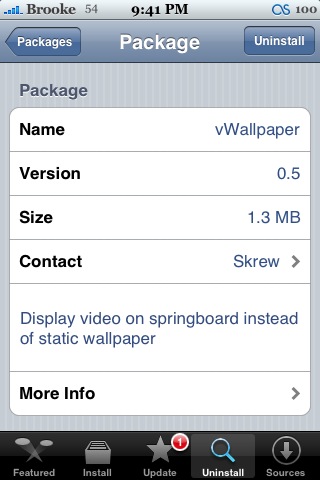
 Version 0.5 of vWallpaper moves the files from the /Library/Skrew/Videos folder to the /Mobile/Media/Skrew/Videos folder. If you have SSH’d in any videos, you will need to move them to the new folder (/Mobile/Media/Skrew/Videos). They will not show up in in version 0.5 of vWallpaper until you move them. However, the best part of the update, is that the Camera and iPod bugs are fixed! YAY! You can now take a photo with your Camera app while your video wallpaper is running…totally sweet. You can also listen to your iPod. However, when you are listening to music, it will shut your video wallpaper off. When you are finished listening to your iPod, it will turn the video background back on automatically! It’s all just very cool! For some sweet video wallpapers check out vWallpapers.com. vWallpaper is available through the Skrew source.

 Loading...


 Loading ...
Definatly glad they’ve patched the iPod/camera glitch, although my wallpaper doesn’t come back after the iPod stops. I’ll take what I can get right now. Good job!
same here but this app is still awesome
Your video wallpaper doesn’t come back when you close your iPod? Huh…that is weird…it worked for Doug when I had him try it!
The autolock is still bugged.
This version now works on iPod touch as well, where prior versions did not. I did have a momentary freak-out when my icons disappeared, however starting then stopping music fixed that. I did not get the hype over this app, but now that I see it in action… WOW! :)
idk where the folder is at so i can add the videos
nevermind got it lol.
0.5 It does not work with 1.1.2? ?
i’m Upgrade now it but not work for my ipod touch
the videos show up but they dont work after i select it…whats wrong?
holy moly this application is getting better day by day….I LOVE IT
Just turn the vwallpaper off and on when you open up the app ame restart springboard.
Hi is it normal that the Video wallpaper in the backround stocks a little bit when it runs(Firmware1.1.4)
This 0.5v is working for 1.1.1?
pleace…tell me
hm somehow i can´t download the upgrade
yea I just did that like three times n still. So idk
I’m bout to uninstall it n put it again. It worked fine when I had the vwallpaper 0.3
my Iphone was bricked after update!!!
I still can ssh in when it in apple screen, but what can I do??? >_<
this is such a fun app.. there is a great collection of vwallpapers here:
http://www.thememyphone.com/thumbnails-155.html
This is a link were you can download new videos and install to the new directory. The read me file is before the update so now you have to use the new path to install the videos. Enjoy!!!! http://www.mediafire.com/download.php?v3xldbmttld
I lost all icons and functions, after having ran vWallpaper for about 10 minutes. Turned my phone off and back on and still all I got was the vWalpaper video. After 5-6 times the icons finally came back and I was able to use the phone again. Then I tried to go into the vWallpaper settings to turn off the video all i got was a black screen then it goes back to my home screen. Again after multiple attemps I was able to get back into the app to turn off the video, and iphone seems to be ok except now I noticed all my music videos have no sound. I am on 1.1.4 anyone else had this problem, is there a fix out yet ? HELP !!!!
Yep, having that same problem right now actually… buggy pgm I think. Also on 1.1.4
Can someone give me (an idiot I guess!!) a step by step on using SSH? I’m dumbfounded! Thanks…
OOOOPS! Forgot stuff…. I’m using an iMac running 10.5.2
Hi!
I’m using 1.1.1 and my vWallpaper program is fine, it’s just that I’m using the 0.5 and my files are still: Library/Skrew/Videos. I thought 0.5 would create (/Mobile/Media/Skrew/Videos) file for me but it didn’t. I’m trying to install the new wallpapers but no luck. I tried using my MobileFinder, iBrikr also. Please help. THanks.
I think that this does not work in 1.1.1 and 1.1.2v….
vWallpapers works with my 1.1.1. The Fire.mov won’t work as my background but weater.mov does (water drop & ripples). I’m trying to add the other new vWallpapers into the folder, but like was said in my previous post, (/Mobile/Media/Skrew/Videos) was not automatically created. Using my “touchcopy” program, MobileFinder or iBrikr to install the new wallpapers into my phone, vWallpapers 0.5 created file… Library/Skrew/Videos. As stated by Brooke:
Version 0.5 of vWallpaper moves the files from the /Library/Skrew/Videos folder to the /Mobile/Media/Skrew/Videos folder. If you have SSH’d in any videos, you will need to move them to the new folder (/Mobile/Media/Skrew/Videos). They will not show up in in version 0.5 of vWallpaper until you move them.
I’m at a deadlock right now.
Hi i am on firmware 1.1.4 and have the same problem all my icons are delete when i use the wallpapers, after four -six times i reboot the i phone they came back”God thanks”.Hope this can be fix soon for this great app!!Greetings NOB
Version 0.6 is out, doing an article about it now!
Wow New function is very cool!!
The major problem right now, is all regular videos has no audio now. Can someone confirm this or its it just my iphone on 1.1.4 ?
I want to turn off vwallpaper but every time I click the app icon it just goes back to the spring board wat should I do