
2.0 Firmware Unstable
135 Comments
9,074 views
I don’t know about you guys, but I am having quite a few issues with firmware 2.0. The App Store seems to crash one in every five times I use it (if not more), my iPhone locks up almost every time I get a text message pop-up while in a program, my iPhone randomly restarts and App Store apps constantly crash while using them. I do not seem to be the only one having these issues. Here at Apple iPhone School we have three iPhones and one iPod Touch on firmware 2.0 (the rest are still on jailbroke 1.1.4) and they are all having problems. Let me know in the comments what your experience with the 2.0 firmware as been like.
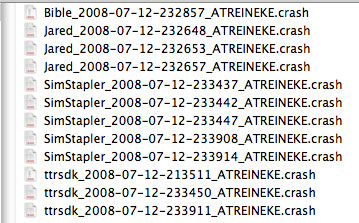
Print Screen of Crash List:


im experiencing random reboots aswell but not too often
[Reply]
Brooke on July 13th, 2008 9:58 pm:
Yeah, I wonder if it has to do with the fact that we do a lot of stuff on our iPhones…they get a workout!
Andre on July 13th, 2008 10:04 pm:
yes. but then i only have 5 apps?
no music or videos and its the new 3g one.
and it still crashes all apps and restarts.
thermoman on July 13th, 2008 10:57 pm:
I’ve noticed that to with apps slowing and overall performance. I think apple rushed things.
danny on July 14th, 2008 7:52 am:
yeah me too
SeijinZero on July 14th, 2008 1:50 pm:
Kinda funny that a jailbroken installer apps work better than official big budget Apple ones.
Joshua on July 15th, 2008 3:39 am:
^^ haha yea. apples lost the plot on this one.sorry apple, but your perfect, excellent, bug free image has been washed down the drain
same over here
[Reply]
yea same here kinda
the phone is slow kinda
and it reboots sometimes
they need a fix and fast!
[Reply]
woah i seem to be not the only one with the same problems.
lets see i downloaded aquaforest, myspace app, aim, and 2 other apps. and guess wat after my iphone gets synced or restarted no matter waht app i open it crashes before it fully opens. id say 2.0=FAILboat.
[Reply]
apple will probably be aware of this iisue, if so many people are cmomplaining, and you guys should see an update to firmware 2.0, soon(within the next couple of days
[Reply]
Andre on July 13th, 2008 10:00 pm:
hopefully we will. so far apple is turning into a poopstain
My phone seemed to be running slow after the 2.0 update. I did the update through iTunes and then restored all the settings. The settings were from my 1.1.4 jailbreak. I ended up doing another restore and this time setting it up like a ‘new’ phone and it seems to be running a little smoother, or at least faster. Don’t know if the clean restore helped but it seems like it did something.
[Reply]
Brooke on July 13th, 2008 10:05 pm:
Doug actually ended up restoring his new iPhone 3G…he didn’t even try to hack it or anything. But, it was being really buggy so he restored 2.0 with iTunes.
yes!!!! my ipod touch is doing the same things! I will try to open a program and it will reboot and take like 5 minutes to restart!
they need an update already
[Reply]
I was having the same issues with my 3g phone. Apparently all iPhones shipped with an older version of the 2.0 software (5A345), even though there is now a newer version of the 2.0 software available (5A347).
I was having huge issues with sluggish UI, bizzare video playback, software crashes. All seems well now that I have the newer version.
You’ll have to attach the phone to iTunes, then do a restore. Once it backs up your data, allow iTunes to restore the phone. This will NOT work by using the update feature in iTunes, it has to be a full restore.
[Reply]
Pyri on July 14th, 2008 12:13 am:
This is exactly what you need to do, everyone should take this as the best solution. 5A347 is definatly more stable than 5A345.
Douglas on July 14th, 2008 7:57 am:
I think they are both buggy. Brooke new iPhone 3G is on 5A345 and crashed, probably more than my 3G. My 3G is on 5A347 but still crashed, especially when an 3rd party app is open and I get a text message pop up. One of our 1st gen iPhones is on 5A347 and it’s very stable. Also has way more apps installed than our iPhone 3Gs.
is apple losing its touch (no pun intended), or just a string of bad luck?
[Reply]
se7en on July 13th, 2008 11:20 pm:
Liar! That pun was TOTALLY intended. Love it.
If I get a text message pop up while in app, and press reply, the typing in the SMS app is very slow and buggy until I exit and reopen it. Typing overall is very buggy on the new software.
[Reply]
Douglas on July 14th, 2008 7:58 am:
I agree. Typing is very slow for me too. I request a processor speed bump!
weird, I’m not having this problem at all. I have a 16GB 3G and a 8GB 1st Gen. and I have over 6 gigs of data on both, plus about 40 App Store apps on both and everything works completely fine. My iPhone does freeze up every now and then and does reboot randomly every 5 apps I download, but nothing crucial.
[Reply]
RigorMortiz on July 13th, 2008 11:11 pm:
Same here. I notice a little bit of diminished stability vs. 1.1.4 but no where near as bad as users here are reporting. My gf’s 8GB 1st gen and my 16GB 3G both work okay. FWIW, she did a complete restore. (my 4GB 1st gen worked acceptably as well)
The biggest issue I’ve had is wrong position reported when on WIFI at home, and strange behavior when removing apps via iTunes. If I hit sync immediately after deleting them (form within iTunes) it works well, though.
Andres on July 14th, 2008 7:50 am:
Same here. So far have only had one reboot and have been using the phone a lot. It’s not too far off from 1.1.4 for me.
I’ve been waiting to hear your experiences — I’d be lost with some of my jailbroken-only apps, so I’m in no rush that’s for sure. Too bad for Apple, this launch seems to be riddled with problem after problem. I’m kinda surprised, actually. Hang tough – we’ll get there…!
-eFoo
[Reply]
I am also getting some random reboots and the app store seems to crash a lot. Also apps downloaded from the app store crash one out of every three times it seems and always freeze up.
[Reply]
SLLLLLOOOOOOWWWWWWWWWWwwwwwweeeeeeeeerrrrrrrrrrrrrrrrrrrr than 1.1.4
[Reply]
i have had a few random reboots its pretty annoying but hopefully they will fix this soon
[Reply]
I take it with 2,0 and the App Store, that Apple have made it so you can have more pages of apps without crashing to the point of a restore, wasn’t there a 60 to 80 limit before a big crash and restore with 1.1.4, plus is there anything like Catagories in the App Store so we don’t have to have pages of stuff ?
[Reply]
Douglas on July 14th, 2008 8:01 am:
I haven’t figured this out yet, but it’s on my list to push it to the limit so we can see what the limit is… We’ll write about it once we know.
Douglas on July 14th, 2008 8:09 am:
While attempting this I also tried to install more than one app at a tiime. You’re asking for trouble when doing this
two were installing and trying a third bogged stuff down pretty bad. I don’t expect this to be a feature, allowing more than one to download at a time, I’d rather it not allow it so it doesn’t crash.
Kane2007uk on July 14th, 2008 1:06 pm:
Thanks for the reply, sounds like you guys are really putting 2.0 through it’s paces, good luck
It’s been running smoothly for me. I noticed just 2 things: google maps lags while trying to input text in search, also one app didn’t fully install so it caused all the other apps to crash when trying to open them. I solved this by deleting the app in question and re-installing it.
[Reply]
yeah, mine has randomly restarted once and a few apps have frozen. Plus when I try to sync with my computer iTunes will say it’s backing up but it will be extremely slow.
[Reply]
Douglas on July 14th, 2008 8:01 am:
This process is extremely slow if you have a lot of apps. Once it does it the first time it gets better from there.
Treadeater on July 14th, 2008 1:36 pm:
ok. Thanks for the advice Doug. Btw, love the site. Definitely the best iPhone site out there. Keep up the good work.
yea, mine’s buggy too.
The most annoying part is that whenever I run an app, it seems to mess with my volume settings.
[Reply]
wow apple you where once a company that made a gud looking kool phone that worked…
now your a company that makes a better looking phone that doesn’t work.
you better fix it soon steve, otherwise im going to have to kill you
[Reply]
I had the same problem with several apps, but one in particular, ICE, crashed continuously. I wrote the author, and this is his reply:
There appears to be an issue with either the iPhone OS or iTunes or some combination of both that for some reason causes the problem that you mentioned. This issue is not limited to ICE, but appears to affect pretty much any third party application, but it’s totally random. Many developers as well as Apple personnel have been working this weekend to try to figure out what is going on.
Now that we have the background information out of the way, let’s move on to resolving the problem!
1. Make sure your iPhone is synced with your copy of iTunes.
2. Remove an application from the iPhone. It doesn’t appear to matter which application you remove, but since ICE is fairly small and you’re experiencing issues using it, go ahead and remove it.
3. Once the application is removed, completely power down your iPhone.
4. Wait a moment.
5. Power your iPhone back up.
6. Reconnect to iTunes.
7. Add the application (ICE in this case) back to the iPhone.
I did this, and it seems much more stable.
(Former Windows Mobile 6.0 convert)
[Reply]
Random Restarts.
Freezing During Application Syncing.
Apps Crashing.
Random Freezes
and this happened once:
i locked my ipod touch and than after a few minutes i wanted to
play with it again and it wouldnt unlock it just stayed
with the blanc screen.
and i had to connect to the computer to unlock it.
tons of bugs >_>
[Reply]
Brooke on July 13th, 2008 10:44 pm:
That sooooo happened to me too!!! I had to plug my iPhone 3G into my computer to get to the lock screen to come up…I thought it was broken! Then, it fixed itself. I had forgotten about that!
rob on July 13th, 2008 11:42 pm:
That actually happens to my jail broken 1.1.4. Not often and if I give it a minute it comes back to its senses but it’s very obnoxious.
Typical Apple fashion for those of you who don’t know. Apple’s customers are always the beta testers for their products, don’t expect a decent version for at least a few months if were lucky.
[Reply]
Glad I didn’t update my touch. Becides, I’d be lost without it looking like windows vista and being custmize to my exact liking. Don’t know what I’m gonna do if theres no custmize on 2.0 when jailbreak is released.
[Reply]
Same here. It looks like Apple released a very unstable update
[Reply]
ok i have a question if i have an unlocked and jailbroken 1.1.3 and i do a restore to go to another firmware like 2.0 when it is unlockable and i click restore from backup is that ok? or does it backup installer files that are bad?
[Reply]
Yeh, my phone has been crashing all the time. I expect an update to the OS very soon.
[Reply]
I noticed that the 2.0 firmware was unstable right off the bat. the app store has locked up at least four times on me and at least one app (TTR) completely crashed the phone :-/. Originally i had the train of thought that it was because of my previous jailbreaks but seeing this post changed my mind.
[Reply]
The caps and the seemingly 10-year-old whiny voice probably will only encourage people to ignore you altogether.
[Reply]
I have had restarting issues!!! Multiple times! Its annoying! APPLE FIX THIS!
[Reply]
Ahhh, I love my 1.1.4 1st gen unlocked iphone!
[Reply]
tonyc311 on July 14th, 2008 1:29 am:
Preach brother! I was gonna totally buy a 3G iPhone on Monday. But FORGET THAT! I can’t believe all the problems people are having. I’ll stick with my jailbroken 16Gig 1.1.4.
Scott on July 14th, 2008 5:43 am:
And I’ll stick with my 8Gig 1.1.4 pwned iPhone!!!
i’m quite happy to still be in good old 1.1.4 jailbreak .
looks likes they didn’t have enough time for this 2.0 crazyness.
[Reply]
yeah, the 2.0 software seems to be unstable. I have had similar issues to what you have been experiencing doug. Hopefully Apple will address the issues.
[Reply]
actually guys, i havent had any trouble with these things happening, i have a first gen iPhone with 2.0 software and mine hasnt crashed or nothing. So i guess im just lucky.
[Reply]
Douglas on July 14th, 2008 8:11 am:
I agree on this, our first gen iPhone that is upgraded to 2.0 is much more stable. I wonder if some of the different hardware in the iPhone 3G is causing problems…
Andrew on July 15th, 2008 12:12 am:
I had the same issues with my phone, I restored it 3 times, on the fourth try I turned the 3g off (when not using data), since then I have had NO issues. I think when apple was designing these new phones, they were only thinking about the 199.00 and 299.00 factors (1 million phones later), all the networks that they launched with had 3g available, so its not the issue of the network. Apple needs to do some larger testing of their phones in markets like chicago, new york , los angels , and mexico.To see if their 2.0 can handle the speed of the customer and the speeds of the networks. BTW, I traded in my 16g that I bought on sunday(which the told was the last iphone available) , I went back today with my lock up issues, they had plenty of phones for software issues, I think apple planned for this to happen, They just needed the revenue push on their stock.
yeah, every time use myspace or something, it crasshes and restarts
[Reply]
YUP!! I have been looking around online to see if anyone has had similar problems and this is the first site to mention it. I compared my 3G iphone to my other 2G iphone and it seems to be slower. The apps and settings start a lot faster on 1.1.4. App are constantly crashing and some wont start. I find myself having to restart my phone more than before. Apple come on!! were is 2.0.1?????? LOL
[Reply]
We are running Firmware 2.0(5A347) and the only crashes are from new apps, like “where” and “Google”. Kind of expected that myself; the new OS seems stable enough for us. No errors on phone, ipod, sms, mail, maps, notes, contacts, photos, clock, weather, stocks and settings so far for us.
[Reply]
for me the app store crashes every time i’m loading an app while being in the store. sometimes all my apps are crashing on the loading screen. then i have to wait sometime to use them again. ihope there will be an update soon.
p.s. i’ve got a question: why doesn’t the landscape homescreen work? or is it just on iphone 3g?
[Reply]
Kane2007uk on July 14th, 2008 12:51 am:
Did Apple add that??? the only info I’ve seen on that was in an iPhone 2 concept vid: http://www.youtube.com/watch?v=5d6m3XNDKCk
Braden on July 14th, 2008 2:00 am:
Uhh, there is no landscape home screen. Not on the iPhone 3G, not on the originals.
Douglas on July 14th, 2008 8:12 am:
Braden is correct. That video is from a contest someone ran. It was to show what ideas you had for the new iPhone.
Kane2007uk on July 14th, 2008 1:12 pm:
I know that, you only have to look at the comments acompanying the vid, my point was to show grafagoggel that, but I wasn’t 100% sure that Apple hadn’t implimented that idea in 2.0
I bought Super Monkey Ball and it keeps crashing, I only got to play it once
I’m going to try re-syncing it hopefully that will help
[Reply]
Hey Doug or Brooke, can you please help me out….I was wondering if you guys know how to customize the calendar with different colors. I saw it all over the 2.0 upgrade page in Apple.com but Im not sure how to do it. I am currently on 2.0 firmware and I do not have the 3g iphone. Thanx for your time and hope to hear from you soon……
[Reply]
Aussiephone on July 14th, 2008 3:23 am:
The colours reflect what categories you have setup on your computers calendar, iCal (Apple) or Calendar in windowz , eg; Personal, Business, Birthdays etc. I’m not sure you can edit them on the iPhone.
Douglas on July 14th, 2008 8:14 am:
As far as I know, you’re right, can’t control this from the iPhone. It’s just to separate the different calendars you have synced.
i havent upgraded to 2.0 yet but ive heard it from different blogs as well.
[Reply]
Mine reboots once in a while as well. I was wondering if this was some residual from when it was jailbroken, but seeing as how this is happenning to brand new iphones, i guess not.
[Reply]
I upgraded by iPod touch to 2.0 and in the begginning I had some problems with AIM rebooting randomly but somewhere official I read that you may need to reboot a couple of times to get the kinks worked out and it’s been fine from then all out.
[Reply]
I knew there was going to be a problem, theres always one in the begining. thats why i always wait at least 2 weeks before i do anything so that all the bugs are fixed!
[Reply]
I hate the new firmware….the only thing I like is the deleting multiple emails and the screen shot….I want to downgrade back to what I had…is there anyway of doing that? please help!!!
[Reply]
same here the volume on my phone is always on superlow eventhough I put it all up it always gets turn on realy low
Another thing when Im texting. It takes for ever to type in a word. That’s what has been a bother for me the most
Any one know how to down grade. iTunes and the iPhone back to 1.1.4?
Another thing I notice on my online banking that. I have been getting 1 dollar charges not sure why if I have been dl free apps
[Reply]
Same here – iPod touch 2.0
[Reply]
my biggest complaint is that every time i plug my iphone into my lap top it starts backing up and ive never finished it, but it seems like it would take about 4 hours.
i have probably over 50 apps installed, they run smooth for a while, but what it seems like every time i open one it actually somehow either stays open in the background or something. Therefore after opening maybe 15 apps or so they open then crash….
…so i reboot which takes probly 2 minutes and everything seems perfect again but not forever.
also, it seems like the more apps i open the slower my edge connection gets going.
oh and my push yahoo account aint pushin as much as it used to.
so in conclusion, steves little at the wwdc said apps dont run in the background, but it seems like they do. i dunno.
[Reply]
Douglas on July 14th, 2008 8:16 am:
Do a sync over night and let it back up completely. Then then next time it will go much faster. I notice that my pics, music and video weren’t syncing and that’s why I restored. It was just actually taking FOREVER to backup and hadn’t gotten to the pics and stuff yet.
My yahoo account won’t refresh. It’s been “checking for mail” for about 3 days now and I never recieve any email. I have to log onto the computer to see my email. I’ve played with the settings and turned the phone off and back on and it still says checking for mail.
[Reply]
German on July 14th, 2008 1:50 am:
wow thats super annoying. i would restore and not restore from backup. just sync adress and calandar after restoring.
when i restore from backup it always does something to my mail.
Andrew on July 15th, 2008 12:20 am:
I noticed that the mail apps are case sensitive. Try changing that
I agree. Lose the immaturity and find help elsewhere. This isn’t a iPhone repair company. No one is going to fix it for you. Buy a new one and suck it up.
[Reply]
I have lose the option 2 turn 24 hour time on or off it is there but grey and stuck on. Anybody else have this problem
[Reply]
Encountered issue: Itunes not showing album art when art is part of the file
Encountered issue: screen is distorted after a sync, randomly, and is fixed by double tapping home to enter ipod or favorites, and then home again to display screen normally
[Reply]
hey guys,
i’m running FW2.0 on my non 3G iphone and all the applications are running quite stable. Only super monkey ball crashed once. But after a restart it ran stable untill now.
best regards, hanson
[Reply]
hmmm.. i d/l the 5A347 link from the live stream the other night (for my ipod.. (gotta love free) and have had 0 problems (knock on wood) .. is the one you d/l from itunes 5a345? i dunno.. i love enigmo.. sprmnkebll and remote.. i saw a vid on youtube where all the icons on the springboard turned when u went to landscape too.. but i think that was fake.. (would be kwl tho) yeah i see the colors in calender too.. (but not here) strange.. but mine runs snappy tho.
[Reply]
Mine runs great – Its 3g and not jailbroken
[Reply]
Everytime I connect the iPhone 3G to my mac the iPhone backup takes almost an hour of time….How is it possible, this is very frustrating. Never had such problems on 1.1,4
[Reply]
Douglas on July 14th, 2008 8:18 am:
This is common, it’s backing up all your apps and settings from all the programs. First time takes a while. Let it run one night when you go to bed and it won’t take as long in the future.
He’ll get a lot of help from spam-bots though by posting his email address here
[Reply]
to DOWNGRADE
1rst download 1.1.4 fw, then download itunes 7.5 and uninstall your itunes install this one.
2nd put iphone in recovery and restore with shift or control depends on your os…
3rd downgrade the baseband with ziphone
You are on 1.1.4 again!!!!
Good luck
Seen at http://www.esferaiphone.com
Sorry for spam, but i think its important, and i cant copy the manual cos it is in spanish and im writing on the iphone…
Cya!
[Reply]
Douglas on July 14th, 2008 8:19 am:
No problem, thanks for the info.
i LOVE my jailbroken 1.1.4 xD
[Reply]
[...] – 50.+ Das iPhone 3G wie auch die erste Version mit neuer Firmware sind scheinbar extrem unstabil (Kommentare lesen) und stürzen öfter mal ab oder starten neu. Mal sehen wann das gefixt wird [...]
I too have found the OS to be unstable…
But what’s really bugging me is all this business about 3rd party hardware no-longer charging the iPhone. I have a really nice speaker system with dock that I used on my 1st Gen iPhone. When I got my iPhone 3G home, before activating it, I popped it into the dock on my speakers to give it a charge, and guess what – it charged perfectly…
But now, since I installed everything and activated it – it says the unit cannot charge the iPhone…
What’s irritating is that the hardware physically CAN charge the iPhone, but apple’s firmware has decided that it WON’T permit it.
Maybe they’ll relent on this in a later update…
It’s proving quite difficult to remain an Apple fanboy…
[Reply]
Douglas on July 14th, 2008 8:19 am:
I heard about this. also heard they are coming out with an adapter. I’m sure it will cost. This is lame…
Sounds like with the addition of firmware version 2.0, the iPhone has turned into a Windows Mobile device.
[Reply]
Douglas on July 14th, 2008 8:20 am:
Not quite, but it sucks…
Jochen on July 14th, 2008 10:21 am:
lol
I had one full system crash using the AppStore (first day). Then I relalized some applications crashing.
Then I decided not to restore from backup. I restored the 2.0 firmware first and did not use any former update. since then things are perfect.
Probably some of the crashes are due to a restore form jailbroken 1.1.4 phones. I had mine heavily modified. Since I did the clean 2.0 install no more problems
[Reply]
shoo on July 14th, 2008 8:31 am:
Dude…most people are talking about their new 3G phone they got from the store….
I am on Tmobile. I have no interest in the 3G phone. Besides I think it will be $99 by christmas.
Wow all the problems.. you stood in line and forked over big $$ for all these problems? Another reason why I didn’t and will wait for the hackers to get me int 2.0 and the best of both worlds. Come back to 1.1.4 and stability, at least for now. I’d be pissed if I had a 3G too.
[Reply]
Agred. 2.0 does seem to have some problem. Mine gets hung up a lot and then just restarts or i have to restart myslef. Sucks but hopefully they will fix it.
[Reply]
for those having crash/lockup issues. Please firmware version(5A347), include 2G/3G info. List of apps installed. Was restore done from Jailbroken backup.
[Reply]
for crashes. Please inlude info noted above.
[Reply]
I have the 16 gig 3g iPhone in white and I’m haveing the problem that every once in awhile my phone does the hard respring to the lock screen. I also found that if your phone seems slow go into maps and see if it is trying to find you. Mine was so I turned off location services in the general settings menu. Since then my phone seems to be acting normal. So you might want to give that a shot. Also I had the first gen iPhone and for some reason I think that the new iPhone or maybe it’s the software makes it harder to type on anyone having the same problem?
[Reply]
yeah i turned off location services in general settings and it doesnt crash anymore!
give it a try!
[Reply]
no on August 4th, 2008 1:18 pm:
uh i have a ipod touch i tried that but it still crashed…
Hey Brooke. Did you get this problem from the starting or after using the firmware for some time and installing apps. Because I am going to upgrade and cant afford crashes. Will be using my Exchange account for corporate work. Also let me know how many apps you have.
Thanks.
Apple has also said that 2.0.1 firmware will be having some security fixes, so hope that solves the problems…
[Reply]
I’m shocked that so many of you updated to 2.0 .
Why would you not wait? with the history behind firmware updates , why are you all acting surprised? come on people if you aren’t botching about one thing then its another. if you thought this first release was going to be smooth , then you deserve a messed up iPhone . Stay with what works and let the devs fix the bugs. Its why we all depend on them.
[Reply]
Michael on July 14th, 2008 12:06 pm:
Dittos! I’ll stay with my trusty jb v1, 1.1.4, thank you…………
if i want to update i am not looking for that installer app but can i use my iphone on a different sim card in my country (lebanon) if yes steps : are update to 2.0 and backup from jailbroken iphone is that true or its fake thx (sorry for my english)
[Reply]
Frank on July 14th, 2008 1:20 pm:
My advice is, Do Not Update yet. Wait for unlocking sofware to be available incase you run into problems.
yea my 2.0 ipod touch reboots so many times at random.
[Reply]
he just wanted some help! This is an iPhone community we r soppsed to help each other!
Ok, so there’s a program in installer called “home button” and it does exacly what the home button does… I’m not sure what source it in so just put it into the search over here because I know doug and broke did a review on it…
[Reply]
I’ve noticed 2.0 is a crash magnet. I updated my iphone classic to 2.0 on Thursday and had loaded about 80 free apps without it being to bad. Now with the new 3G everything seems slow and I get crashes on installed apps as well as even iphone’s original apps.
On a side note, I figured out how to stop that horrible backup process. If you turn off the automatic sync in itunes, and just do manual sync’s it skips right over the backup process.
[Reply]
my non 3g iphone after upgrade with itunes 7.7 not work any more only icone itunes and usb cable on the screen and also my itunes not recognize the iphone only turn on and off
[Reply]
todd on July 14th, 2008 5:16 pm:
Did you activite? or you try down grade to 1.1.4….or use it as door stop (just kidding)…
You have to reboot your ipod every time you sync it to itunes. Its kind of like when you download something in installer how it automatically rebutes, well it doesnt do that with itunes
[Reply]
Brooke, can you please add to the first post. It’s a video from ABC America that highlights how people are having activation and software problems with the device. Here it is :http://au.video.yahoo.com/watch/3097312/8813817
[Reply]
advice dont try and update ur iphone to 2.0 if ur using iphone as unlocked ive staied last night 12 hours reformating my iphone thx to GOD it worked and my iphone is know at 1.1.4 more stable than it was before i dont know why but it worked good bye
[Reply]
tarek on July 15th, 2008 5:46 am:
their was a horror MOVIE night last night DONT TRY TO UPDATE UR IPHONE TO 2.0 SERIASLY NOT KIDDING I WAS REALLY ANGRY 12 HOURS ON MY PC NOT MOVING!!!!!!!!
Hi,
does anyone know of a way to copy things (eg: contacts, wallpapers, pictures etc etc) from the old iphon to the new one?
Thanks
[Reply]
[...] فيما يخص النسخة الجديدة من نظام التشغيل 2.0 فقد اشتكى الكثير من المستخدمين من مواجهتهم مشكلات كبرى تتعلق بالثبات بعد الانتقال [...]
I’m getting frequent crashes when clicking on apps. My iphone shuts down and can’t be restored unless I go into the file system with a third party app first and delete all data. I’ve had to restore it this way many, many times. (First generation iphone)
[Reply]
wow 2.0 is a joke, my iPhone restarts automatically when i have unistalled an application and go back into the appstore, so annoying my god cmon apple fix this crap
[Reply]
[...] for the new version of Operating System 2.0, many users have complained of major problems related to stability on the phone after moving to the new operating system. Also [...]
The same. My phone freezes consistently through the day either when I’m on a call or off a call. Recently, my Edge network has stopped responding.
[Reply]
This new firmware is two faced. I like the appstore and some of the new small features like holding .com to bring up new choices (.net .org…) However it is terribly slow. Its ridiculous, i try to show off new apps and they just crash and the phone reboots. When i type in SMS the response is at some times incredibly lagged. Also, if i get a new voice mail it takes almost 30 – 45 seconds for me to be able to pull up the voicemail tab. They need to update quickly.
[Reply]
I upgraded my Ipod Touch to the Firmware 2.0. My wifi is unstable – constant drop outs. Apps are the same, very sluggish and sometimes crashes.
[Reply]
can u help me to download my iphone back to version 1.1.4!plz..
[Reply]
I have the same problem on my iPhone after upgrade from 1.1.4
[Reply]
[...] أما فيما يخص النسخة الجديدة من نظام التشغيل 2.0 فقد اشتكى الكثير من المستخدمين من مواجهتهم مشكلات كبرى تتعلق بالثبات بعد الانتقال [...]