 |
Available In: Cydia |  |
Price: Free |
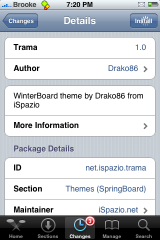
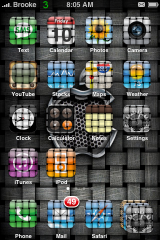
 Trama is an interesting theme that came out in Cydia last night. There is not a ton of info about the theme but, it does seem to change your WiFi signal icon and battery icon on your Status Bar, the battery charging image on your lock screen when you iPhone or iPod Touch is plugged in and the sliders. Check out the screenshots below.

 Loading...


 Loading ...
that one makes me dizzy..
I double that. I installed it for a minute late last night to see what it looked like. I didn’t like it at all so I simply uninstalled it.
The icons do have a great and original look to them
Hi! How did you manage to get such a nice dock with the stock app? When I use the stock app I can only have two other apps on the side of the stock, otherwise one of the apps will appear under the stock app or atleast halfway under the stock app…
I actually installed the “blank icon” in Cydia. Then I drug the blank icon in the forth place (under Stacks) that way I didn’t have an actual app under Stacks. It works pretty good.
I had the same issue using “Stack” – but then I used the 5-dock hack that puts 5 icons in the dock. it didnt look like the sample above. I put the address book behind the Stack, since I can access my contacts from the phone app.
is there a way to put applications on the iPhone homescreen wherever I want, like if I only wanted 1 icon on the top and 4 on all the others.
I remember an app from intsaller back to the 1.1.4 times…
The name was “blank app” or something like this.
It was just a transparent icon so you could get some empty spaces on your SB.
If I remember well, you could install the same app few time to free more than one space…
So basically, for your needs, you could install it 3 times, have only one icon on first row and then 4 icons on the next ones…
I’ve been looking everywhere since 2.x and I can’t find it….soooo sad, I’m a springboard customization addict.
You can still get that in Cydia on 2.x. The title of the package is Blank 1 (there are more if you would like more than once blank icon). You can get them through the Steffwiz source.
That is great news…thx Brooke
looks nice, spelling fail though
Im not sure how to spell it, but i know its not Trama…
You’re thinking of Trauma: a body wound or shock produced by sudden physical injury, as from violence or accident.
This is spelled Trama: a specialized hyphal tissue constituting the internal structure of mushroom gills, pore tubes, or spines.
D: brooke smart, me dumb dumb
Lol, th for letting me know
Mushroom gills……
DJ Contagious just got showed up by Brooke!
Nah, actually this is Doug under Brooke’s name, sorry I am on her laptop :) Wasn’t meant to be like that. I just had to know for myself so I searched to find the answer and thought I’d share it here. I didn’t know either :)
Pixelpro: Thx, looks great now :)
DJContagious: Pwned
Do I have to jailbreake my iphone to get all these apps?
The apps that are labeled Cydia at the top need a jailbroke iPhone. We do review App Store apps which obviously you do not need a jailbroke iPhone to have. As for the theme shown above…yes, you will need a jailbroke iPhone. Check out our Jailbreak page for more info on jailbreaking.
hi everyone..
folks, can you help me with this problem, I installed a winterboard theme and it changed my dialing pad from that sleek iphone look to a one that looks like an ordinary payphone dialing pad? how can I change it back to the way it used to be. I tried the obvious which is changing to another theme or default and it’s still the same? can anyone help me if possible?
Um try uninstalling the theme that messed it up completely (Or try uninstalling it from within cydia)
folks, little help won’t hurt? can someone answer my previous post?
thank you for the reply