 |
Available In: Cydia |  |
Price: Free |
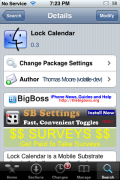
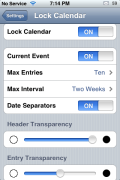
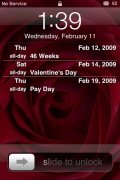
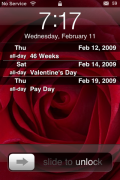
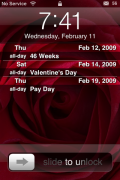
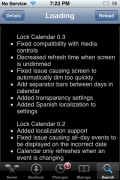
 Lock Calendar has been updated to version 0.3. This version fixes a few bugs (see screenshots below) but, also adds some cool new features. You now have the ability to add Date Separators, Header Transparencies and Entry Transparencies. If you go into the app settings (which is accessible through the stock Settings app) you are able to turn on/off the Date Separators (which puts a line between the dates) and adjust both the Header and Entry Transparencies to your choosing. This makes the app much more customizable! A very nice update. Oh, the update also adds a Spanish translation! See screenshots below.

 Loading...


 Loading ...
Great app! A font slider would make it even better! The default font is a bit too big imo.
Anyone else not seeing it work after the update?
I’ve reinstalled it several times now, messed with any settings I could, and nothing is appearing on my Lock Screen.
This app worked fine until I updated.
Me too! It doesn´t work at all after update. I´m trying Intellisync now…
Maybe u dont have any appointments in the intervall…:) u can change the intervall in the settings section…..
You are probably right about that.
Thanks.
I also cannot see anything after install it!!!
this was better in the first incarnation – where it actually had the ability to show all your appointments – not just up to a month : (
Works fine for me, nice update.
I agree with others that the limit of one month in advance is a step backwards. A limit on the number of future appointments is better regardless of when they are.
Also, it would be nice to have an option to change the font colours. Depending on your wallpaper it can be impossible to read the appointments sometimes.
However, that said, this app is superb and these are minor improvements that can be added in future versions.
where do you download it from?
U r cute!!!
Why is the current day in blue on my screen? The rest is white, which is fine. :(
how can i make my lockscreen look like on picture 4 or 5 cause it looks like on picture 3 and its a bit ugly…
thx
@Greg Same here. I wrote the developer to ask if it is something that can be changed by modifying a plist. Waiting to hear from him.
How exactly do i download the Lock Calendar,
Please some1 Guide me out here….
I need this urgently …
thanks
I AM CRUSHED. I foolishly upgraded and I need the old verison back. The new version build on cydget simply does not work for me. Like Winterboard cydget is a resource hog and the 1G and 2G phones can barely swing it. PS the app words great on the current 3G phones. I need to fine the last verison some how.
Since the update I can’t get the ipod mini controls to pop up when you turn the phone off. You used to be able to double click the home button when the phone was off and the music controls would come up….now it doesnt work.
Same problem here, no music controls since this update. I rely on the music controls and it is bugging me, not able to use it! Is this a bug, or has anybody a solution? Thanx!
Help Please
My lockscreen calender only appears when i first reboot my phone after that it will not come back on untill i reboot my phone again, also comes on sometimes after respringing. I’ve no idea what to do, can you please offer some help?
David