 |
Available In: Cydia |  |
Price: Free |
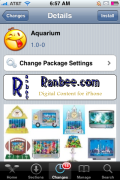
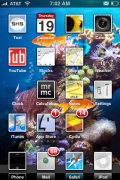
 Aquarium is an application that will turn your iPhone or iPod Touch into an “aquarium.” When you install the app, it will be added into WinterBoard where it can then be activated/deactivated. If you activate the application, it will add a wallpaper to your iPhone that looks like the bottom of the Ocean. It will also add little swimming fish behind your icons on your SpringBoard. The fish are a little glitchy in their movement but, the app does not seem to affect the actual performance of the iPhone. This little application is available through the Ranbee source.

 Loading...


 Loading ...
looks cool ima try it now ive always wanted a deacent swimming app like this ***first*** ^_^
The fish look a little out of place. Goldfish are freshwater fish and do not live in the coral reef!
Lmao
My only request is….please Nemo please.
amen
i noticed a slight delay swipping between springboard pages while this app is running..its cool but needs more stability..
Hey, for all this; why not just use video wallpaper?
I didn’t like the gold fish in the reef either so I made a couple of saltwater fish icons to replace them. Looks much better.
can you post a link to a screenshot
Sure http://picasaweb.google.com/mmoore410/IPhone1#5305451757766849010
Very Nice! If it didn’t cause lag, I would so get this app.
how can i install this?