 |
Available In: Cydia |  |
Price: Free |

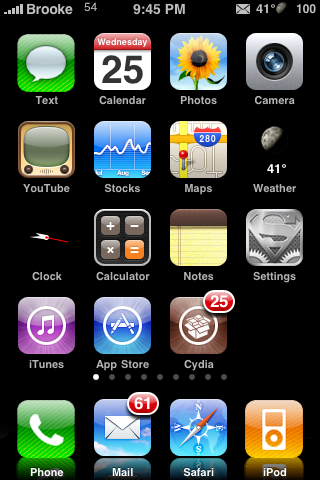 3.0 Beta Icons is a mod that will change your SMS, Phone and iPod icons to look like the icons that come with the 3.0 firmware. When I installed this app, it did not show up in WinterBoard and my icons did not change to the 3.0 icons so, I did what I always do…restarted my iPhone. However, that didn’t work so I uninstalled and reinstalled that app…that still didn’t work so I did some digging. When I SSH’d into my iPhone I found that the files had been added into the main root directory in a folder titled 3.0. So, I just copies the three icon files and added them into WinterBoard as a theme (instructions below) and then activated the theme in WinterBoard…it worked. Hopefully we see an update to the app that puts the folder in the correct place…which I’m assuming would be WinterBoard. This mod is available via the PwnCenter source.
Note: The Stocks icon is also different in the 3.0 Firmware but, that icon is not included in this theme.
Instructions:
1. SSH into your iPhone or iPod Touch
2. Locate the main
3. Locate the 3.0 folder.
4. Open the folders (root/3.0/Library/Themes/Icons) until you see the three icon files; iPod, Phone and Text.
5. Copy the 3 icon files to your computer. You can do so by just dragging them onto your computer.
6. SSH into the root/Library/Themes folder on your iPhone or iPod Touch.
7. In the root/Library/Themes folder, create a new folder titled 3.0 (or whatever you want to title it).
8. Create a folder inside the 3.0 folder titled Icons (make sure you have a capital I).
9. Drag the 3 icon files from your computer into the Icons folder you created on your iPhone or iPod Touch.
10. Go into WinterBoard and select the 3.0 theme.

 Loading...


 Loading ...
lol deja vu….it feels like just ystrday they did this for 2.0 ahha
So apart from the SMS icon, what change is there? I notice you have the Superman logo for Settings, but that’s not 3.0.
Phone and iPod icons have changed, they have faint diagonal lines across them.
There’s one thing missing! The Stocks icon in 3.0 has changed as well, Apple got rid of the little shortages for the month at the bottom of the icon so I guess the mod is not perfect
You’re right! Doug acutally just mentioned that to me. I added a Note to the article.
My download went directly to Winterboard, by the way.
It did? That’s weird…I tried this app like four times and it never went into WinterBoard for me!
Me neither :(
Yes. It went right to WB.
I just installed this. and it showed up in winterboard fine.
oK…but i can’t understand why you guys think those icons will be included in 3.0 firmware? And btw i didn’t saw any icon with stripes on the Keynote…
Actually they were included. The 3.0 Icons look just like that! Need a prove?: http://www.appleinsider.com/articles/09/03/17/iphone_os_3_0_first_impressions_and_photos.html
scroll down to the picture with the home screen and btw could take some time to load
These are the correct icons. I’ve had 3.0 on my iPhone.
That blurred reflection looks awesome. Where can I get it?
Are you referring to the dock reflection? If so, it is called ReflectiveDock and you can get it via the david.ashman.com source.
Thanks.
Just thought I’d let you know, in the iSpazio source, anotherset of these icons have been released. It is called ‘6 iphone 3.0 Icons’ and I have got to say they are the best versions I have seen. There is 6: Stocks, iPod, Messages, Phone, Voice Memos and then MMS which is a red version of the Messages one. BTW, it goes straight into Winterboard :)
or you could get the first 3.0 theme released BY ME via modmyi, it goes directly into winterboard and has all the 3.0 icons
i think you have some cydia updates! : )