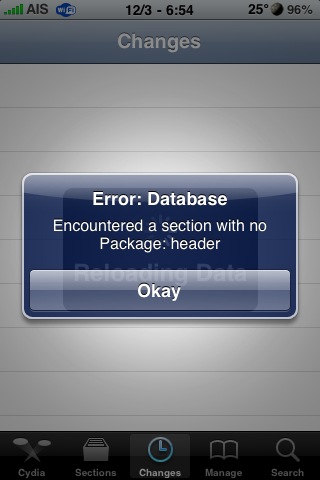
 My Cydia app hasn’t been working lately. I’ve been getting the error “Cydia encountered a section with no package header”, then most of Cydia won’t work. I tried reinstalling Cydia but that didn’t work. After searching around, I found a fix that worked for me. You’ll need to have SSH installed, or use an app like Disk Aid, so you can see the file structure of your iPhone and delete some stuff.
Here’s where you need to go to delete the files. /private/var/lib/apt/lists/ Make sure you do not delete the folder “partial”! You can delete all the other files in that folder.
After doing this your Cydia should be back to working again. :)

 Loading...


 Loading ...
You know what, this happened to me as well… After I did that yeah it worked for awhile… THEN it stopped working altogether… You press it and it starts as fast as it crashes, like instantly… Doesn’t even want to work in safemode. I tried all the fixes I could find on the net with no luck to date. I even upgraded to 3.1.2 from 3.0.. **restored, used blackrain to jailbreak and unlock… Installed Cydia… same thing! I’m using Rock which I have really come to enjoy better… it’s so much faster! Imports everything from Cydia… I don’t see any cons other than having to familiarize yourself with it… but Cydia still doesn’t work… and I don’t miss it
A few weeks ago this happened to me too. I thought it had something to do with having RockApp on my phone but I wasn’t sure. I thought that was the reason because anytime I I tried installing anything with Cydia my queue had Rock Extensions in it. Could that be the reason? I hadn’t updated to 3.1.2 at the time, but that gave me reason to do it. I chose not to use RockApp though.
I’ve had the same issue as brothason were cydia just crashes as soon as I open it..haven’t tried removing files yet..will give tat a go..
ok this got it working again..a little bummed saurik isnt addressing this..im just curious what caused this so i can avoid it in the future..
Used this method to fix Cydia myself, remember to refresh the Changes tab in Cydia when you open it again
It is a bug in Cyda that Sarik is aware of. He seems not to care it is Rock for me seeing Cydia gone is no big deal.
Hi, can I just mention an awesome app for your mac desktop called ‘phoneview for iPhone’ it is excellent and works far better for me than cyberduck and all the other apps to get into your iPhone.
You have to pay for it, but it is worth every us dollar – or in my case GBP pound!!
Not sure if I can do this, but here is the link if you have never heard of it ;-)
http://www.ecamm.com/mac/phoneview/
Cheers and Happy Christmas to everyone.
…Never even knew this happened.
I use the Rock app. Perhaps guys should too. Lol.
Thanks! I think xsellise has been screwing mine up so everyone be careful.
Wow .. thanks .. It worked !!
Thx this worked for me!!
Thanks it works fine !!!
I just did the method that Douglas described up top. Cydia is back up and running again on my phone, but when it refreshes i get the message “failed cache with cydia.xsellize”, so i believe the bug just may be coming from xsellize. Is anyone else getting this same message???
What if we can’t get the openssh app or disk aid because Cydia doesn’t have the sources to download the packages
Thank you. Now Cydia works )
Yea, me too. Only bummed b/c some Cydia packages aren’t on Rock yet… I wish more devs would put their packages on Rock and then I’d just forget about cydia.
What if we can’t get the openssh app or disk aid because Cydia doesn’t have the sources to download the packages… PLEASE HELP
Well my friend. You might be screwed. Ssh should always be one of the first things you ever download from cydia in case stuff like this happens.
Thank’s!
It works!
thanks! worked! cant tell you how much this was bugging me :L so simple too, using a programme like iphone browser :D
Much thanks for this one.
Rock does seem to be much better than cydia in terms of speed and stability… however there a quite a few packages that are still only available on cydia and not rock… and for this reason cydia still gets to take up some space on my phone :)
i dont kno what your talking bout is that a usb or something
i man url
cydia encountered a section with no package
easy, go to ( var/lib/apt/list ) in ( ifile ) and erase everything BUT the folder called PARTIAL.
Many thanks ! It fix my problem !!
i did this but now it wont let me add any sources…. any help?
Thanks worked great!!
i tried what u said but it still doesn´t working for me
hey i have also encountered d same problem as anthony and edith has….I dont remember whether I had installed SSH…but is der n y solution for dis….
if n y one has a solution please send me a mail on tony198@rediffmail.com
ths worked for me
delete the filesunder . /private/var/lib/apt/lists/ Make sure you do not delete the folder “partial”! You can delete all the other files in that folder
hi there, im sorry im new to the iphones, i have had no problems with cydia untill recently where im encountering the same problems as you all.. allthough as previously mentioned im new to the joys of the iphone and dont understand how i can access all the files under . /private/var/lib/apt/lists/ im getting really wound up with it!! can anyone please help a distressed ginger it would be really apreciated if someone could explain in lame man speak please..
many thanks in advance!!!
hi there, im sorry im new to the iphones, i have had no problems with cydia untill recently where im encountering the same problems as you all.. allthough as previously mentioned im new to the joys of the iphone and dont understand how i can access all the files under (. /private/var/lib/apt/lists/) im getting really wound up with it!! can anyone please help a distressed ginger it would be really apreciated if someone could explain in lame man speak please..
many thanks in advance!!!
I have installed DiskAid but i cannot find “root” folder, help pleaseee…
Thank you so much, this really helped me (:
I got problem Error: database Encountered section with no package header. What can I do?I’m so new in iphone! Pls help me.
Hey i am using a jailbroken fone with 3.1.3 version and i am facing the same problem, i deleted those file n not the partial folder. But its not working, still showing the same error. Please some one help. Or post a link from where i can download rock app. Please its an SOS..:(