There are a few ways to Jailbreak an iPhone or iPod Touch. For instructions on how to jailbreak your iPhone or iPod Touch, see our Jailbreak Page. However, before going to the Jailbreak page you will need to know a few things; whether you have an iPhone or an iPod Touch, if you are using a Mac or a PC and what version firmware you have on your on device.
You can find your firmware version by going into Settings on your iPhone/iPod Touch.
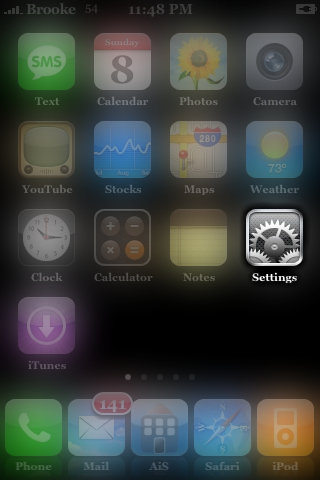
Selecting the General option.

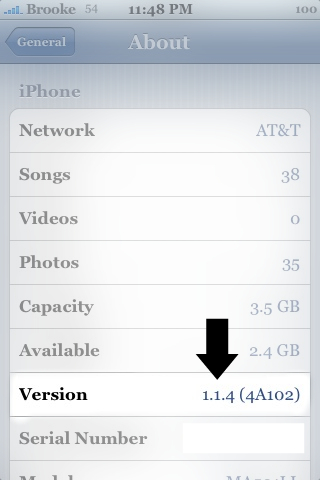
Selecting the About option.

You will then see the Version number. The version number is the version of firmware that is on your iPhone.
The Jailbreak page is broken up into Categories. Be sure to read carefully and find the jailbreak that best suits you based on whether you have an iPhone or and iPod Touch, a Mac or a PC and what version firmware you have.


 Loading ...
I have a new iphone 4.1 and when I went to upgrade the software on itunes,it locked my phone and wiped off all the software on it,rendering it useless. I want to know how to fix it.
Hi I jail broke my 3gs a year ago and its the best thing I ever did.The only problem I have now is that I cant upgrade because it keeps saying I need to get apt-get to sort this out.Can anyone help me get instructions on how to get this please?
just Google in the name of the soft ware and look threw the results. Some should come up that will help u get your I-Pod fixed. trust me Ive helped a friend fix his i-Pod before it s not that hard. :)
Kan u tel me pls exactly how u jailbroke ur 3GS I have the same done and want to do the same
Is this safe?
Uhm no. It’s not safe. it voids your warranty, it makes Itunes ignore your phone so no more updates for your LEGALLY gotten apps. And when you try to get customer service they tell you that you have to buy a brand new phone at full price or wait for your contract to expire to get a new iphone. Until then you’re stuck with which ever FAIL OS you started with at the time of the jailbreak with no customer service or technical support from Apple or your cellular provider and they mark it on your contract that you jailbroke your phone and often decline to renew your contract at the end. So if you really want these features go through the proper channels and tell Apple to stop trying to control your mind and world and give you the features you want in the next upgrade.
Or hey..go ahead and jail break your phone and be a criminal and a sheep.. everyone else is.
“…go ahead and jail break your phone and be a criminal”
I know it’s an old post, but it’s wrong. The Court ruled that Jailbreaking is NOT illegal. That was in 2010!
I was recommended this web site through my cousin. I am no longer certain whether or not this submit is written through him as nobody else recognize such certain approximately my problem. You’re incredible! Thank you!
Its like you learn my mind! You seem to know so much about this, like you wrote the book in it or something. I feel that you just could do with a few percent to drive the message home a little bit, however other than that, this is wonderful blog. A fantastic read. I’ll definitely be back.
Great beat ! I wish to apprentice even as you amend your website, how could i subscribe for a blog web site? The account aided me a appropriate deal. I were a little bit familiar of this your broadcast provided vibrant transparent idea
Wonderful paintings! This is the type of information that should be shared around the internet. Shame on the seek engines for now not positioning this post higher! Come on over and talk over with my website . Thank you =)
I am having a problem downloading jailbreakme.com on my iphone 4s. Everytime I try cydia does come up but it says that it is not supported on my device. Can anyone tell me how to fix this.
How can u get Cdiya apple4
Without jailbroken
Tell me Pliz
go onto jailbreak website
How do I jailbreak and will my current apps and data be erased? If so how can I save or restore my data ?
hi i have new iphone5 and i want to know that how to make font big and number big and when i send sms i should get deleivry report that sms has deleverd plz tell how this all isue can solved ?
regards.
It’s wonderful that you are getting ideas from this article
as well as from our argument made at this time.
It’s very straightforward to find out any matter on web as compared
to textbooks, as I found this paragraph at this
site.
Very nice post. I just stumbled upon your weblog and wanted to
say that I have really enjoyed surfing around your
blog posts. In any case I will be subscribing to your
rss feed and I hope you write again soon!
Normally I don’t learn post on blogs, but I wish
to say that this write-up very compelled me to check
out and do so! Your writing style has been surprised me.
Thank you, quite nice post.
If you are going for most excellent contents like I do, only pay a quick visit this web page every day as it
provides quality contents, thanks
Paragraph writing is also a excitement, if you know afterward you can write or else
it is complex to write.
It’s a pity you don’t have a donate button! I’d without a doubt donate to this superb blog!
I guess for now i’ll settle for book-marking and adding your RSS feed to my Google account.
I look forward to fresh updates and will share
this blog with my Facebook group. Chat soon!
Is there a jailbreak that allows you to update and use iTunes normally at the same time? Or are they all like this