When you first hear about the ability to jailbreak your iPhone, iPad, iPod touch or Apple TV you are probably thinking, “Why should I do this?” Well, the two main reasons are to allow programs to run that Apple doesn’t approve of and to customize the look of your device. I’m going to try and cover some of the best programs (apps) that you can run and best customizations (mods) you can do after jailbreaking your device. Check out the video with lots of great reasons and example apps and keep reading for even more info!
Apple has recently done a great job of adding more and more features to the iOS software which makes many people think there is no longer the need to jailbreak their iDevice. I disagree. The jailbreaking process, along with the apps, hacks and mods that follow, are the reasons that Apple has added so many features to the iOS software. Early hacks like adding wallpaper, scrolling pages, folders and even installing apps were all started in the hacking community. Below are some of the reasons I still jailbreak my iDevices that I use on a daily basis.
Example Jailbreak Apps
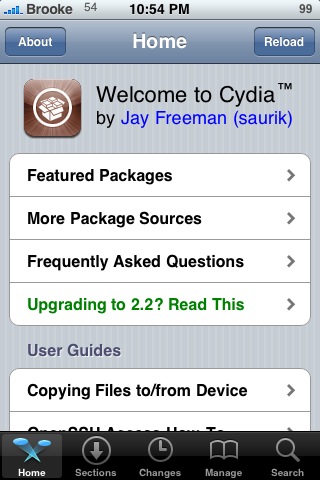
Cydia
 Cydia is like the App Store, it’s lets you install applications right to your device without a computer. Really, the correct way to say it would be the App Store is like Cydia because there was Cydia before there was the App Store. There was also an app called Installer before that, but now Cydia has taken over as the best program to use to get jailbroken apps onto your iPhone or iPod Touch. Anyway, basically the App Store works just like Cydia. If you want to learn more about how Cydia works see this article.
Video
ScreenShots
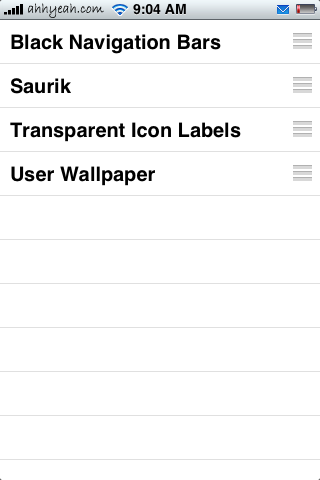
Winterboard
Winterboard is the application that allows you to change the look of things on your iPhone. We’ll use this a lot later when we look at modding your iPhone. Basically it lets you install different themes or visual changes to your device.
Example Modifications (Mods)
Live Icons
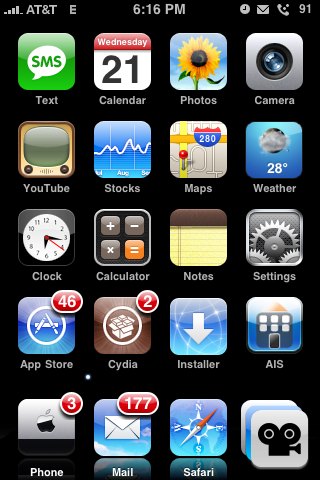
One thing I always wondered is why the Calendar icon changed to the correct date but the Weather and Clock icons were always static (not changing). Well, by jailbreaking your iPhone you’ll have access to some hacks that make these live. The clock hands move with the real time. Even the second hand moves. And, for the Weather icon, the current temperature and weather conditions update right on the icon! I’m not sure why Apple never did this themselves but thanks to Stimpy5050 for figuring it out! Here’s links to the mods called LiveClock and WeatherIcon
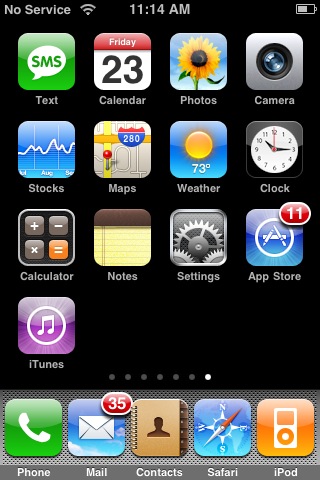
Five Icon Dock
This one’s as simple as it sounds. By installing this mod through Cydia, you can then drag a fifth icon the dock. See the full article here.
Five Icon SpringBoard
If five icons on your dock isn’t enough you can try the Five Icon SpringBoard mod. It makes room for five icon in each row on your entire springboard. It’s also confirmed that it lets you install more apps since there’s more room for icons. You can read more about how to install it in these articles.
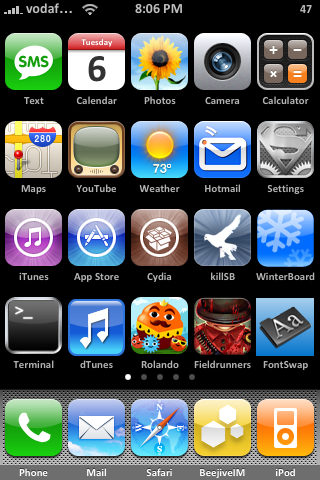
Customize Your Status Bar
I love customizing my status bar so I can see what’s going on from any app. A big one is adding the date to the already existing time. You can do this through an app called SBSettings. This way I don’t have to look at the calendar icon to check today’s date. I also like changing the way things look. This can be done via SSH or just installing some changes through Cydia. Changing what the battery looks like is done with an app called Battery Control. This lets me remove the battery, just haver percentage, tap to change and more. There is a lot more like weather, status notifications and changing my carrier; just check the links for more info.
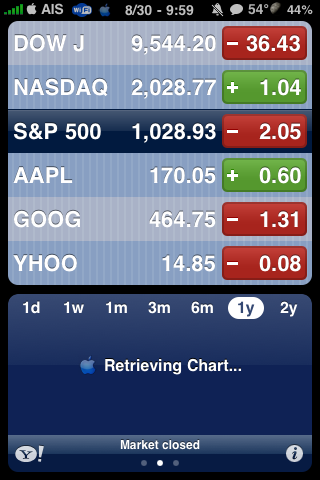
Change Your Dock
Personally, I think the dock that comes on the older iPhone firmware is ugly. No problem! You can change it to whatever you want. There are a lot out there already created and most themes come with their own dock (I’ll get to themes later). And, if you don’t want a dock at all, just check “Transparent Dock” in WinterBoard.

Themes
There are hundreds, if not thousands of themes designed for the iPhone. They include all kinds of visual changes to your iPhone including wallpaper, different icons, battery on the locks screen, docks and so on. There are many ways to install themes like through Cydia or manually uploading them to your iPhone through SSH. How ever you do it, themes allow you to customize your iPhone to look the way you want. Click here to see some of the themes we have listed.
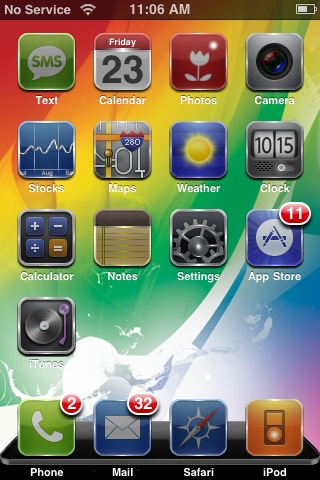
Reflective Dock
Here’s another thing that Apple should have done. They use reflections in a lot of their design and applications so I’m not sure why they left it out on the iPhone. Just see this article on how to set it up. It makes your icons in your dock have a fadded reflection. You use WinterBoard to turn in on.

Comments
Speak Your Mind
You must be logged in to post a comment.
SUBSCRIBE


Top Rated Articles
- iPhone SE – What is Apple’s Newest iPhone?
 (5.00 out of 5)
 - App Store Updates – March 11th, 2014 (5.00 out of 5)
- Maintenance Mode (5.00 out of 5)
- QuickTip – Shake your iPhone to Undo/Redo your Previous Text Edits (5.00 out of 5)
- Spell Number – Free Emjoi [Emoticons] (5.00 out of 5)
 Loading ...
Emoji is available without jailbreaking justi get emoji free from the app store.
actually alex now apple has it installed on ios5 and higer instead of going through the app store and buying an app
for the theme example, what is that theme called? please reply. thank you
If I jailbraked my iphone, is it now ready to be used with any phone company, I used tu hava a Mexican line in my iphone, but since I moved to spain, i want to use the same Iphone and only add a Spanish line.
pls after updating my iphone 3gs to ois5.0.1 and successfully jailbreaking it ,my phone is showing no service signal…..pls wht can i do?
hi charles,
well you pretty much have no choice now because if you like ure iphone jailbreaked then you have no choice andd reset your iphone to the normal ios and never jailbreak
Umm is it going to effect anything on my iPod? Like pics,apps,music,or videos? Is it goig to effect?
no Emily its not i have had jailbreak for 3 years and nothing has happened but expand your ipod/iphones full potential
is it going to effect anything on my iPod? Like pics,apps,music,or videos? Is it going to effect?
Well, in a study, some apps downloaded from Cydia were shown to leak photos and the such from your phone.
If I Jailbreak my IPod touch, will it muck up my iPod? And can I ever get the jailbreak off my IPod if jailbreak inh it does muck it up?
If I Jailbreak my IPod touch, will it muck up my iPod? And can I ever get the jailbreak off my IPod if jailbreak if it does muck it up?
hey guys i dont think so we should jailbreak because it keeps lagging alot and makes your idevice slow.
Jailbreaking looks cool, yeah, but if Apple never certified it is it truly safe? Are we going to risk mucking up a 500$ iPod touch so you can scroll the app screen up instead of to the side? Look, Cydia may seem like another AppStore but listen. THERE IS A REASON THAT CYDIA APPS ARE NOT ALLOWED IN THE APPSTORE. Primarily being that they’re unchecked and clearly unsafe according to Apple. So you decide: what would you rather? A 1D LockSlider or a safe, normal Apple iPod?
Why would they certify it? They’d be losing out on money! ahahahahaha, and to the rest of you, either man up and get it or go back to paying a couple of quid for a game you’ll play a few times and get bored of
That is true. However everyone needs money for a living and those people that make these games are trying to earn it. Besides a couple dollars here and there isn’t much. Lots of people spend more money on Starbucks everyday.
Apple also says downloading music is wrong and, if they could, they would also say that buying music from anywhere other than the app store is a nono. It’s ignorant to think that Apple’s only reason they don’t want you to do this is to keep you safe. A lot of the capabilities jailbreaking allows are things Apple would rather charge you for. User error is the cause of most “muck ups”, which is why you need to know what you’re doing. You’ll get malware and other bad shit happens the same way it does on a computer: By not knowing how to stay safe and protect yourself. Maybe instead of having Apple TRY to protect you, you should learn to protect yourself so you can do whatever you want to your possessions without fear? If you’re too lazy or don’t really care about defending yourself, then just don’t jailbreak. lulz
I bought I phone 4 in UK and got it jail broken to use it in India. now i want to update it to iOS5. how can i do it? i dont know much about these things, and for my previous jail breaking i went to some guy who deals with these things. I dont have cydia installed!
I have a question, I have an older iPod Touch and an iPhone 4s, if I jailbreak my iPod Touch can I transfer the apps and what not over to my iPhone without jail breaking it because I don’t want to run the chance that if something happens to it I cant get it fixed because I jail broke it? Please Answer!!!
6.1.3 jailbreak: rocky-racoon.com
5.1.1 jailbreak: evasi0n
5.1.1-6.1.3: evasi0n i mean
Hi Fred..Are these the versions you recommend? I’m not real literate in this stuff ;)
My granddaughter who is 9, wants to jailbreak her ipod.. is it pretty safe?
Thank you
Jill
jailbreak an ipod? havent heard abt that but doesnt sound really worth it anyway. what does it offer? colored volume controls? music remix features?
I already jailbreaked a TON of my friends iDevices, and all of them are sucessful. Right now if you want other people to jailbreak it it’ll cost 20 bucks. Its worth downloading a safe jailbreak and jailbreaking it at home.
There are also other older versions but all of the old ones are rarely used now.
I stay with jailbreak because you can get music box which is free music to download and movie box which is free moves and tv shows and you don’t have to pay for apps and free in app purchases with localiapstore the only problem is I ipod touch 4g is laggy without jb so you can imagine with it.
There is no need to jailbreak. It looks better even now and is the best theme ever. Jailbreak means making mess with the standard of iphone. Iphone is a quality standard of apple whatever changes they do with it we, should be satisfied with that. Installing jailbreak means we challenge apple and tell them there iphone is of a dull standard.
How do I upgrade my 3rd gen to io6
Superb, whwt ɑ website it is! This website ρresents useful data tߋo us,
ҝeep іt up.
Will this keep me from having to pay 40.00 every time I need a genuine Apple devise to go with my IPad 2?
I have an IPad Mini that I just upgraded to 8.4.1 this morning, and for several days I have been trying to jailbreak it. It’s slow, the apps all suck, and I hate it when something happens to the Wifi that temporarily destroys 95% of my iPad’s functions. I am becoming frustrated because I have a computer of my own but my foster-dad won’t connect it to the Internet, and I can’t download ANYTHING on ANY COMPUTER at a public Library. I’m completely out of options. I use my iPad-Mini for everything since my computer can’t do it without Internet. Is it possible at all to jailbreak this thing without using a computer? If anybody at all has an answer or a solution to this issue, you’ll be doing me the biggest favor of my life. Please help me out with this! Thanks.
@Tiar Atoigue: If you can take your iPad with you to the library, or somewhere with (free!)wifi, I believe you should be able to jailbreak it without connecting to another computer. I read your question and became curious myself, so I just googled it! That would be my advice to you-take your iPad and get on wifi at the library or a McDonald’s or something and just Google search something along the lines of “how to jailbreak my iPad mini without connecting it to a computer” Simple as that!! I hope I helped you, good luck!(:
Apple has killed the need of jailbreak in last few iOS firmware versions. They are keep implementing lots of jailbreak tweaks by default in iOS, but still iOS is running slow as compared to the jailbreaking community.
Many people says they do not want a jailbroken iPhone, but I have some people in my network who can pay extra bucks just to get a jailbroken iPhone / iPad device.