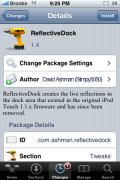
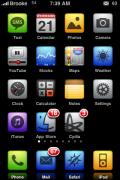
 We have written about how to get a reflective dock using shh. However, if you are looking for a way to get a reflective dock for your iPhone or iPod Touch through Cydia, here is a way. You will need to add a new source to Cydia (check out THIS article if you need instructions on how to add a source to Cydia). The source you will need to add is: david.ashman.com/apt/ After your sources have refreshed, you will see that a new package has been added to your iPhone called ReflectiveDock. Once installed, you will have a reflective dock. It does add two options to Winterboard, No Dock Reflections and Dock Reflections however, I have found that it is not affected by being turned on/off in WinterBoard…it is just always on unless you specifically select No Dock Reflections.
You can take a look at the original thread on Mac Themes HERE. Also please note that when you install the new source it also adds a packages in Cydia called WeatherIcon. I would not recommend installing this application. We tested on two iPhones and both crashed.

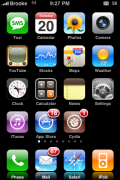

 Loading...


 Loading ...
Very nice!!!
Cheers….:D
Do I have to install it with Cydia or can I just ssh in a new theme with the code?
I keep getting Size Mismatch every time I try to download and install it.
Yep, have managed to get this working and it looks great. Works equally well with 5 icons in the dock as well. The developer’s dock had a nice background on it though – does anyone know how to install this?
Incidentally, WeatherIcon has been updated to solve the crashing problem…
Awesome! And i tried the weathier icon and it works! (maybe it has been updated). Thanks for the info and the source!
Yes, there was a nasty early bug in there that caused a crash. It’s been fixed in 1.1. Bad testing on my part. Sorry. ;-)
my weather icon has a ? under the original 73 why is that?
Make sure to select the “Weather Icon” theme in winterboard.
I have the Weather Icon selected in Winterboard but it still has the default weather icon underneath the new one. The new one doesn’t seem to have the right temp. Is it supposed to retrieve the info from the same source as the weather app? Thanks.
which is the refelectivedock4.png theme?
I also want to know what is the name of the refelectivedock4.png theme!!!!
nice touch
Lucas, how did you get the weather icon to work? I installed it and it just puts an icon over the current weather icon with what seems to be a temperature but the temp doesn’t match the temp of the one location I have set up in weather. Any ideas? Thanks.
thx mitch, where can i find it?
nice & THX
i don’t notice any difference, in the appearance of the dock, does it illuminate more?
Great post and thanks for the heads up on “WeatherIcon”.
hi, great app
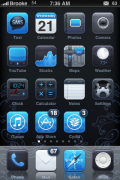
but im really curious, on the fourth picture, what is the blue-ish theme called? i really want it,,, it looks awesome =]
Bluebird via BigBoss.
wow ! so fast… thanks Brooke.
you wouldnt by any chance know the one from the Macthemes link?
thanks ^^
Great :)
What is the theme on the fifth screenshot called? Tenuis?
Thanks in advance.
my weather icon does not work.it says 27 and sunny lol
or my livetime clock after installing bluebird.
Anyone know how to make the weather show the right temp., mine also says 27 & sunny…I have it selected in winterboard
Most likely you all still have my default configuration that uses 20852 zip for the location. Go to http://macthemes2.net/forum/viewtopic.php?id=16792695&p=1 to learn how to configure this. In the future, I plan to change it to use the default Weather app configuration or GPS info to show the right weather.
ohhhhh now I see what reflective dock, does nice, I had tenius flow dock and I couldn/t see reflection coz of the flow, beautiful, thank u
What is the theme name for the fourth screenshot plz??
What is the theme in the final pic?
One question…
I would like to have a reflective dock without using Winterboard. Is there a way to do that on iPhone FW 2.2?
As a side note: I installed (this) Reflective dock, and it works without Winterboard but the stock grey dock is still present. Anybody know a way to get rid of the stock grey dock (without using Winterboard)?
I installed reflective dock, but the option to turn it on or off I don’t have. In winterboard the option no dock reflection and dock reflection didn’t show up. I thought about removing dock reflection and then reinstalling it.
Let me know if you figure out how to resolve this issue. Im having the same problem. I dont see a way to install and remove the dock relection in winterboard.
Thanks
I figured out how to install and remove the dock relection in Winterboard. First I uninstalled ReflectiveDock. Then, I installed “Clean Reflective Dock iPhone” instead. This shows up in Winterboard, and can be toggled on and off via Winterboard.
The reflection is a bit different, it’s more subtle and there’s a faint “line” indicating the icons are on a shelf (my dock is transparent so perhaps that’s why I can even see the faint line) — but I still like it.
I think I feel better about having the UI customization toggle-able via Winterboard. As opposed to having to install/remove via Cydia to enable/disable.
Just wanted to add another thing, “Clean Reflective Dock iPhone” doesn’t actually render reflections on the fly, like Reflective Dock does. It’s kind of “fake” reflection… the reflection is subtle do you don’t even see the mirrored graphic detail. And when you add a 5th icon (thanks to 5 Icon Dock,) only 4 reflections appear. So it’s sort of a kludge.
I still might keep it though, as there’s a small part of me that thinks it takes up less CPU power than the original Reflective Dock, and therefore might not impede battery life quite as much. Hey, every little bit helps. :)