redsn0w (2nd Gen iPod Touch Jailbreak) F.A.Q QuickTip – Safari “Tabbed” Browsing

WeatherIcon – Updating Weather Icon (Updated…scroll down)

January 21, 2009 by Brooke  
Categories: Cydia, System, WeatherIcon
Tags: , , , ,

118 Comments
19,434 views

Available In: Cydia       Price: Free  

WeatherIcon I wrote a post this morning about a reflective dock application. I also warned in that post about another application title WeatherIcon (available through the same source). I received word today that the application had been upgraded and no longer creating crashing problems so, I decided to check it out.

Ok, I had this post written this afternoon but, I had to completely rewrite it tonight! We have done a lot of testing on this application and it does work however, it is going to take some explaining. So, take a deap breath and then continue reading!

When you install the WeatherIcon app in Cydia (be sure you install version 1.1.1 or newer), it adds an option to your WinterBoard titled Weather Icon. When you select the Weather Icon option in WinterBoard, it will activate the application. When the app is activated, it changes your stock weather icon to a blank weather icon and then puts the new temp and weather image on top of the blank weather icon.
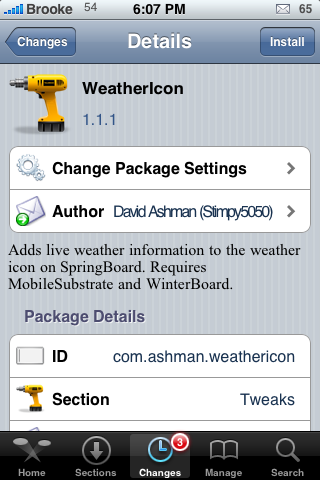
weathericon111

Note: This afternoon, I had an issue where when I selected the Weather Icon option in WinterBoard, it did not change the weather icon to a blank weather icon instead it added the new weather image and temp on top of my stock icon which looked absolutely terrible. If you are also having this issue, uninstall and reinstall the app in Cydia. Example screenshots below.

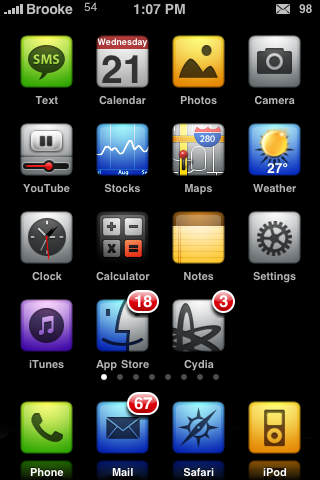
weathericon111over weathericon111over2

Ok, now, there are a few catches. When the app is not activated in WinterBoard, it adds a ? on top of your weather icon. The only way to get rid of the ? is to always have the app activated or to uninstall it. Example screenshots below.
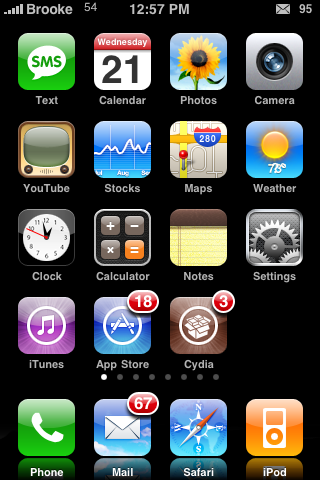
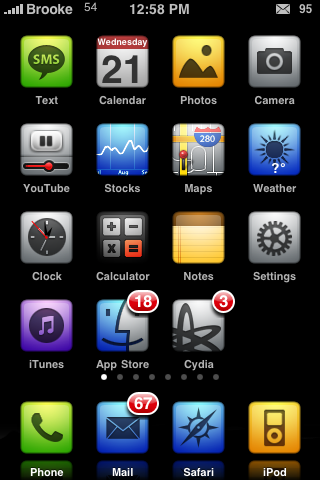
weathericon111qm1 weathericon111qm2

The other catch…the app does not automatically detect your current location, you will need to change the zip code in the .plist to your current zip code. If you are comfortable with ssh, this is an easy thing to do. Below are instructions.

1. Find the file Library/Themes/Weather Icon.theme/Bundles/com.apple.springboard/com.ashman.WeatherIcon.plist on your iPhone or iPod Touch.

2. Open the com.ashman.WeatherIcon.plist file. Below is what it will look like.

<?xml version="1.0" encoding="UTF-8"?>
<!DOCTYPE plist PUBLIC "-//Apple//DTD PLIST 1.0//EN" "http://www.apple.com/DTDs/PropertyList-1.0.dtd">
<plist version="1.0">
<dict>
<key>Celsius</key>
<false/>
<key>Location</key>
<string>20852</string>
</dict>
</plist>

3. Change the number 20852 to whatever your current zip code is. Below is an example of what it would look like changed.

<?xml version="1.0" encoding="UTF-8"?>
<!DOCTYPE plist PUBLIC "-//Apple//DTD PLIST 1.0//EN" "http://www.apple.com/DTDs/PropertyList-1.0.dtd">
<plist version="1.0">
<dict>
<key>Celsius</key>
<false/>
<key>Location</key>
<string>50023</string>
</dict>
</plist>

4. Close the file…it should ask you if you would like to save the change…yes, you want to save the changes.

5. Respring your springboard and you will have the current temp for your zip code on your weather icon.

With the current temp, it will also display a weather image that corresponds with the current time of day and weather conditions ex) a sun with clouds or a moon with snow.
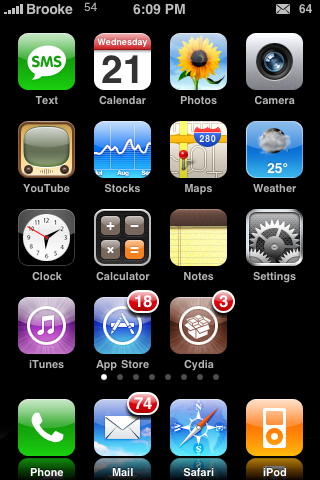
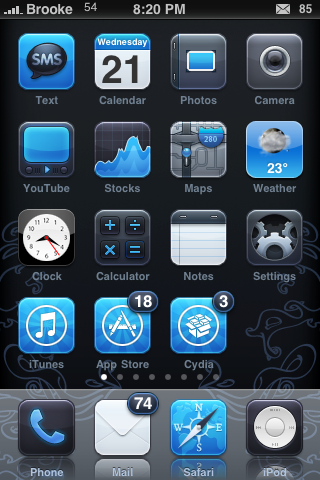
weathericon111good1 weathericon111good3

I’m not sure how often the temp updates. The temperature has changed three times throughout the day today (so, maybe it updates every few hours?). There are also times when it doesn’t seem to connect and it says N/A instead of a temp.

Personally, I LOVE the concept and this is by far the closest we have come to this sort or mod. Does it need improvements to be more user friendly, most definitly. Will I leave it on my iPhone, yes.

If you are looking to mod the app even further, Doug has created a blank weather icon that you can use instead of the blank weather icon that comes with the app. To use it, just right click and Save As on the icon below. Then drag the icon (via ssh) into the Library/Themes/Weather Icon.theme/Icon folder and rename the icon file to Weather.

blankweather

There are other modding options with this app as well. For example you could create your own weather images. If you do so, the files you will need to replace are located in the Library/Themes/Weather Icon.theme/Bundles/com.apple.springboard folder.

Let me know in the comments what you think of this app and if you are going to use it. Screenshots of how you modded it are cool too. Below are two quick mods that I tried. One is with Doug’s icon and the other I created a transparent icon.
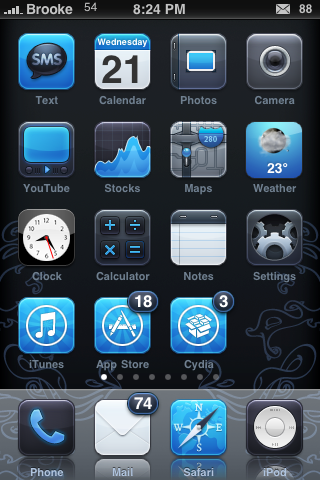
weathericon111modded2 weathericon111modded3

Update:
This app has been updated to version 1.2.1. This does change the .plist a little. You still need to change the number below the location in the .plist to your zip code. The new .plist also displays a refresh time of 15 minutes. You can easily change this as well by changing the number 15 to 30 or 60…etc (which would change the refresh time to 30 minutes or 60 minutes…etc). Below is what the new code looks like.

<?xml version="1.0" encoding="UTF-8"?>
<!DOCTYPE plist PUBLIC "-//Apple//DTD PLIST 1.0//EN" "http://www.apple.com/DTDs/PropertyList-1.0.dtd">
<plist version="1.0">
<dict>
<key>Celsius</key>
<false/>
<key>Location</key>
<string>50023</string>
<key>RefreshInterval</key>
<integer>15</integer>
<key>WeatherBundleIdentifier</key>
<string>com.apple.weather</string>
</dict>
</plist>

A few things to note, whenever you update the application, you will need to go back into the .plist and change all your info again…it does not save your customizations after updating.

This application does work in other countries. It pulls it’s info from yahoo.com’s weather. So, in order to use the app outside the US, head over to THIS page and search for your City and Country. When it finds the weather for your City, you can use the number from the web address as the number to change in the app’s .plist. For example, I searched for Rome, Italy and when it loaded the weather for Rome, I got this web address http://weather.yahoo.com/forecast/ITXX0067.html. The bolded number is what you would change the number in the .plist to. Another example is Munich, Germany. I searched for Munich in Yahoo Weather and once it pulled up the weather for Munich…I got this web address http://weather.yahoo.com/forecast/GMXX0087.html. Just take GMXX0087 and use it to replace the numbers in the .plist file.

Similar Articles:

WeatherIcon 1.5.3 – Updating Weather Icon (13561 views)

WeatherIcon Update – Firmware 3.1 Compatible (3271 views)

WeatherIcon Update – Removes Theme Adds Status Bar Icons (17922 views)

HomeScreen2.0 – Lock Screen Mod (38711 views)

WeatherIcon Update – Compatibility With LockInfo Mod (8288 views)

Comments

118 Responses to “WeatherIcon – Updating Weather Icon (Updated…scroll down)”

  1. E23 on January 21st, 2009 8:32 pm:

    thanks for the info

    [Reply]

  2. JUSALCHO on January 21st, 2009 8:57 pm:

    Hi, i would like to know where i get zip code??
    thanks

    [Reply]

    Brooke on January 21st, 2009 9:05 pm:

    I’m guessing that you are probably not in the US. I’m not sure that the app will work outside the US. That would be a good question for the developer, you can email him by selecting the Author option while in the app in Cydia.

    mastuul on January 21st, 2009 9:06 pm:

    Your zip code is the mailing code that corresponds to where you live in the U.S. If you are outside the U.S., I’m not sure what you would change the .plist to. Anyone else know?

    Stimpy5050 on January 21st, 2009 10:50 pm:

    The extension uses the yahoo weather APIs. Check out http://developer.yahoo.com/weather/ for instructions on how to find international codes.

  3. Mitch on January 21st, 2009 9:22 pm:

    there needs to be a easier way!! ssh is confusing…

    [Reply]

  4. Jess on January 21st, 2009 9:49 pm:

    Awesome! Now the clokc now the weather!

    Tx for the the info on this. KInd of wierd since the weater shows for example 21 degrees but when i open up the app it shows 16?

    Humm?

    [Reply]

    Brooke on January 22nd, 2009 8:31 am:

    Did you change it to your zip code? Also, I have noticed that it is a little different from the stock weather app temp…though, I believe they are both pulling from Yahoo.

  5. mastuul on January 21st, 2009 9:56 pm:

    Thanks a lot Brooke! Really cool to have this and LiveTIme. I couldn’t get the overlapping of the current weather icon to go away by uninstalling and reinstalling so I used SSH to replace the weather icon on my theme with the blank one Doug made and now it looks great. When’s the next iPhone 101 episode coming out?

    [Reply]

  6. seven77 on January 21st, 2009 10:16 pm:

    thanks for this ! is great ! i like it ! no wonder this site is number 1 !

    [Reply]

  7. eFoobar on January 21st, 2009 10:26 pm:

    Hey, really cool! I don’t know how many times I’ve looked at the “73″ on the stock icon and wondered why it was never automated. Thanks! :)

    [Reply]

  8. Stimpy5050 on January 21st, 2009 10:48 pm:

    Do you want to write my user documentation? I hate writing docs and you did a great job explaining how to configure it! Thanks!

    [Reply]

    Brooke on January 22nd, 2009 8:32 am:

    Yep…email me.

  9. seven77 on January 21st, 2009 10:53 pm:

    it just went from 1.1.1 to 1.2, i dont know what the change is but it just got upgraded at 11:50pm Eastern Time

    [Reply]

  10. seven77 on January 21st, 2009 10:56 pm:

    it change teh refresh insterval i guess , 15 mins i guess not sure
    this is the plist file

    Celsius

    Location
    20852
    RefreshInterval
    15
    WeatherBundleIdentifier
    com.apple.weather

    [Reply]

    seven77 on January 21st, 2009 10:57 pm:

    ?xml version=”1.0″ encoding=”UTF-8″?>
    !DOCTYPE plist PUBLIC “-//Apple//DTD PLIST 1.0//EN” “http://www.apple.com/DTDs/PropertyList-1.0.dtd”>
    plist version=”1.0″>
    dict>
    key>Celsius
    false/>
    key>Location
    string>20852
    key>RefreshInterval
    integer>15
    key>WeatherBundleIdentifier
    string>com.apple.weather
    /dict>
    /plist>

    ok now this is it hehehe

  11. 8lias on January 21st, 2009 11:30 pm:

    Question is: with all of these mods, how likely does it slow down the UI and performance? More and more I am reminded of Android-ish, Vista-Widget-ish…yuk.

    [Reply]

  12. Dave on January 22nd, 2009 12:11 am:

    Can someone please help provide the code for Singapore

    [Reply]

  13. Kristian on January 22nd, 2009 3:01 am:

    Any news on what to enter as “zip-code” if not living in the US? Where is it getting its weather data from? Doesn’t the native weather app get its data from weather.yahoo.com? Maybe one could just look for the city there, and get the “zip-code” from the URL? Like this might be the id for Karlstad, Sweden: SWXX0060. (Singapore would, then, be: SNXX0006.) Haven’t tried it yet, but perhaps?

    Also curios about the question 8lias raised; is this slowing down performance in a noticeable amount?

    [Reply]

    Stimpy5050 on January 22nd, 2009 8:15 am:

    You are correct. The data feed is yahoo weather so your code would work for Singapore.

    I haven’t noticed any application performance issues since it’s simply rendering some additional views when the UI refreshes.

    Kristian on January 22nd, 2009 8:25 am:

    Hey thanks for confirming, Stimpy5050 (and Stanley). Good to know — then I’ll be doing some cydiaing (now that’s a mouthful) later today, I believe. ;-)

    As to application performance, I tried out the snow-app (cydia; can’t remember correct name; it makes it snow anyway), and that made flicking pages choppy. I don’t like choppy. But yeah, I see your point. That was continuous rendering, this is just done once every [insert interval of the refresh here], and then it’s done pestering the processor. Good stuff.

  14. Abyss on January 22nd, 2009 3:24 am:

    The zip code works only for US. If it also can be make to work for other countries with editing the .plist, this mod will be well received internationally.

    Anyway, well done to Stimpy5050 for the good mod of WeatherIcon and ReflectiveDock.

    [Reply]

    blatz on January 22nd, 2009 5:29 am:

    i´ve tested it with weather.yahoo.com and it works fine

    just get your code there for Munich, Germany it will be GMXX0087
    and if you want weather data shown in celsius change

    Celsius

    to

    Celsius

    here is my setting for Munich, Germany.

    Celsius

    Location
    GMXX0087
    RefreshInterval
    15
    WeatherBundleIdentifier
    com.apple.weather

    Great extension, but the used images looked a bit blurry can somebody confirm this?

    blatz on January 22nd, 2009 5:30 am:

    the codes doesn´t show up.

    so change celsius false to celsius true

    Abyss on January 22nd, 2009 7:06 am:

    @ blatz

    Thanks a lot for the tip of getting the City, Country code from the weather.yahoo.com (the code is on the URL bar, just for information for those who do not know where to find it, like me at first :) .

    And it works, definitely.

    Kudos, a very good mod and my gratitude for it I would say to Stimpy5050.

  15. Stanley on January 22nd, 2009 3:49 am:

    Have tried Kristian suggestion and it works except you get the reading in Fahrenheit instead of Celsius. Any idea?

    [Reply]

    blatz on January 22nd, 2009 5:41 am:

    there is a false text under “Celsius” just change it into true ;-)

    Lars on January 22nd, 2009 8:12 am:

    Change:

    Celsius

    to:

    Celsius

    That’s it!

    Lars on January 22nd, 2009 8:14 am:

    oops, didn’t like the the code snippets. well all you have to do is changing the line under Celsius to read TRUE instead of FALSE

  16. I'm Your Tho on January 22nd, 2009 4:18 am:

    Someone of you knows how can I set the Italian zip code?
    Celsius

    Location
    13900
    RefreshInterval
    15
    WeatherBundleIdentifier
    weather.yahoo.com
    Doesn’t Work (nothing shows in icon)

    Celsius

    Location
    13900
    RefreshInterval
    15
    WeatherBundleIdentifier
    com.apple.weather
    Doesn’t Work (Shows me an ?)

    Please help me!!

    [Reply]

    blatz on January 22nd, 2009 5:43 am:

    locate your code by weather.yahoo.com it should look like this for rome ITXX0067

    and don´t change the com.apple.weather it works with this also with yahoo

    I'm Your Tho on January 22nd, 2009 5:55 am:

    Tanks!
    It works!!!!!

    Do you know the WeatherBundleIdentifier for http://www.meteo.it/previsioni/96020/istat-96020 ?

    Brooke on January 22nd, 2009 8:51 am:

    Make sure you activate the app in WinterBoard as well.

  17. rje on January 22nd, 2009 6:12 am:

    Where are the settings for this? I can’t find them.

    [Reply]

    Brooke on January 22nd, 2009 8:34 am:

    Check out step number 1 above.

  18. Thomas on January 22nd, 2009 6:13 am:

    Unfortunately I can not find the Themes folder! I have no themes installed. Where can I find the com.ashman.WeatherIcon.plist?

    I have just read about the program finder to file or do I need to do better with ssh looking for?

    Thx ibombi

    [Reply]

    Thomas on January 22nd, 2009 6:41 am:

    I’ve found it! The files were hidden ;-)

    Thx

  19. Jadeye on January 22nd, 2009 6:50 am:

    this is sooooo coool! :)

    but could someone create an icon-set similar to the stock icons used in the weather app, and make a cydia theme pack from it? it would be much more nice, it it reflects the weather with the same icons as in the app if you open it.

    did anyone of you experience any lag or battery life change by using livetime and liveweather?

    [Reply]

  20. SRASC on January 22nd, 2009 7:01 am:

    Normally when I need to put a Zip Code (but obviously have none being out of the US) I enter 00000, though I doubt it’d work in this case. Hopefully someone would come up with a solution as to what to do for non-US iPhone/WeatherIcon users

    [Reply]

    SRASC on January 22nd, 2009 7:27 am:

    Library/Themes/Weather Icon.theme

    I can not seem to find that directory even after installing it, any reason why?

    Kayvan on January 23rd, 2009 3:48 am:

    As of the latest version, the Preferences file location changed, but it gets its info in a new way and you no longer need to set the zip code in the plist file.

  21. Kyle on January 22nd, 2009 7:49 am:

    One of the best apps I’ve ever installed : ) All they need is a GUI to change the settings and it will be perfect.

    [Reply]

  22. idwa on January 22nd, 2009 8:10 am:

    all as I’m getting is a question mark where the temp should be…

    [Reply]

    Stimpy5050 on January 22nd, 2009 8:16 am:

    Make sure to turn on the Weather Icon.theme. It doesn’t know where to load the weather for and what icons to use without it.

  23. Kayvan on January 22nd, 2009 9:17 am:

    Here’s an easy shell script to do the edit on the Location (I put this together after having to re-edit the same file following each update of the WeatherIcon package):

    Put the following into a file (I called it fix_weather_icon_zip):

    —- copy from here —–
    #!/bin/sh
    if [ $# -ne 1 ]
    then
    echo “Usage: $0 zip-code”
    exit 1
    fi
    F=’/Library/Themes/Weather Icon.theme/Bundles/com.apple.springboard/com.ashman.WeatherIcon.plist’
    plutil -s Location -v $1 “$F”
    —- file ends here —–

    And then “chmod +x fix_weather_icon_zip”

    Use it like this:

    iPhone:/var/mobile/bin root# ./fix_weather_icon_zip
    Usage: ./fix_weather_icon_zip zip-code

    iPhone:/var/mobile/bin root# ./fix_weather_icon_zip 95136
    Setting property Location to 95136

    [Reply]

    Kayvan on January 23rd, 2009 3:03 am:

    It looks like as of version 1.4, the WeatherIcon uses the core location manager libraries to deduce the right location, making it unnecessary to do any modifications to the plist file.

    Note that the preferences file has moved to /User/Library/Preferences/com.ashman.WeatherIcon.plist

  24. maximum911 on January 22nd, 2009 11:24 am:

    What repo is this on could someone give me the URL so I can add it?

    [Reply]

    mattyb123 on January 22nd, 2009 11:56 am:

    http://david.ashman.com/apt/

    Kayvan on January 22nd, 2009 12:14 pm:

    It’s the same as for the reflective dock (refer back to that article).

    xander on January 23rd, 2009 8:04 am:

    mattyb123…
    i added that source to cydia, however it keeps crashing and i cant search that source for apps?
    have i done something wrong….
    i followed the instructions on the reflective dock post to add it
    ???

  25. Scar on January 22nd, 2009 12:02 pm:

    Is there a way to change the temp to Celsius?? all I’m getting is Fahrenheit and thats quiet confusing when you live in Austria.

    [Reply]

    Kayvan on January 22nd, 2009 12:15 pm:

    I think you can change the Celsius property on the latest version. It’s set to 0 by default, so I presume if you set it to 1 it would do what you want.

    Scar on January 22nd, 2009 12:51 pm:

    thanks a lot i completely overlooked that!!!

    Clive on January 22nd, 2009 4:22 pm:

    To change from F to C or vice versa simply open the weather icon and change the value from within the utility. No need to SSH.

    Kayvan on January 23rd, 2009 9:07 am:

    Yes. As of the latest versions it gets its info from the first defined location in the weather app, along with the Celsius vs farenheit setting.

  26. Stymie on January 22nd, 2009 12:11 pm:

    Just the app I was looking for!

    [Reply]

  27. stan on January 22nd, 2009 12:41 pm:

    Brooke what is the theme that you have on the first set of screenshots, I think that is a pretty cool…

    Thanks please let me know

    Stan

    [Reply]

  28. Julián on January 22nd, 2009 1:16 pm:

    What’s the name of the blue theme in the screenshots? jeje

    Thank you

    [Reply]

  29. Dioselvis on January 22nd, 2009 1:18 pm:

    What’s the name of that blue black theme thanks

    [Reply]

  30. Xynetor on January 22nd, 2009 1:54 pm:

    Is there a way to use this Mod without winterboard like now I use the LiveTime without winterboard and did replace the orginal icon…

    Is there a solution or a way to do this?

    [Reply]

    Stimpy5050 on January 22nd, 2009 3:10 pm:

    Right now, no. I wanted the ability to customize the images, which is what Winterboard is all about. I may introduce this feature in the future, but not now.

  31. Xynetor on January 22nd, 2009 4:13 pm:

    Owkay I did a respring and then It didn’t show the degrees but the battery from the top bar…

    Did make a screen from it, very strange….

    Here is the Screen:
    http://img105.imageshack.us/my.php?image=img0001nz2.png

    [Reply]

  32. josheesh on January 22nd, 2009 4:31 pm:

    Does it slide with the rest of the icons when I swipe pages?

    [Reply]

    Stimpy5050 on January 22nd, 2009 7:02 pm:

    Yes, it does.

  33. Xynetor on January 22nd, 2009 4:34 pm:

    Yep it does.

    But now again a respring and my date is on top of my weather icon?!?

    Screen:
    http://img216.imageshack.us/my.php?image=img0002rd5.png

    [Reply]

  34. sumsh on January 22nd, 2009 5:02 pm:

    This has been updated to v1.3. It looks like it no longer requires you to enter the zip code. Not sure where it’s pulling the location from, but I would assume the default weather app.

    [Reply]

    Kayvan on January 23rd, 2009 3:38 am:

    The source code seems to imply that it’s getting the location from the first defined location for the Weather app.

  35. I'm Your Tho on January 22nd, 2009 5:48 pm:

    How can I change this?
    “TempStyle”
    “”

    [Reply]

    Stimpy5050 on January 22nd, 2009 7:01 pm:

    You need to edit the plist to add a custom style to the temperature.

  36. Scott Jernigan on January 22nd, 2009 10:21 pm:

    I just downloaded version 1.4 of Weathericon and the zip code was already set. It displayed cloudy and 50 degrees which is correct. Weathericon and LiveTime make for a fantastic springboard…

    [Reply]

  37. iphonejunky on January 23rd, 2009 12:21 am:

    mine wont switch to the moon..it only shows the sun..even though its night time out..any ideas?

    [Reply]

    marTone on January 23rd, 2009 1:18 pm:

    the same problem here! (I’m from Hungary, Europe)
    tought it shows the righ weather condition right?
    I dont’t have safe mode crashes but my SMS apps (iRealSMS and the stock one) are ‘badgeless’

    iphonejunky on January 23rd, 2009 2:13 pm:

    yup shows the right temp..just always sunny!!!

  38. iFini on January 23rd, 2009 12:56 am:

    Badly implemented. Updated to the latest version thinking it would have been solved of the crashing issues. But…. I reboot my iPhone, CRASH. I turn off the app in Winterboard, CRASH! Tried to get out of safe mode and my weather icon goes all weird…

    useless

    [Reply]

  39. Abyss on January 23rd, 2009 2:00 am:

    I think there is a compatibility issue with third party SMS apps which create a lot of springboard crashes and put the iPhone into Safe Mode even after respring or rebooting. It also created weird stuff to springboard icons and text. This happens to versions after v1.2.0. Version 1.2.0 seems do not have these issues.

    The SMS apps that was tested with are iRealSMS and biteSMS (single app at each time). After uninstalling the SMS app, there was no more crashing occurred.

    I think the compatibility issue should be look into, to make WeatherIcon more stable. I hope this info will help WeatherIcon further development, as it is a very good weather mod.

    [Reply]

    Stimpy5050 on January 23rd, 2009 6:26 am:

    Are you running the latest version (1.4)? Can you send me the list of all of your mobile substrate extensions (status notifier, etc)? Do you have syslog turned on? If not, can you install syslog and run the same tests again, and send me your logs? I tried installing biteSMS and statusnotifier and did not have any crashes with 1.4.

    Abyss on January 23rd, 2009 8:15 am:

    @ Stimpy5050

    E-mail sent.

  40. Stanley on January 23rd, 2009 2:42 am:

    same here, version 1.4 crashed mine too and put it into safe mode.

    [Reply]

  41. E23 on January 23rd, 2009 2:52 am:

    yeah I have version 1.4 & it put me into safe mode after I selected it in winterboard, but it is showing the right degrees…I also have irealsms 2.0.7.3 installed

    [Reply]

  42. Stimpy5050 on January 23rd, 2009 5:45 am:

    If anyone that’s gone into safe mode has syslog turned on, can you send your logs to me at dashman at gmail dot com? I haven’t been able to cause these crashes, but seeing someones logs will help. Also, do you all have third party sms apps installed?

    That calendar date issue is odd too. I’ve never seen that one either.

    [Reply]

  43. Stimpy5050 on January 23rd, 2009 7:55 am:

    I’ve been able to reproduce the problem. It seems to be related to the way biteSMS and iRealSMS “replace” the default SMS app that is conflicting with something in weathericon. I’d recommend either switching back to the default SMS or turning off weathericon until I can isolate the problem.

    [Reply]

  44. Endi on January 23rd, 2009 7:55 am:

    I don’t installed 3rd party’s SMS apps.
    I don’t use Winterboard > no crash.
    I use winterboard > safemode.

    [Reply]

  45. Mitch on January 23rd, 2009 10:04 am:

    now we need the safari icon to work lol

    [Reply]

  46. Adam on January 23rd, 2009 1:34 pm:

    No longer need to use SSH…Program uses first weather location

    [Reply]

  47. Stimpy5050 on January 23rd, 2009 8:47 pm:

    All,

    I think I’ve found the bug that caused the instabilities on many phones. Upgrade to 1.4.1 and let me know if you continue to have problems. I had a nasty bug in some multithreaded code that caused weird rendering issues with other substrate extensions (Winterboard, reflective dock) and even crashes sometimes (particularly with SMS/status notifier combinations).

    [Reply]

    Abyss on January 24th, 2009 9:05 am:

    Just tested it with v1.4.2.

    It works brilliantly, no more crashing and rendering issues with third party SMS apps.

    Excellent work Dave and a big THANK YOU :) .

  48. Dave on January 23rd, 2009 9:12 pm:

    What’s the black/blue theme???

    [Reply]

    Stimpy5050 on January 24th, 2009 6:25 am:

    Bluebird

  49. iFini on January 23rd, 2009 11:55 pm:

    upgraded to 1.4.1

    Verdict: GREAT!!!! :)

    [Reply]

  50. swisha on January 24th, 2009 12:15 am:

    what’s the name of those themes? really like the 1st one…

    [Reply]

  51. 8lias on January 24th, 2009 12:42 pm:

    As of 1/24/09…WeatherIcon is nowhere to be found in Cydia. Can anyone confirm this? Thanks.

    [Reply]

    090m on January 24th, 2009 8:11 pm:

    you need to add david.ashman.com/apt/ to your cydia repos

    8lias on January 24th, 2009 8:16 pm:

    Thanks…googled a bit and found the Repo.

  52. mastuul on January 24th, 2009 2:12 pm:

    Just checked Cydia and 1.4.1 was in my updates. Works great, just like the previous versions. You need the http://david.ashman.com/apt/ source installed.

    [Reply]

  53. 090m on January 24th, 2009 8:02 pm:

    Great app. One issue im having is the moon icons dont show, its always sunny. Just like previous posters above. Anyone know of a workaround?

    [Reply]

    Scott on January 25th, 2009 6:26 am:

    If you have the latest version (1.4.2) installed you should get the moon icon at night. It seems to work fine on my phone…

    090m on January 25th, 2009 9:47 am:

    Thanks, it ended up working. Just a couple hours late on icon change but it did change nonetheless

  54. ShotWithAnSLR on January 25th, 2009 7:25 am:

    Am I correct in assuming that version 1.4.2 does not need to have the plist altered? my plist looks nothing like what is listed above, and yet the temperature is correct? There was no changelog listed on Cydia.

    [Reply]

    Stimpy5050 on January 26th, 2009 2:09 pm:

    Sorry about not having a changelog on cydia. I need to work on my Cydia presence. ;) The icon will pull your information from the default weather app so it should work right out of the box.

  55. iName on January 26th, 2009 1:17 am:

    is this compatible with twc ( the weather channel) if so what would the plist file look like?

    [Reply]

    Stimpy5050 on January 26th, 2009 2:07 pm:

    Change WeatherBundleIdentifier to com.weather.TWC.

  56. D on January 26th, 2009 2:56 am:

    I seem to be haveing the problem geting the right icon to work i have the right temp but just the wroing icon meaning is dark but its showing the sun.I do have irealsms and i do have the reflective dock.But its does no crash any more
    Think you for all the hard work

    [Reply]

  57. Get "Real Time" Weather icon for your iPhone HomeScreen! - Page 3 on January 26th, 2009 6:05 am:

    [...] by edit it ur self, I have set it to update every 45 minutes) For more “educating”/information –> WeatherIcon – Updating Weather Icon (Updated…scroll down) | Apple iPhone School Attached [...]

  58. Works better than described?! on January 26th, 2009 7:45 pm:

    When I installed this, it seemed to detect my location automatically??!! The image and temp displayed correspond perfectly!

    [Reply]

    Works better than described?! on January 26th, 2009 7:46 pm:

    actually, I just checked for updates again- this theme has already been updated several times today!

  59. D on January 26th, 2009 9:17 pm:

    yep i just updated to 1.5.1 or is it .2 well either way every thing udates like a charm right temp and image than you sir for this mod keep up the great work

    [Reply]

  60. J on January 27th, 2009 1:06 am:

    nothing happens for me, it just sits there blue icon with no image no ? nothing. doesnt show any image. itouch btw

    [Reply]

  61. Do on January 27th, 2009 10:36 am:

    There is a bug with the new version
    i had the 1.5 version and it worked fine now updated to 1.5.3 and the numbers overlap it only works if i choose the swoosh weather or whatever this calls

    [Reply]

  62. WeatherIcon 1.5.3 - Updating Weather Icon | Apple iPhone School on January 27th, 2009 1:39 pm:

    [...] much easier than in the first few version of the app…you can check out that article HERE. So, lets talk about what the app looks like [...]

  63. slthom on January 27th, 2009 3:53 pm:

    1.5.4 not working either.

    [Reply]

  64. Chase on January 27th, 2009 9:43 pm:

    Hey I was looking for the clear icon the Doug had made. The one that is supposed to be clear is in fact the stock blue one. Do you still have the file? If so I would love it.

    [Reply]

  65. D on January 28th, 2009 5:46 pm:

    yeah the up date 1.5.2 work like a charm i didnt have to to use soomg weather or weather back ground to make it work now i do i whish i could find the file with the firm ware 1.5.2 and just leave it alone

    [Reply]

  66. Ree on February 2nd, 2009 10:14 am:

    I’ve used the smoog theme wome time now. When I installed Smoog Weather Icon Background it installed Weather Icon for me. All I had to do was enable Weather Icon and Smoog Weather Icon BG in Winterboard and I was all set. Nice :)

    [Reply]

  67. REL on February 11th, 2009 10:59 pm:

    Maybe it’s me, but all this tweaking of settings sound odd to me. It seems that my version of this software is pulling weather information from the first entry in the stock weather app that is part of the iphone/ipod software. I say this because I had the weather locations I use in alpha order, Bethesda, MD was first and I am in NY. The icon showed the weather temp and conditions in Bethesda, when I switched NYC to the first position it changed with out all the messing around with the plist and SSH.

    [Reply]

  68. Nutz on February 15th, 2009 11:13 am:

    Just won’t work for me, can’t figure out why.

    Fw 2.2.1.
    Reflective dock works fine, but Weather Icon 1.7.7 – no way.
    Installing from dave.asher.com/apt repo.

    Tried many sorts of edits on both the app’s and the weather.app plists, no success.
    It seems it just won’t start – it’s as if the app isn’t even there, the stock weather icon doesn’t change at all.

    Just as a reference – LiveClock works just fine.

    I’ve already tried a lot of stuff, incl. uninstalling and reinstalling, disabling all winterboard themes/mods, installing themes for weather icon…

    Suggestions on what else to try / where to look?
    Thanks

    [Reply]

    Slimjimwoods on February 22nd, 2009 7:15 am:

    I’m in the same boat, I did at first have the temperature on the icon, but now that has gone too. Status bar icons and temp working fine though.

  69. Rajiv on May 15th, 2009 7:16 am:

    Does anyone know how to change the data feed from Yahoo to AccuWeather? I’m using 2.10, but even though I select AccuWeather from the serttings section, the temperature is still polled from the Yahoo source.

    [Reply]

  70. Michael on June 2nd, 2009 10:38 pm:

    Using WeatherIcon 2.0.3 on iPhone FW2.2.1.

    With only (Toronto) in map using Celcius (tested with F as well), I only see the temperature being updated, the icon always stay as sunny (even though it’s midnight right now).

    [Reply]

Please leave a comment below...
and if you want a pic to show with your comment, go get a gravatar!


redsn0w (2nd Gen iPod Touch Jailbreak) F.A.Q QuickTip – Safari “Tabbed” Browsing