
Lots of people are asking, “Why did Apple name the new devices iPhone 8 and X (ten)? Why didn’t they call the iPhone 8 the iPhone 7s like usual?” Apple has had a pattern over the years: iPhone 3G, iPhone 3Gs; iPhone 4, iPhone 4s; iPhone 5, iPhone 5s… You get the point. The correlating pattern is: new physical design, update hardware speed/features. Apple has been changing the look of the iPhone every two years with small updates in the year in between. This year that changes. [Read more…]
iPhone SE – What is Apple’s Newest iPhone?
April 1, 2016 by

Typically Apple releases new iPhones in the late summer but the iPhone SE as been dropped mid-cycle. Here’s why I think why: The iPhone 5s is a popular size but it was getting too slow to run iOS 9.x. Consumers want the high end features but many liked the smaller phone. They were having to make a tough decision between size and features. Apple has eliminated that by taking an iPhone 6s and shoving it into an iPhone 5s. Now while most features are the same, here’s a list to show what is, and what isn’t. [Read more…]
Hyperlapse from Instagram – Timelapse App by Instagram
August 29, 2014 by

Instagram has released a new app called Hyperlapse that is a very customizable timelapse video app. Funny how it’s put out by Instagram even though they are owned by Facebook. And it’s titled “Hyperlapse from Instagram” not to be confused with the app title just “Hyperlapse” which is a different timelapse app sorta kinda… Anyway, this app is not just a timelapse app. If so, it would become pointless once iOS 8 comes out because it is part of the Camera app update. This app claims some very nice features like: in house stabilization, speed up your hyperlapse to be up to 12 times the speed and quick recording with no account needed. [Read more…]
IN1 Case for iPhone – The Swiss Army Knife of iPhone Cases
March 29, 2014 by
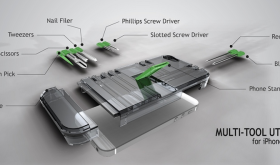
MacWorld is going on right now and there are lots of crazy new tech being introduced. We’re going to share some of the apps, cases and other accessories that are being displayed. First, we’re going to take a look at a case that is not just a case. It not only protects your iPhone but it has the option to hold the following tools: blue pen, red pen, phillips screwdriver, flat-head screwdriver, nail file, tweezers, scissors & a toothpick. The case is made from polycarbonate, has scratch protection inside felt and a kickstand to prop up the iPhone for watching movies. The cost is $44.95. [Read more…]
iOS 7.0.6 Update Details & How to Jailbreak
February 22, 2014 by
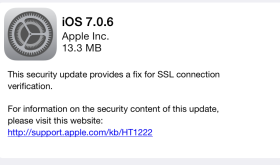
Apple has recently released a security update to iPhones, iPods and iPads. Running this update will remove Cydia and your jailbroken apps if you have them. If you really want to update but want to jailbreak again, there is a fix for evasi0n over at idownloadblog.com that you can download. It’s the same evasi0n tool that has been modified to work with 7.0.6. This is a trusted source. [Read more…]
HUDDismiss – Dismiss the Volume HUD with a Tap
January 16, 2014 by
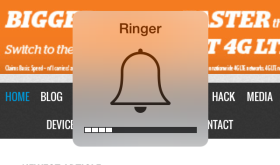
This free, simple hack allows you to tap the HUD (Heads Up Display) that pops up on your screen when you turn your volume up or down with the volume buttons on the side of your device and it will disappear sooner. [Read more…]
CES 2014 – Top 5 iOS Products
January 16, 2014 by

When I first started blogging about tech, I decided the best place to go and get information on the latest gadgets was the Consumer Electronics Show in Las Vegas. It’s an amazing experience and, at first, overwhelming. If you ever get the chance to go, do it! This year was the biggest year yet and there are some amazing new products being displayed. Here are a few of my favorites. [Read more…]
FlipControlCenter – Customizeable Control Center Switches
December 30, 2013 by
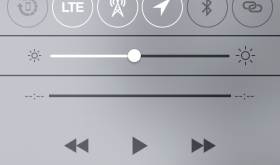
There are a few different hacks out already that add features to the Control Center. So far, I like this one the best for customizing my switches at the top. Here’s what the Control Center looks like from Apple without any changes: [Read more…]
Why is My iPhone Running So Slow?
August 2, 2013 by

There are many things that can cause your iPhone to run slow. In this video I try to give you a few ideas to fix the possible problems, starting with the simple fixes to the most complex. [Read more…]
Are One of My Speakers Broken on My iPhone?
August 1, 2013 by
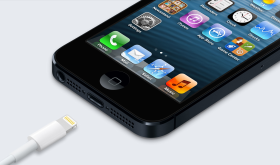
Since the very first iPhone, people have asked me if one of their iPhone speakers are broken. Most likey, the answer is no and I’ll show you why. Also, in this video, we take you back in time to one of our i101 episodes from 2008! [Read more…]
Will the iPhone Life Come With iLife?
July 27, 2013 by
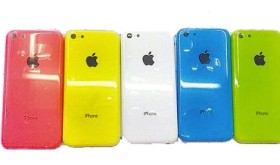
This question assumes the new iPhone will be called iPhone Life. I hadn’t heard of that so I did a little searching and then answered the question the best I could. I do talk about my prediction about the new iPhone 5S and the budget iPhone. [Read more…]
What is iCloud and Should I Turn It On?
July 26, 2013 by
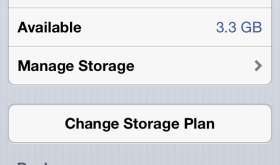
In this video I talk about iCloud. I explain what it is and why you should use it. I also give tips on how to customize your settings. [Read more…]
What Case Should I Get for My iPhone?
July 26, 2013 by
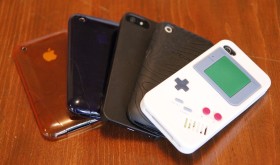
In this video I give recommendations on brands of cases and how to look for the best case that works for you. I also tell where some of my favorite places to shop are when looking for iPhone and iPad cases. [Read more…]
Should I Update My iPhone & iPod touch Firmware?
July 25, 2013 by
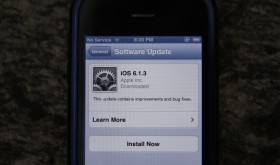
In this video I share why or why you would not want to update to firmware 6.1.4. If you have anything to add or correct in my answer, just leave it in the comments below. Thanks! [Read more…]
iOS 7: Calendar
July 21, 2013 by
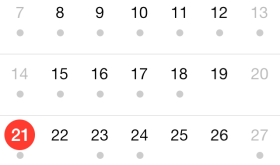
Apple’s Calendar app has a very fresh new look. Almost too fresh. I really don’t like the use of so many circles throughout the OS. You’ll see it more later in other iOS 7 apps we review. The Calendar app is very white, like many other of the iOS apps. The current day is highlighted with a red dot and days that have events have small grey dots below the date. Navigation is much easier when you get the hang of it. The year view is pretty sweet too! Check it out in the screenshots below. [Read more…]


 Loading ...