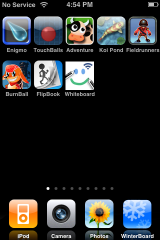
 I found a way to get a reflective dock in firmware 2.2. It’s not superhard, but you will have to know how to SSH into your iPhone. It’s also static, so it doesn’t change as you drag icons on and off the dock. You’ll need to go here to download the file for a 4-5 icon dock or go here for a 3 icon dock. I’ll be showing you how with the 4 icon option. Upload the folder named “Reflective Dock (4 Icons)” to your iPhone to the following folder: /private/var/stash/Themes
You’ll also need to copy the 4 icons that are in your dock into the “Reflective Dock (4 Icons)”. You can get these in the application’s folder. Now edit the Widget.html file and add in the icon names where it says img src=. If you have a custom dock you’ll have to put that in the same folder too named dock.png. If you’re like me and use a transparent dock then just delete the dock.png and ReflectiveDock.png files. You should just be able to activate it in WinterBoard and you will now have a reflective dock! Let me know how it works for you!

 Loading...


 Loading ...
Is this what the ipod touch used to have???¿¿¿
The reflective dock use to be available through Kate. However, Kate has not been updated to work with 2.x firmware. I LOVE the reflective dock and used it at all time when I was on 1.1.4 and below. I wish someone would add it to WinterBoard!
Kate does work with 2.2 now, and is the easiest way for reflective and five icon dock. The dock automaticly adds the reflection when the icon is dragged onto the dock. Kate used to not work past 2.0 but they seemed to fix the problems with the November 30th update
how it’s possible to get 5 icons per row on the springboard like screen shot ?
read a few post before this one it’ll tell you about it…
“”read a few post before this one it’ll tell you about it…””
I read all the previous posts, please how to do that ?
Ok I figured it out, waiting for the public release
i made one myself some time ago for the springboard because i liked to have a background too. it still works with winterboard. (http://modmyi.com/forums/new-skins-themes-launches/11036-leopard-reflection-dock.html#post66338)
There is a simpler version of Sakurina’s excellent work: http://macthemes2.net/forum/viewtopic.php?id=16791831&p=1. Doesn’t require copying icons or docks. Just updates a config file and you’re good to go.
I tried that one first and it didn’t work for me. I must have been doing something wrong.
Worked great for me and I’m using a five icon dock. Just respringing didn’t do it for me, though. I had to activate it through WinterBoard. Did I do something wrong or was that just an oversight on your part, Doug?
Also, the link “the file for a 4-5 icon dock” brings up a five icon file. Would someone with four icons simply put in 4 icons and ignore the last or would they need to make some other edit to the file?
You’re right! I forgot to tell you to activate it in WinterBoard. I updated the article now. You right about the file, for the 4 icon I just deleted the last row of the 5 icon file since I was only using 4.
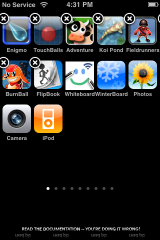
I’ve managed to get the icons up and reflective but behind the lot of em it still says READ THE DOCUMENTATION – YOUR DOING IT WRONG.
Can’t figure out what I’m doing wrong
copied icons from each applications folder (icon.png) then renamed them to iPodicon.png, smsicon.png, phoneicon.png, mailicon.png and dropped them in the root Reflective Dock (4 Icons) folder which is sitting in /private/var/stash/Themes*****.
Then I changed the img src=”” sections to the iPodicon.png etc etc…
Any ideas?
Still in beta, and not available on Cydia yet, but I’ve implemented a true reflective dock via MobileSubstrate (not a theme, but true reflection). This works on 2.2, but hasn’t been tested on earlier releases yet.
http://macthemes2.net/forum/viewtopic.php?id=16792451
guys, you can just download it from cydia, it works in 2.x.x now so just trying to save you the trouble