 |
Available In: Cydia |  |
Price: Free |
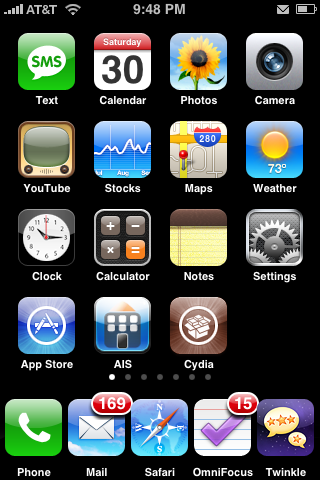
I’ve missed this when I upgraded to 2.0. It’s pretty simple really, just install “Five Icon Dock” From Cydia. Then all you have to do is drag an additional icon to your dock. Here’s what it looks like:
Learn how to use, hack and mod the Apple iPhone, iPad & iPod touch
|
Available In: Cydia | |
Price: Free |
I’ve missed this when I upgraded to 2.0. It’s pretty simple really, just install “Five Icon Dock” From Cydia. Then all you have to do is drag an additional icon to your dock. Here’s what it looks like:
 (No Ratings Yet)
 Loading...
[…] Five icon dock – squeezes another icon onto the dock. Nice. […]
[…] Five icon dock – squeezes another icon onto the dock. Nice. […]
[…] 5 Icon Dock: Allows for 5 icons on your dock, I have sms, phone, safari, mail and iPod. […]
[…] 5 Icon Dock is Back! | Apple iPhone School Then all you have to do is drag an additional icon to your dock. … if not how can i get 5 dock icons on 1.1.4/3 (1.1.4 … Pingback: A week ago I broke my iPhone out of … […]
[…] keep four applications always accessible in the dock, but jailbroken iPhone users can install the Five Icon Dock application to add one more to the list. Not a big deal, of course, but you can easily fit five […]


 (5.00 out of 5) (5.00 out of 5) (5.00 out of 5) (5.00 out of 5) (5.00 out of 5)
 Loading ...
How did you guys get the mail icon next to the battery? Is that the new version of Notify from back in the 1.1.3 days?
That is part of Intelliscreen.
Thanx Doug! Love the site! I check it ever hour. I’m addicted…. I need help….
We’re addicted too, that’s why we started this site :)
yup i noticed this this afternoon….hey doug, did you see NemusSync in Cydia??
From what i remember, that was one of your favorite apps!
cool app
BTW where is brook????
and how come no new poll????
it’s been out for a couple of days it’s really cool but it doesn’t have reflection!
Doug…Please help, I am looking for a screenshot app for 2.0.2. especially the one where you just have to home+silent switch. What app did you use to take the 5 dock screenshot ? Thank you in advance.
a screenshot app is built in to 2.0.2. Just hold the home button and then the sleep/wake button.
I was able to do that back on 114, but since going to 202 it doesn’t work anymore.
You’re not doing it right then. Press the home key and lock key at the same time for a second and the screen will flash white. The screenshot will then be in your camera roll.
Thanks Chris and Mattyb123- I thougt it was the home & Silent switch. Should have read more carefully :).
I am going to donate to Sauric. I was a user of Kate and the Facelift feature which allowed the 5 icon dock. But an update to Kate made the Faeclift feature incompatible with Winterboard.
I have since asked for a refund from RipDev and got it 3 days later with some questionable emailing back and forth. I am uninstalling Kate. Sauric mainly produced a 5 icon dock because of many requests. We can thank RipDev for that.
So now I will donate to Sauric. I’m very happy he did this. He really didn’t have to. RipDev really surprised me with that decision. I can’t live without Winterboard. And ironically before I updated Kate both program worked flawlessly together. So I believe RipDev’s decision was more political than technical…sad…
Does anybody know if the leaf theme will still work with 5 dock installed?
It should.
YES. It works quite nicely. I have placed my calendar icon in the center and I have the “worded” icons to the left and right. If what you mean, is will the icons be text, other than the 4 originals – then NO. Icon’s are predetermined by the theme and Leaf took the 4 main ones and made them fit for visual purposes and used a text icon for the dock icons. The dock is not morphic (yet) it just displays the icons in the dock position as you scroll, whatever icon you decide to place in the dock.
Thanks. I’m trying 5 icon now. FYI, you can have ANY icon be text, not just those 4. Download the extra icons from the leaf website, and you will find tons of them turned into text.
How come you guys never give the source adress?
I may be a novice at this…
because in cydia you don’t need a source address
hey d & b,
does this 5 icon dock work with any theme? just want to make sure before i do it…
im still a n00b
yes, it will, but like the above question about the Leaf theme, if the theme’s background or dock is built for 4 icons, it will look weird.
Hey is there a way I can have the wallpaper always on instead of the black screen, I know there was a once before but I cant seem to figure it out
lol i figure it out.
I just updated to 2.0.2 via Winpwn from 1.1.4 (2g)
I installed Five Icon Dock form Cydia as well as Kate.
I now have found that when I arrange my screens (icons) and have to reset of any kind my icons reorganize sporadicly.
The first page no longer have the iPhone apps on it as they were.
Anyone else notice this or is there something that I need to do to correct this?
Thanks
I love this app. Best use I’ve found for it: using the 5th icon spot as a placeholder for an icon I want to move between pages. When I go to a full page and have an icon from the previous page, it will bump out the last icon to the next page. Using the 5th spot saves me the hastle of needing to rearrange 3+ icons because I moved 1 app.
hey guys I know this isn’t the right place to post this topic but I really need an urgent answer. Since I upgraded from 1.1.4 (originally unlocked, activated, and jailbroken using ziphone 3.0) to 2.0.2 using winpwn2.5 my cellular reception became really weak, I also upgraded my bootloader to 4.6 during the process. What should I do I really need help I live in Dubai and over here cellular reception is really strong. I also placed my phone in dfu mode and reinstalled the firmware but no use. Thanks in advance.
Hy does this work for 1.1.4/3
if not how can i get 5 dock icons on 1.1.4/3 (1.1.4 preferably)
doesn’t quite work for me: i have a blank space to the far right where i should be able to put a fifth icon, but when i try to drag one in it never ‘sticks’ there. i’m trying to replace Kate, so maybe this has something to do with it? i disabled the 5-icon option in kate before installing 5 icon dock… [shrug]
Seems to me that the popularity of 5 icon dock will be short lived because someone is surely going to invent 6 ICON DOCK!!!!!!! oh if only I could create apps. 5 icon dock would be history!!!!! MUUUAHAHAHHAHAHAHAHAHAHA
LOL! I would upgrade!
it’d be nice for 6 icon dock, but unlike the 5 icon dock, the screen actually doesn’t have space!