Once again, sticking to my Safari theme, below is this week’s QuickTip. If you have a QuickTip you would like to submit you can email it to QuickTip@appleiphoneschool.com.
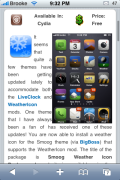
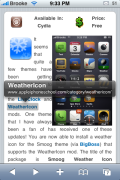
QuickTip – When in Safari, you can preview a link’s url by tapping and holding it. When you touch and hold your finger down on a link, it will bring up a bubble displaying the link’s url. If you would prefer not to be directed to the link, just slide your finger off the link. If you would like to be directed to the url, just hold your finger down a little longer and then release your finger (instead of sliding it off the link). This QuickTip also works in the Mail application when in an email.
A very useful way to view where a link is going to take you without actually clicking on the link…saves time and avoids spam! See screenshots below.




 Loading...


 Loading ...
Ah great tip this saves me so much time especially when using my really slow internet connection.
So, it will become imperative to find out about the form of antenna requirement according to the need and in a set budget of the customer.
Note: This antenna is predicted to are very effective with UHF frequencies, and you can’t expect it to hook the weakest VHF channels for sure.
Best hdtv antenna in canada One from the key elements you will need to get your high definition TV set to
function as it is intended for your requirements need to invest in a quality HDTV antenna.
The TV installation Sydney would not present you with
any problems and you could also try antennas Sydney. Make it a point that your particular antenna ought to be placed inside direction facing towards the broadcasting station so that it can capture the best signals.
Hdtv antenna with hdmi connection Well it
is possible to have a wonderful experience while viewing
your favorite prime time programmers that too without
even changing your television antenna. Best outdoor hdtv antenna A professional TV antenna installation company
would train their professionals in such a way to ensure they can meet
any type of challenge inside the antenna installation procedure.
If you’re stuck deciding on the video card and TV tuner for your HTPC, have you thought to kill two birds with
one stone and go for any combo HDTV Tuner Graphics Card.
Diy hdtv antenna copper wire You also needs to remember
that outdoor position for HDTV Antenna is actually
comparatively much favored if you are able to roll it.
These tiny antennas could work in a very limited locations to get a limited
variety of folks but for that most part they’ll
disappoint an individual with unsatisfactory reception. Then we can easily
look at some in the most popular HDTV technologies from the day.
Indoor hdtv antenna diy Some offers include testing the digital antennas,
mounting a TV to your wall, installing of screens and projectors and setting increase audio
and visual equipment. What would I have ever done excluding my antenna and HDTV, I tend not to know.
These tiny antennas could work in the limited locations for any limited amount of folks but to the
most part they will disappoint an individual with unsatisfactory reception. 8 bay hdtv antenna diy Then simply
contact the correct service to your needs, and have your TV antenna
repairs looked after by professionals in your area.
I love what you guys tend to be up too. This kind of clever work and
exposure! Keep up the wondrrful works guys I’ve incorporated you
guys to my blogroll.