Installer 4.0 Update
July 24, 2008 by Brooke
Categories: Installer.app
68 Comments
10,006 views
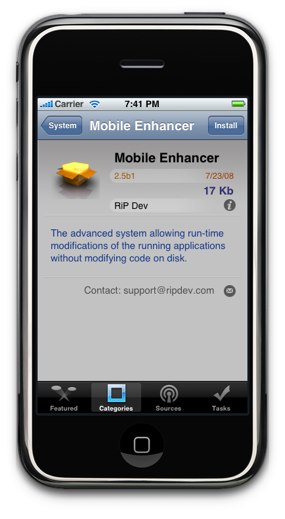
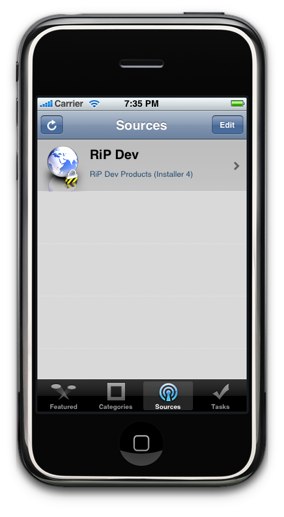
Here is what the RiP Dev Blog has to say about the progress of Installer 4.0 and some screenshots of what it will look like!
Hi folks! Many of you are wondering what’s up with Installer 4. No, we haven’t slowed down the work on it, and are currently in the final stages of hooking the GUI to the back-end. We will be contacting the authors of the major repositories in a few days to invite them into the testing process and to prepare for the upcoming repository changes.
Meanwhile, here’s a few actual screenshots so you can check out how the new Installer 4 will look like:
Hope you’ll like the new functionality and interface when it’s out. Please bear with us and let us know if we have missed something you think is essential in Installer.
![]()
![]()


wow this is way better than i imagined cant wait…
[Reply]
NICE
[Reply]
wow!
[Reply]
Thats really nice
Can not wait for it to come out
[Reply]
again… WOW!! Very nice interface design, awesome icons!!
[Reply]
Using icons is a great idea.
A suggestion: please, make it possible to turn off a source (instead of deleting it). Sometimes you know which source is taking too long to refresh, maybe it is out for a while, but you don’t wanna delet it.
[Reply]
ulyman on July 24th, 2008 2:11 pm:
Totally Agree, sometimes, for example, you know when a repository is having problems and it delays the update, but you just can update one-by-one or delete it :/
Ken on July 24th, 2008 7:04 pm:
I would also like to ti NOT update the Sources right when opening the App. I would prefer to refresh myself….so an option for this would be great….that way I can open to check things out…or to show off to a friend…and then refresh if I want to….also being able to turn off or on resources would be Excellent. Maybe even a repository list of resources to add would be nice….just like the Apps themselves.
Adam on July 24th, 2008 10:54 pm:
You don’t have to manually refresh any more it does it in the background same with installing apps.
Wow! Its Great! Great GUI! even better than Apple Applications
[Reply]
And where is the “More Info” button?
[Reply]
bigmcq77 on July 24th, 2008 2:11 pm:
I think it’s that little “i” thing next to the source. I=info maybe
Anyone know if it will work on 2.0 software update?
[Reply]
ulyman on July 24th, 2008 2:07 pm:
Yes, it will
and someone said that he liked cydia and dont care about installer 4.0 and the other said that 1.1.4 is better that 2.0 I THINK U ARE WRONG!!!!
[Reply]
crisis on July 24th, 2008 2:44 pm:
totally agree
T Webb on July 24th, 2008 5:18 pm:
You do know that installer 4.0 will work on 1.1.4 too. As of now 1.1.4 is better than 2.0.
tarek on July 25th, 2008 2:38 am:
NO INSTALLER 4.0 ISNT GOING TO BE RELEASED FOR 1.1.4 ITS ONLY FOR 2.0 AND U HAVE TO INSTALL IT BY CYDIA APP AND THATS ON THE 2.0 !!!!!!!
oo nice and app store looking
[Reply]
shweet
[Reply]
Looks great, very clean GUI, waiting for it to come out, and then update to 2.0
[Reply]
cool! Beats cydia…
[Reply]
Awesome UI!
[Reply]
if I have a activated iPhone 3g, will I still be able to download this and keep my phone activated
[Reply]
Douglas on July 24th, 2008 8:07 pm:
yes
sexy…
[Reply]
YAY
[Reply]
[...] appleiphoneschool.com Als PDF [...]
the blog from rip dev says that packages will now download all necessary apps that are required for a particular app to work such as jiggy runtime for tetris or bsd subsystem for apollo. will there be a popup letting you that these other apps are being installed to give the user an option to not download the initial program?
[Reply]
i seriously couldn’t care less about HOW the tool for browsing repositories and downloading / installing apps looks like.
it’s the apps that matter, and i wouldn’t mind sticking with cydia for not having to browse 2 different app”stores” when looking for new apps.
[Reply]
atrophic on July 24th, 2008 4:38 pm:
Improved looks are nice, but I’m looking forward to the greater functionality.
cihan on July 25th, 2008 1:50 am:
so it’s ok for you to wait for half an hour for your installer to search for software updates and not be able to install anything till then?
nice thinking…
[...] Vía, appleiphoneschool [...]
this looks way better than installer 3. cant wait
[Reply]
nice
[Reply]
Looks better than the app store in my opinion! This is going to be great! Can’t wait for it to come out! I also hope it doesn’t have the annoying bug in Cydia where whenever you install something it freezes and you have to reboot. Time will tell!
[Reply]
I would like to do the translating again. Looks slik
[Reply]
very nice son ! can’t wait !
[Reply]
WOW this looks awesome Installer > Cydia for sure no questions about it!
[Reply]
Gorgeous!
[Reply]
how do u unistall
[Reply]
I have a que…
How can we get this Installer 4.0 on our 2.0 firmware ?..
We need to restore again ( :S ) or can be installed via Cydia ?…
[Reply]
Fliesen on July 24th, 2008 7:18 pm:
i greatly suppose that it’ll be an app that’ll be installable via Cydia.
does any1 no if there is going to b a search feature?
[Reply]
Brooke on July 24th, 2008 8:09 pm:
I really hope so…I doubt they would leave that off. I think that is the part I liked most about Installer (once they implemented that feature).
The Apple Store is garbage! Who cares about a funky app that is limited to what Apple will allow. Heck, I more in to customization. Sounds, video ringtones, video backgrounds, system strings name it. As for 2.0, I respect the picture save feature and the scientific calculator! Thanks Devs for all your head work.
-sent from my iPhone
[Reply]
wheres the uninstall button??
[Reply]
Linh Nguyen on July 24th, 2008 9:50 pm:
Interesting observation. Either they’ve really made it possible to uninstall straight from springboard… or these screenshots are fake
Or there’s a separate “Installed” section in categories/tasks. Though this is unlikely.
If only Cydia had more apps and a better GUI.
To all those asking where the “uninstall button” is, perhaps they’ve incorporated it in so they can be deleted like apps from the AppStore are. Hold down on an icon, icons wiggle, hit little “x.” I’d like that.
[Reply]
Shoo on July 25th, 2008 7:02 am:
RIP had this setting before on 1.1.4. I am sure they added it to the new version.
Wow it looks very close to the Appstore. Looks awesome!
[Reply]
quick question, if i were to build a custom firmware w/ pwnagetool now, would i still b able to get teh new installer when it comes out? or would they hav to do a minor update on pwnagetool itself?
[Reply]
Very nice and great GUI. Waiting for this before I upgrade!
[Reply]
You’ll probably be able to install Installer via Cydia
[Reply]
I think the “uninstall” feature is under the “Tasks” menu. It has got to be there. It wouldn’t be such a bad idea too if they can make it like you can uninstall the app from the springboard by just holding on the icons until they start to wiggle, then an “x” will appear on that app so you can uninstall it.
Can’t wait for it to be part of winpwn 2.0.1. Great job Rip Dev!
[Reply]
wow thiz iz awsome cant wait!
[Reply]
Nice! Can’t wait! And by the way, do I have to jailbreak by Pwnage Tool *again* if I’ve already jailbroken my iPhone to have Installer 4.0?
[Reply]
installer is just an APP like any other, means someone will put in on their cydia repository.
[Reply]
hey guys, are you sleeping
)
nothing on your site today
[Reply]
this looks really good iam impressed
[Reply]
i am literally dying for installer and customize to be ported over ……………………………..
[Reply]
What’s the task button do???
[Reply]
uhh..Brooke…Doug?….any news for today? its just like a mornig routine to ckek ur website
just wonderin
[Reply]
Installer 4, in my opinion, is the most highly anticipated app to ever be in the iPhone. Gorgeous UI, promising functionalities, heck, I might not even bother to check the real App Store now provided that the useful apps we all used to love get ported…and fast!
Cydia? Pfft!
Just take your time Rip Dev!
[Reply]
i want it to have installed both 2.0 and installer 4, however ill wait till the test it to be succesfull
[Reply]
Where is the ‘Update’ Area?
[Reply]
Installer 4.0b5 is out! I just downloaded the new update.
[Reply]
I don’t get an update message… i’m still on b1
[Reply]