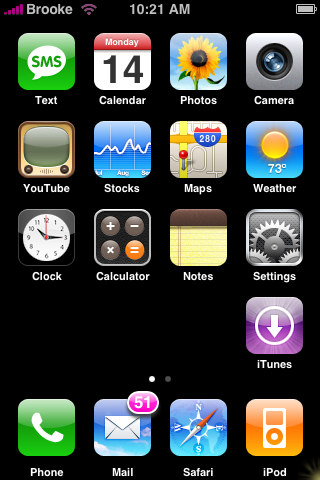
I just added a post to our forum about how to make your SpringBoard look stock even though you have 3rd party apps and thought it would be good to do a full post about it!
Here is a zip file titled blankapps…you will need to unzip the zip file and OpenSSH into your iPhone. You can then open the blankapps folder(the one you unziped) and drag the three .app folders into your root/Applications folder on your iPhone. The names of the three folders look blank but, there are spaces in there so make sure you do not rename the folders! You can then use Customize and rearrange the icons so that those are the three icons before the iTunes icon. You will also need to turn off your Skip Last Row in SummerBoard. Then TaDa…you have a SpringBoard that looks stock!!
If you tap on the blank icons once they are on your SpringBoard they will bring you to a black screen…if you do click on one, just tap the Home button to get back to your SpringBoard.

 Loading...


 Loading ...
This is something I’ve been trying to do for a couple weeks now. However, once I reboot my iPhone, I get grey icons with question marks where those apps are. I’ll try these when I get home. Hopefully they work better. I see they are using Embark instead of running code. Maybe that was the problem I was having. I was also having an issue of getting all four (I want four blank spots instead of just three) blank apps to show up. They’re all named differently but only one would show on the Springboard. So hopefully this will work well with my phone. Thanks.
Just put all the “other” apps on the second/third Sprinboard screen, tell summerboard to skip the last row.. and voila.. why should i use a stupid hack for that?
Peter, that skips the iTunes Store in the last row too, and that’s not the original springboard. :)
This makes it look original, and I like it.
there is no blankapps in my customize
help…… ok i am using a cyber duck for ssh and a mac. When i was finnish downloading the Blank apps and did put them into applications on the phone, and restart the phone. When i go now in to customize there is no Blanks in the icon display order @ manual recorder, what did i do wrong
@freysi…well, I actually use a PC but I will do my best to help. I think the most common OpenSSH program to use with a mac is iDemocracy.
Did you unzip the files first…before dragging them to your /root/Applications folder on your iPhone?
Did you drag the entire three folders over…not just the contents of the three folders?
Also, the apps will not say…blackapps in Customize. They will show up as just blank lines.
hey Brooke
yes i unzip the files first and drag the folder in to /root/Applications on my iPhone.
here is a photo
http://farm3.static.flickr.com/2281/2193126093_cac1be3352_o.jpg
don´t know what i did wrong
same her as freysi!
Can you explain how the make those apps unique? I tried to just copy one of the folders and renamed it with four spaces and it will not show up. Is there some kind of coding to make them unique from each other? All the files look exactly the same. I thought I might be able to see if it’s in the actual Embark coding, but since that plist converter link is down, I can’t figure out how to convert them into text.
Oh yeah, and you might want to add the step of adding the 0755 permissions to the Embark file in each folder. Otherwise, it just sits there for a 10-15 seconds or so.
Nevermind, I figured it out. It’s the com.blank.embark that needs to change in the plist file. Sorry.
There’s actualy an easier way to do it… It’s simple, I found how to do it in a blog (hackintosh). You copy the “apps” to the Applications folder and then copy the M68AP.plist to /System/Library/CoreServices/SpringBoard.app. This file is modified to put the icons in the “stock order”. All you need is an application like Transmit or Fugu to upload the necessary files.
The link: http://www.hackint0sh.org/forum/showthread.php?t=11777
The user (Vger) posted all the files you need to get it done.
Also, you don’t need summerboard for the apps to go to the 2nd page. That function is like “built in” in the 1.1.1 hack.
This is a video of my iphone with this mod:
http://www.youtube.com/watch?v=XM8ttHCiWE8
Good Luck!
@freysi and jack – You need to OPEN the blankapps folder and drag the three folders inside of it to the /root/Applications folder on your iPhone. The three .app folders. Let me know if that works.
@xious – did you get everything figure out?
@jvargas – Yeah…I tried to get those files to make it easier but…files-upload.com is down so I couldn’t download them. Also, the only reason you would need SummerBoard is if you already have it installed and have the Skip Last Row setting on…you would need to turn that off for the mod to work.
Brooke… Here is the link for the files
http://www.cyber.si/iPhone/Spring-13icons.zip
Brooke tanks fore the help it works fine now ;)
I haven’t been up to much recently. I’ve just been letting everything happen without me lately. I feel like a bunch of nothing.,