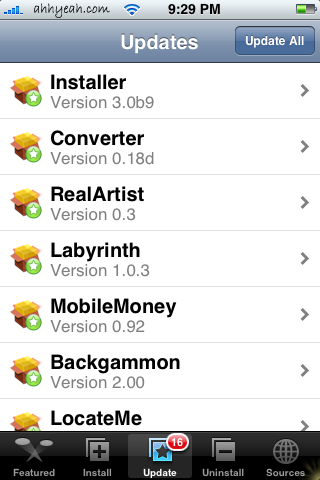
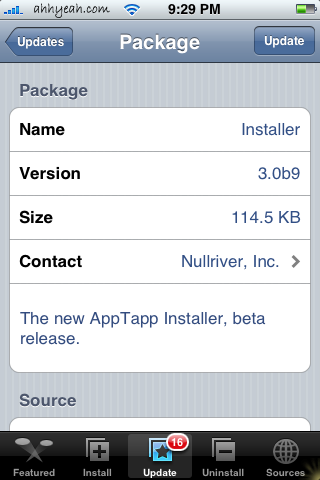
When opening Installer tonight I was notified of an update. I’ve looked and looked and see no visual changes. If anyone finds anything let us know and we’ll post it here.
Update: The update to Installer 3.0b9 does indeed change the refresh rate of Installer.app. Instead of refreshing 30 minutes after your previous refresh, it has been changed to refresh once every 24 hours. So, your Installer.app will not automatically refresh unless your last refresh was more then 24 hours ago.


 Loading...


 Loading ...
I believe it only changes the refresh time to once a day and maybe a few bug fixes
I’m assuming it’s just bug fixes. The installer has seemed a lot faster since the update… whenever I press the “more info” button it seems to give me the info a lot quicker than before. Then again, I could just be convincing myself to think that because of my desire to find some sort of change in the app! : P
Anyway… yeah, no visual changes here either.
Tim
Hey guys, I was wondering if someone could help me. The thing is I updated installer.app and everything seem alright untill I try to reopen the app it did not work. It just seem to open and then it throws me back to my summerboard. I would let U guys know if there was any changes but I cant evev view the main installer.app screen:(
Same problem here. I think my application memory was full and when I tried to update Installer, it only installed it partially and now it doesn’t work. Does anyone know where to find the latest version online? (Nullriver’s site still has an old version which doesn’t work either.)
@ihighmanny – are you the same person (John) that wrote in the forum? Any app that I’ve ever installed that did this to me was because I was out of space and needed to remove some apps. I always had to openssh in and remove them because removing them from installer would not work. You may have to remove some apps and reinstall installer. I’m looking for a way to reinstall Installer.app via SSH…
I found a couple possible solutions over at modmyifone.com. One is to reinstall installer via jailbreakme.com (worked on 1.1.1). Another is install installer via iBrickr (worked on 1.1.2).
I would be the John that posted the problem. I tried to do the jailbreakme.com thing and nothing happened. I tried deleting installer through mobile finder and nothing changed. I’m lost. Now what?
Does anyone know where I can find the ACTUAL AppTapp files so that I can manually copy them on my iPhone? Thanks!
Hey all!
THIS MORNING I UPDATED MY INSTALLER!
AND AS YOU ALL HAVE BEEN WRITING ABOUT, MY IPHONE DID THE SAME:
– I TRIED TO OPEN INSTALLER, BUT IT CLOSES ONE SEC LATER AND RETURNS TO THE SPRINGBOARD!
I HAD SOME “IPHONE BOOKMARKS” ON MY COMPUTER, AND ONE OF THOSE WERE “HACK THAT PHONE”. HE HAS GOOD GUIDES OF GETTING THE EMULATORS INSTALLED ETC.
BUT THIS GUY ALSO HAS THE GUIDE OF HOW TO GET INSTALLER ON YOUR IPHONE.
so follow this guide:
http://www.hackthatphone.com/112/iphone_apptapp_install_windows.html
it worked for me, now I have Installer back again!
I am a newbie, but I managed to thank me for those of you that went into the same situation as me . haha!
Hope it works for you…Let me know!
* I started off deleting installer from my /application folder, because if I copy over the installer folder over the old one, it says that some files couldn’t be named the same….so delete installer from your /application folder, and then just copy over the installer.app you downloaded from the link above
Regards
//Oskar
but it seems like, you have to update installer to the newest version for it to download stuff!
I can open the program now,but ones I try to download something, it manage to download, but then whenit says “installing…” it just puts me back to springboard..HMM!!!
I don’t know if I shoud update, maybe then I will be in the same situation again, that installer won’t open!?
3/3
ok, hopefully last thing:
I couldn’t donwload anything as I emntioned earlier..but I noticed that I had to delete the “installer” folder in my library folder!
So delete, your installer folder in /application folder
and
library folder
then copy in installer that you donwloaded from the link belove…
only bad thing is that, now you have to re add all the sources, because it is all “reserted”
let me know if it works
Bonjour, comme je ne parle pas bien anglais, je vous laisse traduire ma solution qui a très bien fonctionné :
Itouch 1.1.2. Voici ce que j’ai fait:
– sauvegarde du répertoire Installer qui se trouve dans “var/root/library” (contient toutes les sources d’origine);
– suppression de pas mal d’application au cas où;
– réinstallation avec Idemocraty;
– mise à jour d’Installer réussi;
– récupération du répertoire Installer copier dans var/root/library qui contient toutes les sources d’origine;
– nouvelle mise à jour d’Installer sans pb;
et zou tout fonctionne comme avant.
J’ai juste perdu la page de lancement d’Installer.
Reste à réinstaller les applications sauvegardées.
the update was to alleviate the traffic to ste and other repo sites
http://blog.psmxy.org/2008/01/20/please-upgrade-to-the-newest-installerapp/
check/increase your disk space with the Boss Tool
located under utilities (modmyifone source)
Boss Tool is definitely the way to go. The problem for those who can’t run Installer, though, is that they can’t (easily) install Boss Tool.
The following is not for the faint-of-heart. I hope someone more of an iphone expert (and not just a Unix guy) can tell folks how to simplify this process.
If Installer won’t run, you basically have to:
1. ssh into your phone
2. make some space on the root filesystem (e.g. move ringtones):
mkdir /var/root/Library/Ringtones
cp /Library/Ringtones/* /var/root/Library/Ringtones
rm -rf /Library/Ringtones/
ln -s /var/root/Library/Ringtones /Library/Ringtones
3. download and unzip the new installer on your machine
4. remove the broken installer (in your ssh session)
rm -rf /Applications/Installer.app
5. copy the new installer to your phone (replace 192.168.x.x with your iphone’s IP address)
scp -r Installer.app root@192.168.x.x:/Applications
Gurus, please tell folks how to do this more simply!
-Joe
if we havnt installed the new installer cause we are to affraid it will mess it up like some peopel here, should we wait…i have some 3rd party apps and many ringtones (using send a song). i dont have ssh on my phone yet. (seems a bit hard for newbie like me)….
i’ve read that the boss app has caused some problems for some users, is there a way to check disk space without it?
i want to install the new installer but affraid it will mess up my phone.
any suggestions??
BTW great site and great advice from all of you! thank you
anyone?
I found out what the update was. When you manually add sources to install you can now drag back over the text with the magnifying glass incase you made a mistake. Convenient no?
Same problem: installer crashes to blank page after update. I followed all steps above, reinstalled it (using SSH) and I STILL have the issue… HELP !!!
I have an iPhone with 1.1.3 firmware is there an installer.app or any type of installer for this one PLEASE HELP!!! doug and broke
without jailbreaking it or doingit an easier way PLEASE HELP!!! SORRY for he boder
As of right now there is no jailbreak for an Out of The Box 1.1.3. Now, if you have upgraded to 1.1.3 from another FW you can downgrade and then jailbreak.
Hi, I have an iPod Touch with firmware 1.1.3 and its jailbroken.. however, today I update the installer and then it couldn’t open again… I tryed Oskar’s steps to solve it and it works… BUT.. I can’t install/uninstall/update applications again.. I got a “Main script excecution failed” error on it… does someone knows how to fix this??
Please HELP! I don’t want to rejailbreak it from 1.1.1 again to get through all the long steps to get the 1.1.3 jailbreak firmware
THANKS!!
Thaks Brooke!!
i have an iphone on 1.1.1 with installer 3.0 installed, i do not have ssh installed on my iphone and i keep getting the “main scriot execution failed” error when i try and install an app, i also get a download failed error when i try and update any packages.
I am a newbie with all of this and would appreciate it if someone could give me easy to understand instructions on how to get installer up and running again.
entrei no meu installer quando est
ok
i feel really stupid but i just got my iPhone and i i have v 1.1.4 and i want to get the installer.app Can someone please let me know the link so i can download it?
can somebody give me the link, where i can download the new version of installer.app?