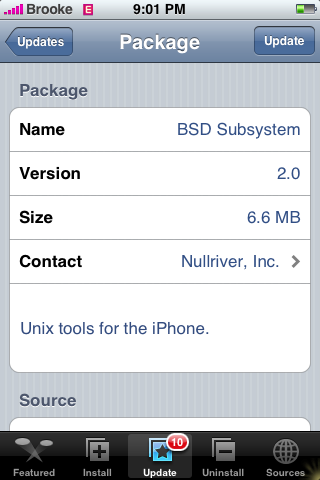
There were updates to both the Installer.app and BSD Subsystem…they are both available in the Installer.app through the AppTapp Official source. Honestly, we are not really sure what the updates do…we see no visual changes to the Installer.app and BSD Subsystem does not have a change log. So, if you know of any changes or you notice anything…let us know in the comments! Below are the screenshots:



January 26th, 2008 at 2:23 am
this is whta it say on the intro screen of installer
“Installer (3.0b10) now works properly under the user “mobile” provided it is setuid root and owned by root”
[Reply]
January 26th, 2008 at 3:26 am
I’m not quite certain what I’m seeing after upgrading it on my iTouch is its problem, but I’m able to start weDict again. It crashes right after the white screen come up.
I had to re-install 1.1.2 again, use older BSD version to make it work.
[Reply]
January 26th, 2008 at 4:23 am
Hey there,
since I installed the new BSD subsystem, all apps work fine again!
There were some apps that didn’t work under 1.1.3 anymore… now they
all do.
Regards!
[Reply]
January 26th, 2008 at 8:01 am
The only changes I can see on Installer are the comments under the heading Firmware 1.1.3.
[Reply]
January 26th, 2008 at 8:28 am
I cannot download BSD to my phone is that because I use 1.1.1 FW?
[Reply]
January 26th, 2008 at 10:14 am
er if this is what I just updated to…then its not working on my iPod Touch
Launched installer.app - said update for install - I accepted
Updated, then i tried to launch it again and it just stalls then goes back to the home screen. Any fix for this other than a full restore of the iPod?
[Reply]
January 26th, 2008 at 10:32 am
little gnoms told me that 3.0b10 can run setuid root.
[Reply]
January 26th, 2008 at 11:01 am
I noticed that within the BSD subsystem that at least one useful new command was added: du.
However some environment variables got reset and require a few ‘tweaks’. bash still consumes too many resources and prohibits any usefulness from it. (my ipod touch stops responding for long periods of time… a quick ‘top’ shows that bash is using 45%+ cpu. - bash also doesn’t disconnect from TTY’s correctly as I seem to run out of them or it could be part of the earlier problem)
yay!
[Reply]
January 26th, 2008 at 12:17 pm
I cannot update to Installer 3.0b10 i got this error message ” Package download failed”
[Reply]
January 26th, 2008 at 1:24 pm
Me too :
I cannot update to Installer 3.0b10 i got this error message ” Package download failed”
[Reply]
January 26th, 2008 at 1:55 pm
Same problem. It either fails to download or something screws up during installation. Help, someone?
[Reply]
January 26th, 2008 at 2:10 pm
@sergey….I am running 1.1.1 and was able to download bsd…I would give it another shot!
@Francis, abdliuae and saif…is the Installer.app still on your SpringBoard? If so, the update should be in your Installer.app under Updates…or, you could try going to the Uninstall part of the Installer.app and reinstalling the Installer.app, you do that by selecting the Installer and then selecting Reinstall in the upper right corner.
[Reply]
January 26th, 2008 at 2:45 pm
@Brooke: it worked. I love you, will you marry me?
[Reply]
January 26th, 2008 at 3:04 pm
Haha!! I’m glad it worked!
[Reply]
January 26th, 2008 at 5:10 pm
great job thx
[Reply]
January 26th, 2008 at 11:57 pm
DD_NVidia: I had the same problem (installer showing blank screen then returning to springboard) and tried to reinstall it…etc without success.
After following all suggestions found on numerous forums, the only thing that worked for me was to go to Terminal and type the following:
cd /Applications
chmod -R 755 ./Installer.app
Then exit the terminal and try running installer again. It should now run normally.
It basically seems like the new version of installer screws up some write permissionning in the folder, which is needed for the sources to refresh.
I hope this helps.
[Reply]
January 27th, 2008 at 7:46 am
hi, ive downloaded the last version of the instaler and now it dose come up :S please help
[Reply]
January 27th, 2008 at 1:36 pm
Still no luck. Im on 1.1.1 installer 3.0b8 under uninstall category the installer 3.0b8 is 0 bytes is it normal? Anybody knows how to install it manually?
[Reply]
January 27th, 2008 at 5:10 pm
slt
[Reply]
January 28th, 2008 at 1:19 am
somehow I cannot download this BSD version 2. tried about 10 times and it says that it cannot find host! other links seem to be working. anyone else has this problem. I wanted to use anysim to unlock a brand new 4gb.
thank you!
[Reply]
January 28th, 2008 at 10:42 am
@sergey…just keep trying. If you get the Cannot Find Host prompt it is because too many people are trying to download it at once and the server is bogged down or it is not fulling installing. It should go…just keep trying.
[Reply]
January 28th, 2008 at 12:25 pm
i know
[Reply]
January 28th, 2008 at 12:31 pm
For those who update to 3.0b10 and it is returning to homescreen please follow my instructions on getting this working. First of all you need to downgrade your installer. so go to this website “http://rapidshare.com/files/77732205/Installer_v3.0b8.zip”
Save this to your desktop.
Now you must Ftp into your iphone with “wifi” using a program such as “Winscp”. Username is “root” password is “alpine.
Delete /Applications/Installer.app Folder and then copy the 3.0b8 file you downloaded in the same directory. Once this is done you will right click the new “installer.app” on winscp and select Properties. We will now set the permissions. Make sure you select all “R,W,X” your oct should be “0777″. Reboot your phone and now you will have “3.08b Installer” on your phone and it should be working fine.
Paulie
[Reply]
January 28th, 2008 at 2:09 pm
Hi, soz but i didnt get that explination :s ive got that problem wiv the instaler. I downloaded Winscp but dnt now wat 2 do wiv it help
[Reply]
January 28th, 2008 at 2:51 pm
I’ve installed both without any trouble. The BSD 2.0 subsystem has issues with term-vt100 - the backspace key doesn’t work anymore in the terminal. Vexing!
[Reply]
January 28th, 2008 at 7:22 pm
dani in “Winscp” you have to put your dhcp ip address and login. You know when you connect wifi you get an ip on your iphone? You can check it by going to settings, wifi and click that arrow of the router you are connecting to. Anyway once your connected , go down a few directories to /applications. In applications you will see /Applications/Installer.app. Delete Installer.app and replace that with the link to 3.08b. So once you delete the old one copy the new one to /applications.
[Reply]
January 29th, 2008 at 9:23 am
Hi, ive tryed doing the WinSCP and puttin in the Ip number, user name: root password: alpine and i press Login in and it says “Network error: Connection refused”
[Reply]
January 29th, 2008 at 11:36 am
Dani try turning off your firewall or going on your router and setting yourself as DMZ host.
[Reply]
January 29th, 2008 at 11:36 am
i think 1.0.2 users password is dottie and 1.1.1 users password is alpine
[Reply]
January 29th, 2008 at 2:14 pm
@dani…also make sure that your iPhone does not go into standby mode…your iPhone has to be on in order to SSH in.
[Reply]
January 29th, 2008 at 3:36 pm
hi guys im so sorry about all this but this aint working.. you allready now my problem, but i try going in through WinSCP and puting in IP, name and password and this dosent work. I avent got a clue how 2 do this is there anyway u get my email and speak on the msn dm_gaditano@hotmail.com
thanks
[Reply]
January 29th, 2008 at 4:36 pm
hi. managed to install both with little trouble, but now all my important vt100 apps dont work D: irssi both local and remote, anything that uses screen.. this is crucial for me. anyone have a work around or. way to downgrade bsd subsys back to 1.5??
also that backspace issue happens in zsh but not in bash
thanks
[Reply]
January 29th, 2008 at 4:50 pm
note: this is on iPod touch 1.1.2
term errors suggest problem with terminfo ‘network’
[Reply]
January 29th, 2008 at 10:26 pm
Just an observation - not verified.
I have noticed that when i get somewhere around
96ish folders in the applications folder,
that installer.app stop working.
F.Y.I. background info that may get ya going.
OK i have a solution that worked for me….
I am not sure how it happened, either from the installer or my own mistake but when i SSH’d into my iPhone i discovered that i had my entire Application Directory replicated within the Application directory. Very strange..
..
Before i discovered this i could not successfully copy the Installer.app folder into the Application directory. After removing the duplicate directory i had no problems at all and next reboot all was well…
..
It is possible that if the folder Installer.app is replicated anywhere else within the Applications folder this may cause issues.
..
I have 1.1.1 using WinXP via wifi and used the http://hackthatphone.com/downloads/Installer.zip for a fresh copy of Installer_3.09b.
My settings for copying with winscp406.exe were to copy with settings on binary and permissions set to 0755.
..
Hope that helps.
..
MrCyberdude.
Posted on January 23rd, 2008 at 8:21 am by MrCyberdude
[Reply]
January 30th, 2008 at 9:26 am
i m tryin to update BSD SUBSYSTEM version 2.0 on my iphone 1.1.2 version but somehow it prompt me the below after downloading and then nothing happens.
“do not use passwd to change the password on 1.1.3, it is currently broken and will make springboard crash continuously:”
there is an ok button there but it jus wont work no matter how many times i tap on it. so i tap on back button. try tapping on installer and then it shows me the same error msg again.
pls help. does that mean that i should not update BSD update then?
[Reply]
January 30th, 2008 at 9:30 am
its ok after i tried a few times and even reboot the phone. no probs now
[Reply]
January 30th, 2008 at 10:47 am
still have trouble and failing when downloading BSD ver 2, does anyone know of alternative repositories w/BSD ver 1.5?
Thank you!
[Reply]
January 30th, 2008 at 2:06 pm
Dani why don’t you explain your problem again starting from scratch.
[Reply]
January 30th, 2008 at 3:20 pm
Ok here we go…
A week ago a updated my installer and since then it dosent work ive got the version 1.1.1, it tryies to load up and gose back to the beggining. Ive tried usig WinSCP putting in my Ip that comes on Wifi, username: root password: alpine. and it says “Network error: Connection refused” you told me to try turning off your firewall or going on your router and setting yourself as DMZ host. I guess u mean the firewall of my computer and that is allready of but i avent got a clue how to turn my router and setting into DMZ host.
Please Help :’(
[Reply]
shay reply on March 4, 2008:
well so winscp or cuteftp u need version 1.1.2 to go into your ipod!!! and u need wifi not that other stuff!!!
January 30th, 2008 at 3:27 pm
dani do you have bossprefs installed on your iphone?
[Reply]
January 30th, 2008 at 3:29 pm
bossprefs or services can turn on shh …
[Reply]
January 30th, 2008 at 3:35 pm
dani honestly since you have no clue how to do anything i would just restore it, sorry i couldn’t help.
[Reply]
January 30th, 2008 at 5:56 pm
how do u restore it?
[Reply]
January 30th, 2008 at 7:23 pm
@Dani…we actually just wrote a post on how to restore…click HERE…however, did you jailbreak your iPhone yourself or did you buy it that way? Also, are you unlocked with a different carrier or are you with AT&T? Because that will make a difference.
[Reply]
January 30th, 2008 at 7:56 pm
Well i bought my Phone in eBay cause i live in Spain and it was firmware 1.0.2, i took it to a MAC technical and he up graded it to 1.1.1. I avent got AT&T. Gonna try the link you just gave me
[Reply]
January 30th, 2008 at 7:59 pm
mmm…i tried that but it says Theres not enought memory :’(
[Reply]
January 31st, 2008 at 9:33 am
DANI read this website and learn what you are doing.
http://iphone.ranova.org/
The instructions uptop that i gave you was howto downgrade your installer so that you can actually get it working again. You said when you open installer now it just goes back to the homescreen. To fix that all you have to do is downgrade but you seem to have a hard time doing that, so i recommend you Restore your phone.
Try this link above it has many resources and directions.
[Reply]
January 31st, 2008 at 10:20 am
Thanks alot Paulie 4 tryin 2 help me out. Ive been trying 2 restore it and when its gonna start an error jumps and say i avent got enough space! Ive hardly got anything in, all my music nd Pics are deleted all ready so dnt now y :s
[Reply]
January 31st, 2008 at 3:57 pm
is there a way to downgrade back to bsd subsystem 1.5?
still havent seen any clues on how to get screen or irssi working again on bsd subsystem 2.0
does anyone else have these problems?
will upgrading to 1.1.3 fix these issues?
[Reply]
January 31st, 2008 at 9:50 pm
bsd subsystem 2 breaks term vt100 backspace for sure
[Reply]
February 2nd, 2008 at 8:14 am
ok, simple fix:
1) type “bash” when you launch term vt100 on the touch or iphone
or…
2) For the backspace issue, there is a simple fix. Please SSH to your phone or run term-vt100 directly on the phone and create a file “.profile” (without double quotes) in the /var/root directory. Simply put these two lines in and restart term-vt100 and you are good to go.
TERM=ansi
export TERM
[Reply]
February 2nd, 2008 at 5:23 pm
A long afternoon of iPhone frustration.
Short version: I had a 1.1.1 jailbroken/hacktivated iPhone. I tried to update to 1.1.3 by first upgrading to 1.1.2 and then using the Dev Team’s upgrader available in Installer. That failed, so I restored to 1.1.1 and then upgraded to 1.1.2. I used Installer to reinstall two of the apps that were erased in the failed upgrade process — Othello and Customize, in that order — but after that, Installer gives me an error message every time I try to install a package. The message is “Error: Package download failed!”
Please help! I’m sad, and mad at myself for taking my wonderfully customized 1.1.1 phone and trashing it …
[Reply]
February 2nd, 2008 at 11:03 pm
Well, I have also had an evening of frustration. I’m trying to downgrade my Installer to 3.0b8, since I too was a victim of a broken 3.0b10. Everything was runnig fine, until I tried to copy the older Installer.app over to the iPod. It kept giving me errors, and wouldn’t copy the entire folder over.
So then I tried it file by file. I figured out that it was the actual script (the file inside “Installer.app” actually named “Installer”). The other file that wouldn’t go over was the OTHER executable named “AppTapp”. Whenever I tried these files, it kept saying that there was problems with the permissions.
I am running Windows, so I went to my OS X machine and tried chmod there. Took it back, still no luck. I booted into LINUX, and tried it THERE. STILL no luck! I have tried everything I can think of, but I cannot get those files onto my iPod! I don’t know what else to do. Ugh.
Does anyone have any suggestions? Please??
[Reply]
February 4th, 2008 at 11:54 am
alright nubcakes!
there is a fix for the backspace and terminfo problems. on installer look for bsd subsystem 2.0 termfix
thank you hackint0sh forums! gl everyone
[Reply]
February 6th, 2008 at 2:08 am
by I have a question ever since I got my iPhone unlock to use on a tmobile service the youtube on the phone won’t connect do u guys know what is the problem please let me know thank you
[Reply]
February 7th, 2008 at 7:37 pm
i need help!! when i open istaller on the home screen it says
“Refresh Failed…could not refresh sources!”
what does this mean and what do i do!!
[Reply]
February 8th, 2008 at 3:17 pm
Hi,
Got a 1.1.2, and hesitating to install BSD 2.0. Still running 1.5. However updated my installer to 3.0b10. Still working fine. I am scared to upgrade since I don’t have time to screw around trying to fix it. Will BSD 2 make a big change in my life? Please let me know anyone.
[Reply]
February 11th, 2008 at 9:32 am
verry good
[Reply]
March 4th, 2008 at 6:37 am
hey guys i can’t install WEDICT AND POOL on my ipod it says ERROR IN COMMAND 1: installapp WUT DO I DO??? email me thandis70@yahoo.com
[Reply]
March 30th, 2008 at 2:49 pm
I just update my tmobile iphone to 1.1.4
It was working fine downloading apps then all of a sudden I tried to reinstall bsd subsystem and now it won’t download the app and says “error: package download failed” I tried to download any other apps and now it won’t work.
I tried to remove que then reinstall then it would download 2/3 then says the same error message. I also updated the source for repo.smxy.org/iphone-apps/ and it still wouldn’t work.
Somebody please help me! this is driving me crazy!!
[Reply]
Douglas reply on March 30, 2008:
I noticed BSD wouldn’t download the other day also. Anyone else having trouble downloading BSD?
May 30th, 2008 at 1:17 am
I cannot seem to be able to reinstall Bsd Subsystem either. is there some pre-requiste for it? I would really appreciate any help hat can be provided.
[Reply]
June 14th, 2008 at 8:47 am
I have same BSD subsystem error. I can install uninstall all the app except BSD. “Download error”. I used ziphone to upgrade from 1.1.3 to 1.1.4.
I refresh , install Community sources but BSD is die hard to reinstall.
Atleast can someone post to manually uninstall BSD subsystem because I SSH fine on my iphone.
Thanks
[Reply]
June 17th, 2008 at 2:59 pm
okay i got my touch a few weeks ago and every time i try to download bsd subsystem it says error package download failed. ive tried rebooting the touch, waiting a little bit, refreshing my sources and nothing works!
it always says error package download failed and i am getting sooooo mad
please help me!!!
[Reply]
June 25th, 2008 at 1:43 pm
I’m having the exact same problem here…. First off, I couldn’t get ApolloIM to work so I was told to reinstall the BSD Subsystem and now I cannot reinstall the BSD Subsystem.
Help!
J.R.
[Reply]
September 18th, 2008 at 11:28 pm
Hello
Thanks for links, just downloaded
[Reply]
October 24th, 2008 at 11:20 am
bsd subsystem doesnt show up in the installer
i have the BigBoss Apps and Things source but it still doesnt appear to be there.
[Reply]