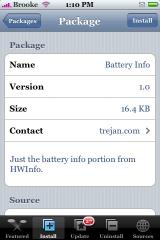
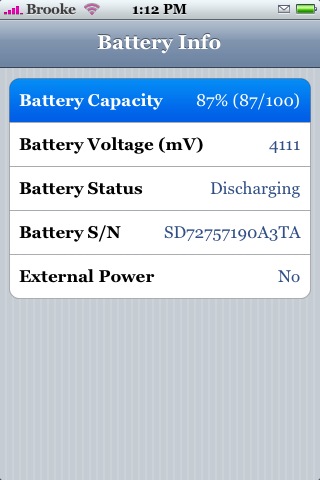
 Battery info is an app that gives you more specific information about your battery. When you open the app you will get specific information about the Battery Capacity, Battery Voltage, Battery Status, Battery S/N and whether not you are connecting to External Power. The part that I love about this app is the Battery Capacity which gives you the exact percentage that is left of your battery. I wish it would change the battery icon on the to status bar to the percentage when you tap on it…like you used to be able to do through Extended Preferences. I will have to agree with Matthew (the gentleman who emailed us about this app) that when you close the app and then go to open another one…it hangs for a few seconds. But, then the app opens and runs normally! So, I’m not sure what the deal is with that! Battery Info is available through the Trejan source. Below are the screenshots.
P.S. I just wrote this post on like the oldest computer in the entire world (I’m on the run…not at my normal computer) and it seriously took like 20 minutes longer than it should have!! Gotta love old school computers!

 Loading...


 Loading ...
I’m sorry but what source address ?
I just added it to the Sources page!
Thanks, btw this is perfect webpage, thanks for your work.
Brooke, I was looking for extended prefs in the installer and could not find it. So I asked around at modmyifone and someone gave me a link to the program. It was redone and is missing some of the things I remember it having, but it does have the tapp the battery to get the percent of the battery left. It does not have the one for WiFi though. Here is the link for it and you have to SSH it into the apps folder.
http://www.modmyifone.com/forums/downloads.php?do=file&id=2621
Richard
COOL!! I will take a look at it tonight!
I am running it on a Ziphone jailbreak 1.1.4. I dont know if it works with previous versions. The dowload section does not say anthying about it not working.
Tip: If you install HWInfo from the Trejan source instead, it gives you the information in Battery Info as well as much more info about your iPhone/iPod Touch
I have been using Advanced Prefs on my 1.1.4 ziphone with no problem whatsoever. I use the tap for the percentage of the battery, as well as my wifi signal. I love it!! It’s version 0.6a in Dlubbat’s source on installer.
What is the source address for Dlubbats. I dont see it on the source page. I really like the version you have. Thanks in advance.
I added it to our sources page.
ajstarr23: Thank you for the info ;)
Thanks for the thanks!
The repo is http://www.dlubbat.com/iphone.xml
umm.. 20 mins longer, doing what?? is it an apple IIE?
Were you using a PC that still had a green screen? Apple IIE. I actually still have a couple of those for sale if anyone is interested, green screens and all. LOL
Have been using it for a couple of days. (1.1.4.)
Noticed that a system hangs on exiting the Battery app.
Crash logs verified the suspiction: it allways closes with a crash.
Everything back to normal after uninstall…
Cool. I didnt know about Extended Prefs, just installed it. Its cool!
ok. i added the source. but when i go and look for Battery Info. I dont have it.
why>?
Do you see the source in your sources list…make sure you have the source entered correctly.
Hey guys just installed this and in the 5 minutes since I have the batter says I’ve gone from 92 to 86 percent. Either 1) this thing is wrong or 2) i’m in serious trouble with my battery. I’m inclined to think it’s wrong (not because I’m in denial) because when I turned the numbers off my battery is showing that it’s full. Also, ive experienced no problems with crazy battery loss so far so unless this app did something to my phone, I don’t think I am now. I’ll try to shut this thing down for a little bit and see what happens. Anyone else experiece similar issues?
I have noticed that the first app I try to open after using the battery app, the system freezes momentarily and it takes around 8-10 seconds for it to come up but then after that they all come up immediately. anyone else notice this?
Yep…I wrote about that issue in the post above.
umm ya i do add it correctly.
but i still dont have the Battery Info, after i put in the source.
I emailed the developer to make sure he didn’t take it out of the Installer… I will let you know when I hear back from him!
just use cydia boss prefs to show numbers on battery icon. i wished for an app to monitor and log battery life.