Caterpillar changed to Kate (1.3) Ringtones 2.87

Installer 3.1

May 5, 2008 by Brooke  
Categories: AppTapp, Installer.app, System, updates
Tags:

78 Comments
10,457 views

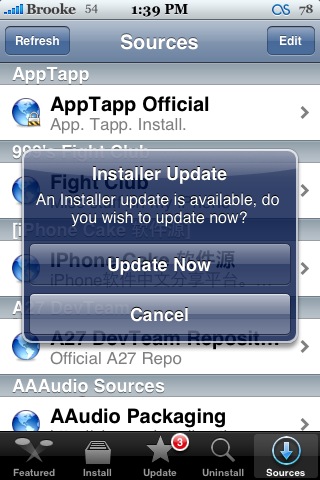
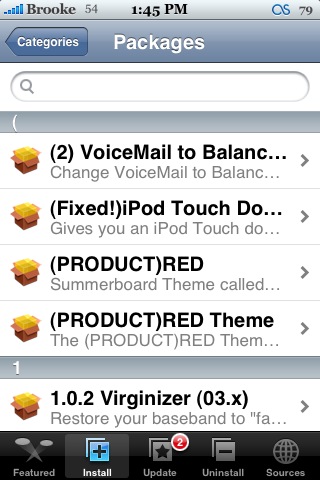
Installer There is an update to Installer, bringing it to version 3.1. I only noticed one new feature with the update but, it is HUGE! You are now able to search for applications! A search bar has been added to the top of the Installer. It searches within each category. If you are in All Packages, it will search within All Packages. If you are in Recent Packages, it will search within Recent Packages. It also updates the search as you type in the title of the app, giving you the most relevant apps based on each letter you enter. It is really cool! I also noticed that the applications now have headings as well. This makes it a little more organized. Overall…very cool update!

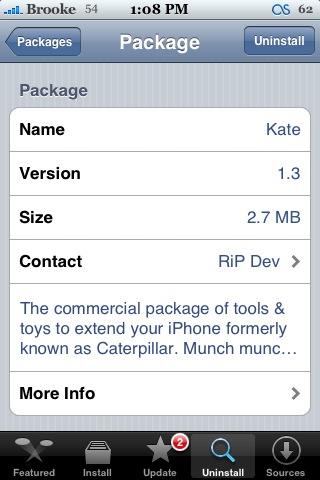
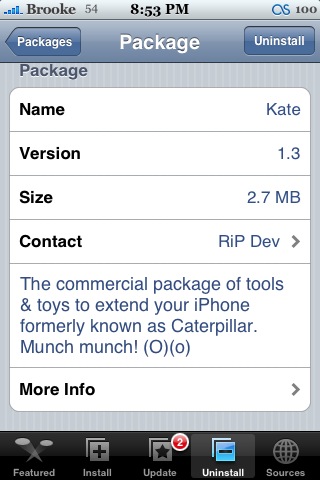
Update: After looking around…I also noticed that the update to Installer allows more then three lines in the description field. Check out the screenshots below…one is of the new version of Kate before the Installer update and the other is after. There are four lines in the description field where it used to be cut off.


Installer 3.1 Installer 3.1 Installer 3.1 Installer 3.1 Installer 3.1

Installer 3.1 Installer 3.1


Similar Articles:

What is up with the Installer! (625 views)

Cydia Update – Adds Letters Back into Search (2375 views)

Kate available in Installer 4.0 (4144 views)

Installer 3.11 (3373 views)

Search 1.08.1b (697 views)

Comments

78 Responses to “Installer 3.1”

  1. bigmcq77 on May 5th, 2008 2:01 pm:

    I just updated as well. AWESOME! Also I was wondering why your installer is slighty different than mine. In your screen shots son of the icons at the bottom of installer are different. Mine are like the ones that are two overlapping squares. Why are they different?

    [Reply]

    caa4444 on May 9th, 2008 10:07 pm:

    he used appstore skin for it
    if u want it is part of visualize 2.0

  2. The Tuesday Night Tech Show on May 5th, 2008 2:01 pm:

    Excellent utility only gets better! Searching is great for this app–sad to see it go when the App store comes out this summer.
    ———–

    Free iPhone-Only Ringtones
    ringtoneyouriphone.blogspot.com

    [Reply]

  3. magon on May 5th, 2008 2:01 pm:

    yeah
    no more scrolling down the whole all packages list, searching for the right application

    [Reply]

  4. AlexIT on May 5th, 2008 2:02 pm:

    Wow!

    [Reply]

  5. iCl4udi3tta on May 5th, 2008 2:06 pm:

    Hi Brooke
    with this update, there is a new source called “local packages”
    which tells us that we can upload packages in local in this path: ~/Media/Installer
    and if you tap on about, opens a pop-up which tells us that installer is to rip dev and nullriver now.

    i’m sorry for my english,
    I hope you understand.

    bye!

    [Reply]

    Ricardo on May 5th, 2008 2:22 pm:

    yes, i saw this too.. if you go to sources, you can see the “Local Packages” option now.. seems like this can be very useful and time saving when restoring or what-not..

    Ricardo on May 5th, 2008 2:26 pm:

    forgot to say.. just gotta figure out how to work that option of local packages..

  6. George on May 5th, 2008 2:14 pm:

    my installer doesn’t seem to say anything about a new update. any ideas of might be going on?

    [Reply]

    Nate on May 5th, 2008 2:19 pm:

    same here… help?!

    George on May 5th, 2008 2:21 pm:

    i just added another source to the installer and all of the sudden it appeared…well, works now

    Inam on March 19th, 2009 10:04 am:

    plz help me any1… i finised restoring iphone 2g to 1.1.4 n jailbroken.. but im not getting any update for installer… i did restore n jailbroke by ziphone again… still im not getting updates for installer… hav tried refreshing sources many times… any help will b appreciated

  7. Brenkee on May 5th, 2008 2:23 pm:

    not the new source helped, but the source refreshing! :)

    [Reply]

  8. Phil, Washington, DC on May 5th, 2008 2:25 pm:

    This update saves time!! Great update..The Features page could be updated also.

    [Reply]

  9. George on May 5th, 2008 2:38 pm:

    too bad you can’t do a global search…

    [Reply]

    Shevek on May 5th, 2008 2:56 pm:

    Just select the “All Packages” and search

  10. Libertyforall on May 5th, 2008 3:05 pm:

    Does not show up even when refreshing the sources… :-(

    [Reply]

  11. any1 on May 5th, 2008 3:13 pm:

    I needed to refresh twice.

    [Reply]

  12. Christoffel on May 5th, 2008 3:14 pm:

    I think that the server has a bussy time :-)

    [Reply]

  13. Libertyforall on May 5th, 2008 3:17 pm:

    FINALLY, got it on multiple refreshes….

    [Reply]

    Christoffel on May 5th, 2008 3:19 pm:

    Yeah, me too.

  14. axlf on May 5th, 2008 3:34 pm:

    Why are they giving up this project when apple store comes out not everyone will upgrade to 2.0 firmware…..

    [Reply]

  15. Chip on May 5th, 2008 3:43 pm:

    I get an error message stating that I need at least 512 kb available to update my installer. I’ve got like 600 MB of free space so I can’t figure out why I can’t update my installer.

    any suggestions?

    [Reply]

    bigmcq77 on May 5th, 2008 3:48 pm:

    I had the same problem. I downloaded bosstool and moved stuff and then it worked.

    Ricardo on May 5th, 2008 3:58 pm:

    do you have enough space on your media partition? it creates a folder on ~/Media called Installer, maybe this is the problem?

    archie on May 5th, 2008 4:09 pm:

    I just used bosstool to move my fonts, and now my iphone has the spinning wheel of death. So I don’t recommend using it to free up space. I was on 1.1.4.

    tony on May 6th, 2008 8:53 pm:

    i got the same problem too i neeeed help

    sarnas on May 8th, 2008 5:20 pm:

    any solutions yet mine says 512kb of free space but i have over 1.5 gb free

  16. Omar985 on May 5th, 2008 3:49 pm:

    my installer keeps crashing after the upgrade. Need help…. :( Any ideas?

    [Reply]

    Ricardo on May 5th, 2008 3:59 pm:

    restart the iPhone/iPod?

    omar985 on May 5th, 2008 4:38 pm:

    I alredy did like 20 times :( it still crashes at d beggining!

    Tyler on November 5th, 2009 7:27 am:

    i have the same problem i also have the cydia installer but it says error package download failed!
    any help would be greatly appreciated thanx
    -Tyler

  17. Caleb on May 5th, 2008 4:08 pm:

    such a needed update. would be nice if they added a address book ABCDEFG…. on the right side to skip through also.

    [Reply]

  18. cartoon156 on May 5th, 2008 4:12 pm:

    Oh my that is a great update, now I don’t have to scroll down for 2 minutes!! :D
    The next thing is what Caleb suggested, a scroll on the right side of the screen.

    [Reply]

  19. Vicho on May 5th, 2008 4:27 pm:

    Hi, when i try to upgrade Installer says package download failed!
    Somebody knows whats the problem?

    [Reply]

  20. Ed on May 5th, 2008 4:41 pm:

    Yeh I’m having the same problem. I’ve already BossTool’ed it, well I did months ago, so I think it’s to do with the sever/source. When this happens I leave it a day, 2 days tops and its normally fine, so time’ll tell, but I’m sure it’ll be fixed very soon.

    [Reply]

  21. Vicho on May 5th, 2008 5:03 pm:

    Ok, thanks
    I also checked in BossTool and i’m not running out of space, so I think it’s the server

    [Reply]

  22. Keith on May 5th, 2008 5:13 pm:

    thank you, thank you, thanl you!!!!!!!!

    [Reply]

  23. omar985 on May 5th, 2008 5:24 pm:

    I was able to install d upgrade but now my installer keeps crashing. I try to restart d phone and still same problem. I need help please!!!!

    [Reply]

    Eric on May 9th, 2008 12:12 am:

    mine also…..please help!!!

    Rares on May 11th, 2008 11:16 am:

    if you cannot start your iphone anymore (keeps restarting) you need to restore your iphone. hold home button when it is off and then plug in computer cable.

  24. Nick on May 5th, 2008 6:44 pm:

    After I installed this, all my apps are treated like webclips. Any ideas?

    [Reply]

    bigmcq77 on May 5th, 2008 6:49 pm:

    that’s a feature if caterpillar. Oh I mean kate. :)

  25. Jordan on May 5th, 2008 6:45 pm:

    I HAVE BEEN WAITING FOR THIS FOREVER!!! or the option of having an alphabet on the side but this is much better :)

    [Reply]

  26. Brendan on May 5th, 2008 7:23 pm:

    Although cool, I thought it would have been really cool if they made the search like Safari. They could have put the magnifier up on the top-right in the menubar, and when touched with would graphically slide it down, so you could hide it and show it when you needed to.

    [Reply]

  27. Austin on May 5th, 2008 8:07 pm:

    why does the bottom bar of the screenshots look different than mine after the update?

    [Reply]

  28. allen on May 5th, 2008 8:26 pm:

    i just did the update, but no search bar?

    [Reply]

  29. allen on May 5th, 2008 8:28 pm:

    never mind, i must be blind

    [Reply]

  30. Steve on May 5th, 2008 10:27 pm:

    NICE!! have been waiting for so long for this. YAY now i dont have to scroll through all packages

    [Reply]

  31. Lucky on May 5th, 2008 10:39 pm:

    I refreshed 1 time but it doesn’t seem to show the new update, i’m refreshing the 2nd time now, hope it fine…

    [Reply]

  32. AlexIT on May 6th, 2008 3:34 am:

    [!]
    Changelist from RiP Dev: http://www.iphones.ru/iNotes/3212/

    – Local repository (~/Media/Installer);
    – Improved refresh speed of sources;
    – Search apps;
    – Apps are sorted by the first letters of names;
    – Box to describe the app now is dynamic;
    – Page “Featured” now cached for faster load;
    – Other bugfixes and improvements.

    [Reply]

    _BigBoss_ on May 6th, 2008 4:55 pm:

    One other change is that failed installs are now removed from queue. In 3.0, failed installs stay in queue and when you try to install something else you just get the message “error: package download failed” or “error: main script execution failed” again. It was confusing because user’s didn’t realize they needed to clear the queue and the error was from the first failure. This is solved. Now failures are removed so the next install is unimpacted.

  33. Oli on May 6th, 2008 5:13 am:

    Because it searches for anything with the letter S in it.

    [Reply]

  34. evan leibel on May 6th, 2008 10:07 am:

    I’ve also noticed that refreshing the sources is faster with this new update! Great job developers!

    [Reply]

  35. Joshua on May 6th, 2008 4:07 pm:

    so this version has obviously been co-developed by rip-dev.( i saw that in the about section in installer) I’m suprised they didn’t charge for it like they do with all their their other apps!!

    [Reply]

  36. Jude on May 6th, 2008 8:54 pm:

    I upgraded to installer 3.1 then could not download any new programs or upgrade any I already had. Now installer loads but crashes when it trys to refresh. I would really appreciate any and all help, please!!!! My iPhone uses 1.0.2.

    [Reply]

    moncerth on May 6th, 2008 11:00 pm:

    Maybe its time for you to upgrade your phone to 1.1.4!

    Joshua on May 7th, 2008 1:42 am:

    yea dude, thats like the first iphone firmware!! There is a MASSIVE difference between your firmware and 1.1.4, including the stuff from the jan software upgrade, webclips, lyric support, chapters, and webclips.

  37. Mark2 on May 7th, 2008 3:40 am:

    Are you getting any new updates for the apps that were installed prior the Installer update? I’m having problems even with my own repo (that I know there is new update)… older version of Installer works ok

    [Reply]

    Mark2 on May 7th, 2008 3:52 am:

    … and yes I’m on 1.1.4

    Mark2 on May 7th, 2008 6:43 am:

    Never mind SOLVED.
    Just needed to reinstall Installer for few extra times and it started to work

  38. Eric on May 7th, 2008 9:01 am:

    I upgraded to Installer 3.1. i can not get it to work. It keeps crashing!!! I have rebooted my iphone at least a dozen times. Can you please help. I have read through the posts and see others have had this problem. I did not see any resolution.

    [Reply]

  39. Fclcintra on May 8th, 2008 12:36 pm:

    I upgraded to Installer 3.1. but it doesn’t work at all, it keeps saying: “Package download failed”! Does anyone knows how to solve it? Thanks.

    [Reply]

  40. Dave on May 12th, 2008 11:54 am:

    Upgraded to Installer 3.1 as well and having the same problem of the program crashing whenever I try to install something. Restarting doesn’t work. My firmware is 1.0.2 also and I prefer to keep it so please suggest other solutions.

    [Reply]

  41. Pablo on May 13th, 2008 6:44 pm:

    Why sometimes while I am trying to install an app I got “Error main script execution failed”???

    My iphone is 1.1.4

    Thank you so much

    [Reply]

    philippe fuhrer on May 17th, 2008 7:54 am:

    iClarified has just come out with an installer fix 3.1
    For those having issues with
    “package download failed” & “error main script…”

  42. squizzle on May 14th, 2008 9:12 am:

    I have 1.0.2 on iPhone I also installed the installer 3.1 and it keeps jumping out of the screen and it won’t allow me to download any new apps. Is there anyone who can help me please?

    [Reply]

  43. toul on May 15th, 2008 4:01 am:

    it seems that there are a lot of problems with 3.1!
    can someone post a link where i can get 3.01?

    [Reply]

  44. philippe fuhrer on May 17th, 2008 5:36 am:

    iClarified has just come out with an installer fix 3.1
    For those having issues with
    “package download failed” & “error main script…”

    [Reply]

    Pablo on May 18th, 2008 11:32 am:

    Even with the installer fix3.1 sometimes i got the “Error Main script execution failed”……

  45. RedParkz on May 18th, 2008 1:31 am:

    Does anybody know how the “local packages/repository”-feature works?

    [Reply]

  46. Jacob on May 19th, 2008 9:45 am:

    I just recently “jailbroke” my phone with iNdependence, and installed SSH. I have used AppTapp and ZiPhone in the past, which added Installer.app automatically, but iNdependence simple jailbreaks without installing anything.

    I can’t find a tutorial for how to add installer.app manually. Can anyone help me with this?

    [Reply]

  47. CobraGeek on May 20th, 2008 11:58 am:

    My phone is 1.1.4 and with installer 3.0 the PuzzleManiak game installed and worked fine. When I upgraded to installer 3.1 and now 3.11, PuzzleManiak installs just fine, but it will no longer run. When I try to run the game it comes up with the splash screen and then quickly crashes to the springboard.

    Any ideas for things to try? I’ve contacted the puzzlemaniak developer and he pinpointed it to the installer 3.1 update, but we’re not sure why. Thanks!

    [Reply]

  48. CobraGeek on May 21st, 2008 3:38 pm:

    I figured out that the problem was a combination of installer 3.1 and the “installer 3.1 fix” that has now been removed from the installer apps list. Go to this discussion to see the details and the solution. Thanks.
    http://www.hackint0sh.org/forum/showthread.php?t=40327&page=12

    [Reply]

  49. Sean on November 22nd, 2008 9:49 am:

    How do I get the installer 3.1??? I’m on firmware 2.1 and my installer is not 3.1 What do I do? Please help?

    [Reply]

  50. Sean on November 22nd, 2008 10:05 am:

    I really need the installer 3.1 How do I get the update?? Please somebody help me.

    Appreciate that..

    Regards,
    Sean

    [Reply]

  51. Paul on September 12th, 2009 8:47 pm:

    I have had problems installing 3.1 update – the update wouldn’t complete, stalling at the last stage and putting my phone in recovery mode. A restore has the same result, nearly completing the process and stalling at the final stage (apparently the part that says to the phone, installation complete…you okay…shall we finish this). The phone fails to respond to this final request and the update is not installed and phone returns to recovery mode….repeat again and again and again.
    2 1/2 hours to Apple Care and they gave up.
    Tried downloading 3.0 installer but phone refuses to downgrade to this old version saying firmware is not compatible.
    Apple Care says wait for a fix in 3.1.1 but meantime am left with a non-functioning phone. Any ideas?
    I’ve tried putting the phone in various modes before starting recovery as well as updating and reinstalling iTunes 9 with reset preferences but no joy.
    Anyone else had this issue? Error is 1002 which is apparently to do with USB communication between device and computer hence the failure in the final sign off section of the install process. Tried various ports and cables.
    Needing help.
    Cheers,
    Paul

    [Reply]

    Brooke on September 12th, 2009 8:51 pm:

    FYI, you are commenting on Installer 3.1, that is a hack software from a long time ago, not the new firmware from Apple 3.1. Anyway, I would take it to the nearest Apple Store. They will try to restore it with their tools. If they can’t, they will most likely give you a new iPhone. -Doug

Please leave a comment below...
and if you want a pic to show with your comment, go get a gravatar!


Caterpillar changed to Kate (1.3) Ringtones 2.87