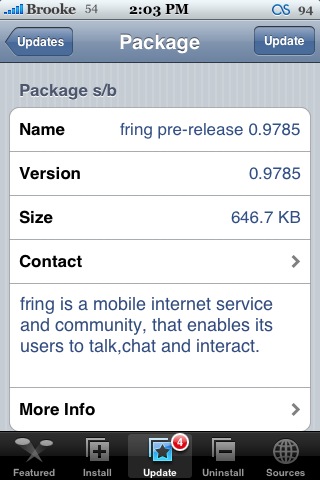
 There are no visual changes with version 0.9875 of fring. However, below is a list of the changes (via the developer).
1. Issues resulting in deleted SMS (additional QA work on our side still in progress).
2. mVoIP calls on 1.1.2 are now fully supported.
3. Incoming SIP calls are also available with this new version.
I still think the app is a little sketchy. I am able to randomly make outgoing calls to Skype from my iPhone. I still am unable to make calls from Skype to my iPhone. Let me know if you have the same results. fring is available through the fring source.

 Loading...


 Loading ...
I’ve been able to make skype out calls consistently with this app. That part works great. No more delays than with a computer.
Has anyone seen a fix for the registration SWOD yet? I can’t even register the thing >_>
Have not updated to new version yet but old one works fairly well. Aside from the initial call, I could do Iphone skype to skype, to landline and computer skype to iphone skype and computer skype to iphone number. Could not do iphone skype to iphone skype.
How do you do Computer Skype to Fring? I made two Skype acounts, logged into one on the computer and one on the iPhone with Fring, setting up the Skype community, but when I try to add the buddy (my Computer Skype account) on Fring, it says that account doesn’t exist. I tried adding the iPhone Skype account as a buddy on the computer but it said that account wasn’t online even though I was on Fring. Do I have to have Skype In for the computer or something, I would like to be able to do this for free.
Help pls.
To call fring from a computer you have to add the buddy on a computer first. You cannot accept a buddy directly on the iphone, you must log in with the account you use on the iphone on a computer, add your buddies and only then you will be able to receive incoming calls on fring.
As for me i still cannot get the update, it doesnt show in the installer,the source is right and i alredy refreshed a couple of time but nothing, i had the same problem when first installing this app about a month ago, it took a while before i got the app in the installer list, iam guessing is a fring server problem :(
Alex, dade is right. In your case you would need to have two computers logged into each account and add each as buddies. Just to be on the safe side I would make a call to each from the computers as well.
Updated the app last night and tested it. Works just as previous. Not sure if it is my imagination or just luck but calls seem to connect more quickly. Maybe the app is just better.
Its still not working for me. I logged onto both accounts at the same time on two computers and chatted between the two, then quit on the computer using the iphone skype account, launched fring, and the computer skype said that the iphone account was online and in the bubble it said “Skype on mobile by fring” so I tried calling it from the computer and it said “Call refused” whats up?????
Wrong version in the title, it’s supposed to be 0.9785 not 0.9875.
Thanks, fixed it.
Over her in Switzerland Fring works great. I really love this app!!
Greets from Switzerland (small, but shiny ;-) )
First time i tried this app i was able to make an call from my pc to my iphone using skype. It worked flawlesly. Havent tried it lately or with this new version though.
is the app not coming up in installer for anyone else?
yeap, same problem here, dunno :(
the only downside is even if you have EDGE connection, you can’t use it to call. You have to really use wi-fi.
Anybody tried Yahoo?
hi i have a problem using skype..when i try to connect (log in to fring skype) it says “connecting” and after about 3 minutes just says “Subscription failed, try re-enter username and password”.. BUT it’s the right password and username i tried over 40 times now.. pleez what is wrong this is annoying me so much..
I can’t install the update, I always get an error msg from the installer.. “Problem Downloading” and goes back to the installer…and after that If I try to install any other app, they will have the same problem…I need to reboot and after that I can install different app’s…anyone with the same issue?
hi rookie! It’s just becuase you have a que-list of the fring update so everytime you try installing another app the fring update will be in the que and will install that first before any other app… the first thing i don’t know about.. just clear que when you try installing other apps..hope it’ll work for you!
//John
hey does this program requires wifi for in order to be on aim, yahoo, etc and to make calls? does regular data internet ok or t-zones?
thanks
hi, tried to install the new version but when I’m starting the process the message was popup with this message package download failed. Any help please
Is there a way to delete the fring test call contact?
hey guys…does the sms still get deleted?