 The Installer.app is finally out of beta and has become a full fledge app!! The new update is Installer 3.0 (notice the lack of beta at the end of that)! There are also some cool new features with the update!! When you go to install or update an app you are given the options to Install/Update the app, add the app to the Queue or Cancel. Once you have added an app to the Queue and you select another app you will then get the options to Install/Update the app, add/remove the app to the Queue, Clear the Queue or Cancel. If you add an app to the Queue it will add it to a “list” of apps that you would like to Install or update (it is not list you can see…just a list the Installer creates for itself). So, lets say you want to update Converter, iZoo and MACalc…you can go and select “Add to Queue” on Converter and iZoo and then when you get to MACalc you can select Install and it will do all three at once. This is nice because then you do not have to wait for one app to install and then go back in a do the next one and the next one….you can just do them all at once. If you tap Clear Queue…it will erase your “list” and you can start over adding the apps you would like to install to the Queue. They have also changed it so that the Installer now refreshed every 12 hours instead of every 24 hours! Below is the full list of changes and the screenshots:
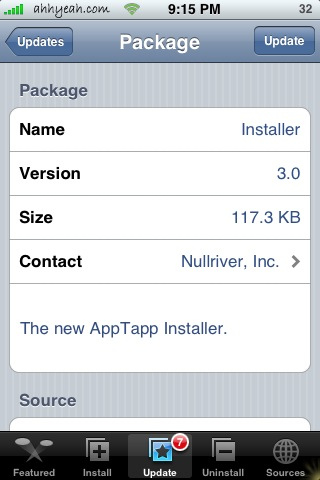
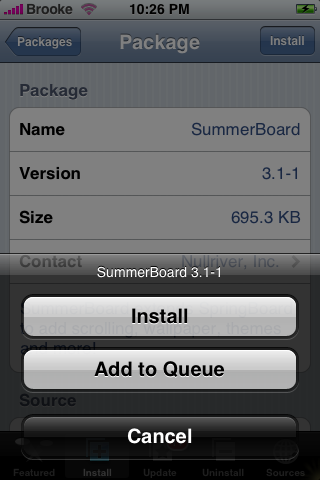
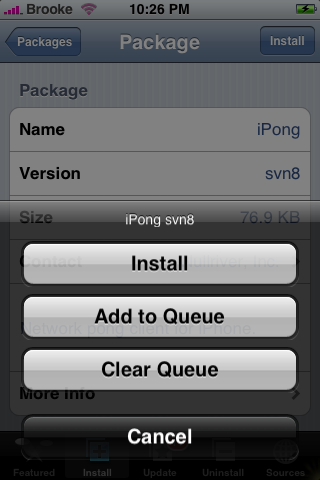
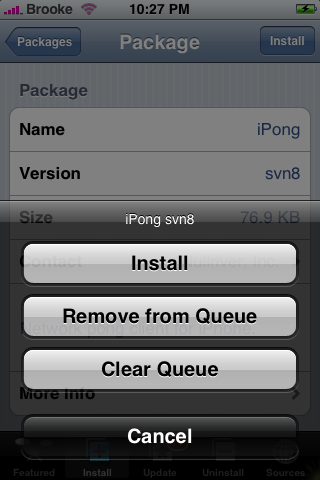
Installer 3.0 Update:
*Package operation queues
*Automatic refresh is now every 12 hours
*Status indicator when working
*Proper keyboard for adding new sources
*Free space check when upgrading installer, ensures at least 512kb is available
*InstallApp(bundleName) and UninstallApp(bundleName)
*LinkPath(fromPath, toPath)
*If(FreeSpaceAtPath(path,minBytesFree))
*~ and @Applications support in paths
*If(MinDialect(dialectNumber))
*If(IsExecutable(path)), If(IsWritable(path))
*If(IsLink(path)), If(IsFolder(path)), If(IsFile(path))

 Loading...


 Loading ...
can you please start saying which apps will work on 1.1.1, 1.1.2, and 1.1.3???
This is really important information.
It’d be easy to say, this is compatible with …. etc.
Oh, and who cares about 1.0.2 – only write if 1.1.1 or higher.
Thanks!
@tk…not all developers have this information available…if the information is available…I have been adding it and will continue to do so. We run all our iPhones on 1.1.1 and can only guarantee that apps work on this version.
I have been having problem since version 3.0b9. iPhone 1.1.2 jailboken and couldn’t update to 3.0b10 “Error, Package download failed!”. After many attempts, it was successfully update to 3.0B10 yesterday and now same problem with this newly release installer 3.0 again…
@CC….whenever you get the “Error, Package Download failed” it has to do with the server you are trying to download from. Either the server is overloaded or something is wrong with it.
i didnt get the summerboard update…
and another iZoo update :/
I wonder if this version of Installer will be able to be officially used in an iphone/ipod touch for now as of February there will be an SDK. Installer has brought wonderful apps to us. Perhaps itunes will use it.
I clicked the Update for 3.0 (am on 1.1.2 jailbroken phone).
Now that I click the installer app it blinks and returns to home screen. Kees doing the same thing after restarting so many time.
Anyone knows what happened?
Brooke, thanks for your respond. My 1.1.2 jailboken iPhone updated from 1.1.1 and it was ok and successfully update to verion 3.0 from 3.0b10 after numbers of attempts. It is now also working on my 1.1.2 jailbroken iPod touch. It does seem some server or repository issues regarding “Error, package download file”.
clamsy1,
same thing with me… i really hope i dont have to flash again. i just got it back to my apps and all after a bad 113 ud, i had to bring it to 112 again. anybody have an idea when there will be a bundle dl for 113 so that you wont have to patch it a million times to get it to work???
im really nervous about the installer app flashing on and off though… now i cant do my daily routine of checking out whats new… ;(
i have an unlocked 1.1.3 (done by Nate’s proc..) installer 3 works flawlessly to me…tnx folks….
hi
i just updated the installer.
and no i don’t think it’s a repo or server overload. It’s something to do with the installer. i managed to install 1 new app, the rest of the app (no matter where they are hosted) will never get downloaded and get the “Error package download” message.
I’m not sure if it got something to do with me, or maybe my ipod is already screwed.
either way, i’ll probably wait a little while more and see if any other people are experiencing the same problem as me.
cheers!
Hii
I also updated the installer on my Iphone (jailebreak 1.1.2) to 3.0 and now cant install any application,it just download the package and when it finishes, installing packages then it goes to home screen without adding it anywhere and if i try to reinstall the installer the Iphone gives me an error ” Not enough space to update installer! Please free at least 512 KB of space.” And it is a new machine dont even have a song on it.
Any ideas, thank uuuuuuu :)
jAbAl, did you ever figure out what is wrong with your installer, mine does the same exact thing as yours, goes back to the home screen after downloading and nothing shows up.
I have iphone running 1.1.1 and ever since updated installer.app yesterday it says i need firmware 1.1.3 what happened?
I had the same problem right after updated to 3.0
(using 1.1.2 iPhone)
looks like this installer update is for 1.1.3???
It does show installer 3.0 without the beta but nothing happened.
Oh well until things change I guess we all wait ;-)
I had a reply from another forum that a hard reset (Press and hold hold the home and power buttons until you see the apple logo, then release both.) worked perfectly for some Iphones, well i tried it on 1.1.1 firmware and worked perfectly, but for my 1.1.2 same issue, we would really appreciate any help.
Perfect – this fixed it. I have 1.1.4. This fix should be more prominently displayed since a lot of people evidently have the same issue? The server not working was a red herring. BTW, installer is great of course. Hope it will be available for 2.0 and 3G iPhone – don’t want to use iTunes to get apps.
My mane is errol and I just got anew iPhone
Using a jailbreaked 1.1.2 OTB, upgraded to 1.1.3. using the soft method (not iTunes). Installer 3 installed, daily request to upgrade to 3.0 ignored until this morning. After hitting the update button the installer is still on the springboard. Whenever I click on it, it returns to the springboard without starting.
Searched the i.unlock.no, iClarified, jailbreakme.com etc. No help. Any ideas to get installer RE-installed on the 1.1.3?
I cant find an answer for you either… sorry. The only thing i can suggest is re-jailbreaking. but you may wait to see if this pops up somewhere with a solution. That said, I don’t think i could go a day without being able to refresh Installer to see what came out :P
someone help me. I have unlocked 1.07 phone with ibrickr. How do I get to 1.11 so I can get to 1.13 and the new cool updates apple supplied. Do not want to brick phone with wrong step.
i have a jailbroken iPhone 1.1.2 (from 1.1.1.) all of a sudden my Installer 3.0 works infrequently, like if i try 15 times to install an app, it may work once. please help. im wondering if i need to jailbreak it again or get installer re installed? but if i reinstall installer will i lose the apps i have already installed?
thank God, installer seems to work now, i just noticed community sources 3.4 update, once i managed to update it, i went to Sources & noticed ‘new & improved’ version of Ste Packaging. & install seems to work now
after installing installer 3.0 on my jailbreak iphone 1.1.2 now my installer can’t refresh. even if i go to sources page and refresh it manually, it shows :”refresh failed could not refresh sources!” also i can’t serve web thru my wifi anymore. this is really serious, can anyone help!! pls
can anybody tell me how to down grade my iphone .;.. i bought it and it was 1.1.1. and then i upgraded and now its a 1.1.2 now i can’t get all the other programs to work..how do i downgrade it back to 1.1.1..can anybody tell me the easiest way to do this? I’m using windows
con anybody tell me how to down grade my iphone.i bought it and it was 1.1.1 and then i upgraded and now its a 1.1.3 now i canot get all the other programs to work. how do i downgrade it back to 1.1.1.. can anybody tell me the easiest way to do it ? i am using windows
I had the same problem after Installer 3.0 in my iphone 1.1.2. I couldn’t install and update any package “Error, Package download failed!”.
So I found the solution in this blog (http://blog.psmxy.org/)… now my installer is working again!
Going to the “Sources” page in Installer.app and deleting the current entry for “Ste Packaging”.
Add the new repo URL of: http://repo.smxy.org/iphone-apps/ (Make sure you include that final slash! Also make sure that your iPhone doesn’t capitalize the “p” in “iphone”. Going to that URL with your browser won’t work BTW – you’ll just get redirected to this blog site.)
You will know you have the new repo, as the tagline for it is “New, and Improved!”
You may need to manually refresh it once, after Installer.app adds the repo and does it’s own refresh. The site will show up as “Uncategorized” (at least, it does for me), but that’s ok.
When Nullriver updates the “Community Sources” package, and you update to it, I don’t know if it will just move my repo to the “Community Sources” category, or if you will wind up with it listed twice. If it does get listed twice, and one is in the “Uncategorized” category, then just delete that one. If you wind up with two of them in the “Community Sources” category, then just pick one and delete it.
hi, i got the error “package download failed: can’t find host!” what do i have to do now? i could not find any solution,thnx
ok i ‘ve done with reply above:)thx
For the ones having problems reinstalling applications after having updated and getting the “Error package download” message all the time, it was solved after I installed BSD Subsystem 2.1 (under System).
If it’s hard to get this one installed, try hiting Install and Clear Queue for a couple of times if you get the error message, eventually it will let you install and you’ll be good. After this, no trouble at all reinstalling or installing new apps. Good luck.
i think its working
the download just begun but after that it freezes with a notice do not use passwd to change the password on 1.1.3 it is currently broken and will make springboard crash continously help what should i do
Thank you Juliano! I had same problem and looked all over online to find a fix. Your solution worked!
how can i download & add the (Installer app.) to my iPhone???
Hi, i unlocked, jailbroke an ootb 1.1.3 with ziphone and worked a treat. However, whenever i install an app. and hit the home buttong, the phone locks and the icon never appears.
Anyone have same problem?
n00b here, do i have to jailbreak my iphone before using installer.app?
hi i just update to 3.0 app and i think i updated and i have version that it does not work with now my phone dont work i cant receive calls it keep flashing from apple sign to the home page and it keep freezing i cant get to go to uninstall the software itune does not evven see the phone it keeps showing the updating icon spinning like its trying to update can someone please tell me how to format and the hard reset just bring it back to the same problem it dont give me enought time to access anything before it takes me back to the home page can someone please help me
I have a 1.1.2 iPhone which was jailbroken by someone else. I now want to get installer (so I can get all apps!). Where do I get it? And how do I install it?
1.1.4 is rubbish cant install half apps
SDK march 06 will be a meeting for apple to decide wheiter to relesase it then or later
dont upgrade stick 1.1.3 or 1.1.2
i prefer 1.1.2 with iphone apps cause 1.1.3 keyboard frezze always
The QUEUE doesn’t work. There should be an “install all” button, once there are items in the queue.
I followed the above instructions to add to queue, and upon installing the last app that was added to the queue, all of the queued apps did not install.
BUG.
I am using a jailbroken 1.1.2 iPhone with Installer v3.01. It worked fine for a long time (two months). I successfully installed several different apps. However, in the last couple of weeks I can not install anything. When I select “Install” for an app I always get an error message that says “Error Package download failed!”
Can you help me with what may be wrong?
Thanks,
Cliff
Hi im a new itouch owner and i want to get some of the apps this lets you install, butt first i have a few very n00bish questiions:
1. what’s all this jailbreaking sutff? is it only for iphone? if it is, then never mind
2. will installer.app work on itouch ver 1.1.4
3. im guessing this isnt authorized by apple, but is it illegal?
4. can i uninstall if i dont like?
well i guess that’s it for now! Thanks!
how do u install?
click the link at the beginning of the article?
Could u tell me where can I install Installer 3.0 ?? I need it becouse my 3,11 doesnt work as good as I want…