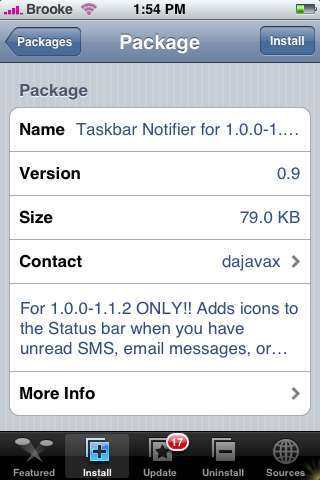
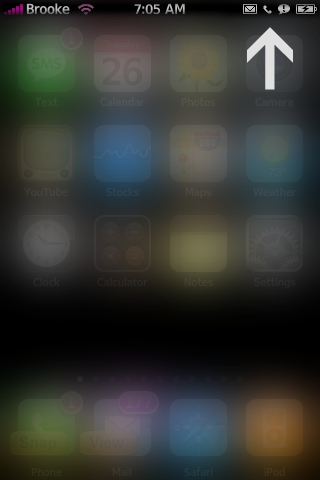
I was soooo excited to see that the dajavax source not only had the updated Taskbar Notifier for 1.1.3 but also versions 1.0.0-1.1.2!! Jacob had wrote a post about this app and it’s updates for 1.1.3…and let me tell you…I was feeling a little left out! I love this app and it is even cooler now that it not only adds an icon to your Taskbar when you have a missed text message or a new email but when you have a missed phone call (and those icons are just so cute!)!!! Now all it needs is an icon if you have a new voicemail! Check out the screenshots below.
Remember this is just a code app and does not put a icon on your SpringBoard.

 Loading...


 Loading ...
How does it know you have a voicemail, my iPhone has never informed me that I have voicemails? I’m on a jailbroken 1.1.1 iPhone.
@Scally if you click on voicemail in the phone application does it call or bring you to visual voicemail?
It calls my voicemail number, I thought Visual Voicemail didn’t work on iPhones that aren’t using an official Simcard, like mine.
Visual Voicemail doesn’t work on Unlocked iPhones, but does work on Jailbroke iPhones.
Scally i am having the same problems that I never know when i get a voice message. I need to go into my voicemail every so often and listen to whether i have any new messages or not! Very frustrating. Did you find a fix???
….Also I have Taskbar Notifier v0.8 installed, yet this update does not show in ‘Updates’ but is in ‘All Packages’. I assume I have to Uninstall the earlier version and install the new one?
Yes…you can uninstall your Taskbar Notifier version 0.8 and install version 0.9…the reason it doesn’t show up in the Update section is because they are from different sources. 0.8 is from Ste and 0.9 is from dajavax.
So I had 0.8 which worked until I went to 1.1.3 a few weeks ago. Now when I try to uninstall, I get the error, “Main script execution failed!”
So it won’t uninstall and I can’t get to the new version. Any ideas?
Only app I’ve had such a problem with…
Mike,
Clear your installer queue, this came up 3 days ago on this site.
Thanks– I actually discovered the site two days ago, hence the miss.
Unfortunately that didn’t fix. On a whim, I tried resetting my phone after the queue clear failed to resolve, but that didn’t do it either.
Any other ideas?
Make sure you have the correct source installed…the previous version was through a different source. You will need to get version 0.9 in the dajavax category in the Installer, once you have added the source. As for removing the previous version…I would say delete it via SSH.
Hi Brooke,
I found version 0.8 on the installer, but no version 0.9, according to your message above, I should be able to find 0.9 somewhere on the installer. Am I right?
Thank you
This is not installer yet, I guess. So where do I go to find out how to install it?
Thanks
Yes…it is in the Installer…that is how I installed it. It is under the dajavax category in the Installer.
Boy, I cannot find it? I don’t even see a “dajavax”?
Is it in the All Packages?
But thanks for your response.
Michael
Did you add the dajavax source? Make sure you actually have that source added.
I have downloaded it and it doesn’t work. Any ideas?
Mine doesnt work as well. I tried sending test emails and text messages to myself and nothing shows up. Is there anyway to check if it is working?
Reading above Douglas says: Visual Voicemail doesn’t work on Unlocked iPhones, but does work on Jailbroke iPhones….. If I already have the Installer App on the springboard – does that mean my 1.1.1 iphone is jailbroken? If so, my visual voicemail does not work (im using an Australian sim), neither can i get any indication that a new voicemessage has been left for me!!! This is most frustrating as I have to continually ring my voice message to see if I have any new messages! Happy if visual voice mail does not work, but would love to get an indication that i have new voice messages like I do when i have a new sms.
I’ve been following the development on this app closely,
see here on the official site http://code.google.com/p/taskbar-notifier/issues/detail?id=65
it seems iphones 1.1.3 jailbroken thru ziphone have a common problem of Taskbar Notifier not working properly (something to do with permissions hooha).
the developer is working on 0.9.5, which can be installed whatever firmware you’re running, and hopefully whatever jailbreak method used…
Hope this helps!
also, the official distributor of this app should be STE packaging, as noted by the developer… :)
Huh…I know that previous versions of this app were available through Ste…but, I haven’t seen this version through Ste…I will keep my eyes open for it!
hhhhhhhhhhhhhhhhhhhhhhhhh
does this work on 2,1? if not, is there an app that does the same?