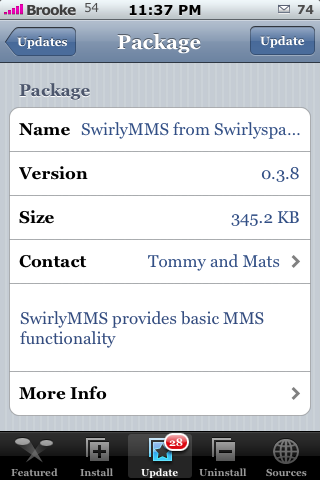
.png) Many of you will be happy to see version 0.3.8 for SwirlyMMS. There are no visual changes but, after the last release I know we had a few comments from people saying that the app didn’t work (could not send or receive Multi-Media texts) after updating to the previous version. Hopefully this version fixes those issues. Let me know in the comments! SwirlyMMS is available through the Swirlyspace source. This app is also available through the Ste Packaging source however, to get the most up-to-date versions you will want to get it through the actual source, Swirlyspace. Click HERE for more info on SwirlyMMS.
Many of you will be happy to see version 0.3.8 for SwirlyMMS. There are no visual changes but, after the last release I know we had a few comments from people saying that the app didn’t work (could not send or receive Multi-Media texts) after updating to the previous version. Hopefully this version fixes those issues. Let me know in the comments! SwirlyMMS is available through the Swirlyspace source. This app is also available through the Ste Packaging source however, to get the most up-to-date versions you will want to get it through the actual source, Swirlyspace. Click HERE for more info on SwirlyMMS.
Note: Ok, I did some searching and according to the developer this version, “hopefully solves the problem of an immediate crash when starting it that some users have suffered from. Apart from that it is a little bit quicker in setting up the MMS specific APN etc.” Let us know.

 Loading...


 Loading ...
proxy ends with .195
http://www.activexperts.com/mmstoolkit/mmsclist/
??????
Normally a “update” will fix errors right?
Ive upgrade with intisapation with to find nothing but disappointment.
Again i get this error:
I get this error:
“Failed to send MMS
Possible incorrect mmsc setting.
Unexpected http response
(HTTP/1.1 403 Forbidden)”
Whats up?
Again…..
( I also have a new icon next to my to my SwirlyMMS. I open it up and i have something in my “Fetch” tab. Like if someone were send me a pic or something. This is the message i get
“MMS cannot be fetched right now since GPRS/EDGE is not available! Please review your MMS and/or EDGE APN settings, Or wait a while if settings are correct…”
I have no idea what that means!
Im with AT&T and settings are set at:
mmsc.cingular.com
066.209.011.032
Anyone having this issue and know how to resolve this?
any word how to get it to work with at&t…I’m a first time user so any help would be great
Will someone who has gotten this to work with AT&T type in here exactly what they have in their settings? Ive done everything the Swirly Space site says to do as far as inputting the correct settings and I still cant get it to work.
I’m guessing this won’t work with AT&T unless you can get them to set up your plan with MMS… Let us know if you get this to work though.
I called AT&T and when I switched to the iPhone I left my messaging package, so they said I still have the unlimited picture messaging on my plan. This just may not work with AT&T period.
i had att add mms told them I had second phone, but i still get this incorrect mmsc and i also have two to be fetched but wont be fetch nothing there help fix mms
I had this app (Preivios version) and it worked great.
Settings were set at:
mmsc.cingular.com
066.209.011.032
But since the upgrade nothing work anymore!
:( There should of never been a upgrade.
Works a treat with my Contract Vodafone UK and O2 UK sims…
Any chance we can get a text box in the next release to send some words with the picture – rather than just a title?
Keep up the good work guys – much appreciated.
settings for Swisscom
MMSC and Proxy Server Settings
MMSC: mms.natel.ch:8079
Proxy: 192.168.210.002:8080
MMS-specific APN Settings
APN: (empty)
Username: (empty)
Password (empty)
make sure you have setup your gprs.swisscom.ch in the default settings in your iphone
What is the setting for Brunei
Hey there,
installed it on 1.1.4 (jailbreak only) with T-Mobile Germany, used the settings from your list, test-send MMS to my other phone and my girlfriend (T-Mobile and O2), both worked!
Thank you!
At&t and apple no longer allow MMS to sent by the iphone
This will not work with At&t anymore
I cant send a mms because my GPRS/EDGE is not avalaible! whats the APN for ROGERS in canada!
Help :)
I have the up-graded version 3.8 on my 1.1.4 firmware and I have also had AT&T activate the MMS option, However as soon as I hit send on the app the app closes and sends me back to the spring board. Do I need to apply the 1.1.3 compatibility patch and then install Swirly? I’m getting frustrated because I really want this to work….. Help
rofl! does not work.
I was wondering is there anyway to view the picture without having to install mobilefinder, mobilr preview, and BSD subsystem??
Searched the internet for days and found o2 payandgo settings that WORK!! so for steve here u go
MMSC: mmsc.mms.o2.co.uk:8002
Proxy: 193.113.200.195:808
APN: payandgo.o2.co.uk
Username: payandgo
Password: password
works for me, hope it helps
I have iphone with T-Mobile USA and swirlyMMS Version 0.3.8 need help with settings required to have it work. Can someone please advise. Thanks
MMSC: 216.155.174.84/servlets/MMS
Proxy: 216.155.165.50:8080
APN: wap.voicestream.com
Julie,
I have a 16GB 1.1.4 iPhone and the settings you gave do not work.
could not connect to proxy (unable to locate host)
Any suggestions?
Thanks
it works on my o2 contract and I have 1.1.4 on my Iphone, but only for sending mms, I still get the text from o2 telling me someone has sent a picture and I need to go to a website to view. are my settings wrong, I can send but can’t receive
can i know what’s the right settings for 02 contract, please? tried it but still failed. i have a 1.1.4 and swirlymms v.0.3.8 please help thanks.
ok I have the settings an everything an it still won’t work can somebody please help me? I have t- mobile service with version 0.3.8 what did I do wrong?
hi i have a slight prob with the soft , i can send without anyprob mms , but when i receive one , it downlods it but i can’t see the pic and when i reopen swirly i have the mms but can’t access it.
any ideas???
thx
when i recieve pics from other carriers they come out small how can i make them bigger
just use email.. Jeeeez guys ..
what for t-moile?
whats the easiet way to view an MMS .. after recieving a link appears ??
Ramon and Julie,
I got it to work on my T-Mobile iPhone with the settings that Julie gave. But now when I fetch an incoming picture it tells me I need an external view like MobileFinder/MobilePreview to see them!
Is that another install?
use email u dumb ducks it doesnt work
am just wondering if anyone have a full website that help iphone to set this swirlymms to their countries network……. cos i m from singapore … i need the setting too… anyone can help??
I have all the settings done, but still can’t fetch my MMS or send MMS.
MMSC: mmsc.cingular.com
Proxy: 066.209.011.032
APN: wap.cingular
User Name: WAP.CINGULARGPRS.COM
Password: CINGULAR1
Error Message when try to fetch:
unexpected http response, could not fetch any MMS, Check your setting!
Error when try to send:
Failed to send MMS, Possible incorrect mmsc setting. Unexpected http response (HTTP/1.1 403 Forbidden)
I even was able to add the Multimedia Message to my account with AT&T. Is there something else I can do to make my MMS work with AT&T?
Please help.
Ive all ready tried all different settings for mms the most cominly ive used mmsc.cingular.com 066.209.011.032 but nothing works still cant fetch or send i got at&t with firmware 1.1.4 has any one got a real good setting for at&t sum thing different
How am i going to find a solution for viewing the SwirlyMMS.
please help!!!!!
Hey,
I’ve tried the settings supplied from swirlyspace but have had no luck. I’m with AT&T with 1.1.4 installed.
I get an “unexpected http response”
any help?
same thing for me!!! So it doesn’t work with attn’t anymore?? That sucks. How can the iphone not have MMS to begin with?
can some one please tell me how to set this up??
Still not working with at&t…
Nice blog! Love the graphics interface..
Once I press send a window pops up and says:
Failed to send MMS
the mmsc field must not be empty
…please help!
i swirlymms works great. i can send and recieve no problem. i just got mobile finder/mobile preview and they are alright. i have 5 pictures i have fetched but mobile preview will only let me view one of them. when i try to view another one it always brings up the same picture. any ideas? thanks.
Doug,
How about a review of the Swirly mms 1.0
how can i down load SwirlyMMS version 0.3.8
BEN where did you find mobilefinder/mobilepreveiw? did you find on the net or in installer??
使用
Some of us actually need the MMS working you dolts. Obviously we could send it through emails but what about receiving pictures from friends on basic phones? Why dont you think before you throw around snide remarks. Sure, 3.0 firmware upgrade will provide us with the option come June/July, but I’ve had a pic sitting in my inbox from my girl for about a week now that I cant open.
Just installed swirlymms on my iphone 3g fw 3.0 on AT&T network….. didnt work at all. Its giving me an error of “failed to send MMS” could not connect to proxy. I tried all the wizard settings given and also tried the auto settings, still didn work.
Pls help….
what a waste of money!!!! i just blew 12 dolars for something that doesnt work i want a refund!!!!!!!!!!!!!!!!!!!!!!
dy8 casino blackjack xmn casino deposit tep borrow money h7b
loans for people with bad credit lcz bad credit loans guaranteed approval g0i personal loans for bad credit nrz no credit check loans ozq online payday loans ank same day loans o6w payday loans direct
lenders only 4ej bad credit personal loans 2cx personal loans for people
with bad credit tjf loans with no credit check xlg short term loans s5p installment loans for
bad credit b7f unsecured personal loans dsx i
need money d87 unsecured loans s3w fast cash y23 online loans no credit check 69a cash advance loans
6q5 fast money xke mobile loans 1h6 no credit check personal loans 10k no credit check payday loans ct0 cheap loans me6 direct lender payday
loans