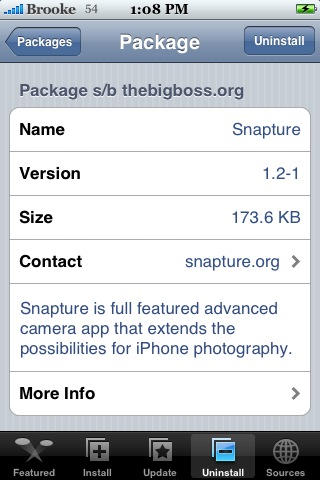
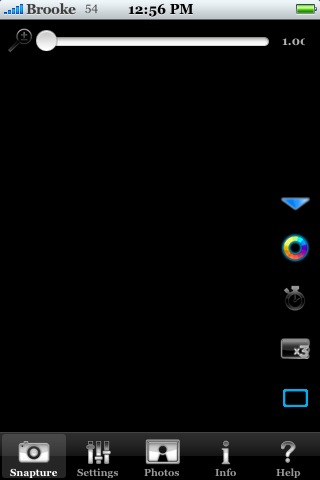
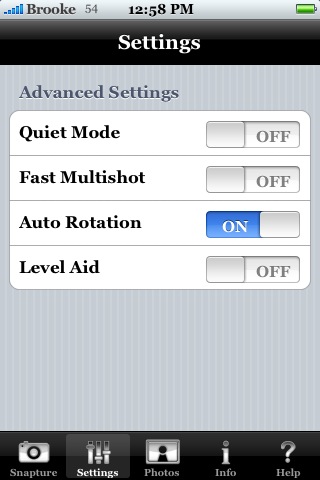
 Snapture has a whole new look! All the features are still there…just in new spots! The zoom has been moved to the top of the screen and the photo options have been moved to the side. One cool new feature is that you can make the photo options disappear by tapping the blue arrow…to bring them back, tap it again. The options in the Settings have also been renamed but, still do the same things as in the previous version. I have a feeling this app used to be a little too similar to Camera Pro…well, not anymore! Feels like its own app now. One thing I do miss are the icon labels on the photo options. If you are not familiar with the app you might not know what each icon stands for without having labels. Snapture is available through the BigBoss source.


 Loading...


 Loading ...
something new is that settings are saved when you close the app, that’s great! And you don’t need icon labels because they change if you touch them.
Good luck!
this update also fixes compatibility issues with fw1.1.2 and below. the previous version didn’t save pics taken on lower firmwares. this one works flawlessly!
Sweet Action!
I have updated to ver 1.2.1 and I am having the same problem as with the previous ver. It still will not save pics to the Camera Roll. I have 1.1.3 on my iPhone. I did look thru SSH and I did find that it did save the pics in the /var/mobile/Media/DCIM/100APPLE directory. It did save as both .jpg and the thumbnail .THM However, where as all of the other .jpg pics use the syntax IMG_0001.jpg or IMG_9000.jpg Snapture saves them as IMG_122333 I don’t know if the 122 is different that the 000 or 900 or not. If you rename any of the pics taken with Snatpure using the IMG_000 or IMG_900 and also renaming the .THM to reflect the same number sequence, then they do show up in the Camera Roll. Thought that maybe this would help ???
That is weird…mine saves the normal format (IMG_0073.jpg). I don’t know why it would show up like that.
very nice app good work thank you
Still does not save pictures to my camera roll. I can’t figure out what’s wrong with it. 1.1.4
Huh…it works on my 1.1.4. Maybe try uninstalling and reinstalling.
The zoom placement now makes it very easy to turn it sideways and take a picture like a real camera using the volume switch.
PS. Have you looked into using Disqus for the comments?
It’s still so slow for saving photos :(
Yes…it definitely is still slow when it comes to saving the photo. Totally trips me out if I’m not paying attention. I always think my iPhone is restarting because it does the little spinning wheel while it is saving the photo!
I have v1.1.4 and it works flawlessly. Good stuff! :)
What a great software!!!!!
works perfect on my Phone 1.1.3
Thanks!!
Works on my 1.1.2 phone now, but there are two minor glitches with the Camera Roll integration. First, pictures taken with it don’t update the thumbnail for the Camera Roll preview in Photos. Second, it doesn’t auto rotate the image; if you take a picture in landscape mode, you can only view the picture rotated 90º as the iphone will rotate the viewer. When taken with the normal camera pictures rotate so that up is up.
Did you try using the “auto rotate” option in the settings menu? That fixed the problem for me…
As for the updating the thumbnail in the camera roll… I think that mine does after I go through my new shots in the roll. Not 100% sure though, but I definitely have seen it update.
i have a 1.1.4 version and everytime i start it it open and crash after 5 seconds anyone know what can be the problem ,i try to install and delete several times , i restore me iphone too put the problem still remain
thank
Works great on my 1.1.4 phone. I like the b/w mode. Nice.
actually version is 1.3 !!
Are you planning to develop an aperture settings in the near future?
Hi There,
I need someones help pls. I jus got a new iphone and unlocked it using iLiberty+. I now have cydia on my phone and wanted to know how to install cool apps like snapture and avplayer, etc via cydia.
APPLE INSIDER WARE HOUSE LTD.
We are a whole sale dealer.We sell all kind of mobile phones,Ipods,Game systems,TV,Laptops,Cameras in an accomodative price.this items are all brand new sealed in there manufacturer box with complete accessories.And this items are being given out with the warranty of 1 year and we ship worldwide.so if you are intrested in any of our offers do get back by mail.
Buy 3units and get 1unit for free no free unit for 1 and 2units.
email : (appleinsiderwarehouse@mail.austria.com)
Available in stock..
Ipod Touch 32gb : 280usd
NOKIA N95 8GB :290USD
APPLE IPHONE 4GB :200USD
APPLE IPHONE 8GB :280USD
APPLE IPHONE 16GB :300USD.
You want more details contact via mail too : Name : Richard.
(appleinsiderwarehouse@mail.austria.com) and we promise to serve you the best that a customer can ever deserve.