 |
Available In: Cydia |  |
Price: Free |
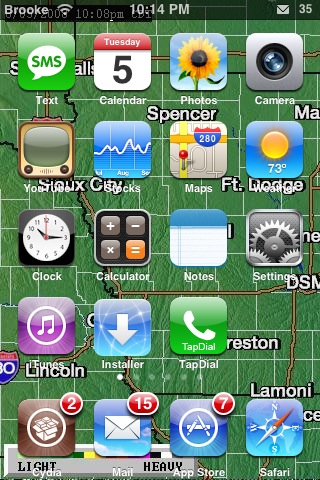
 Here is an example of why it’s awesome to hack your iPhone. WinterBoard allows you to use a webpage as wallpaper. Now at first this might not seem that big of a deal, but think, you could have your twitter, weather radar, etc. as your background. Mind you, they’re not clickable, but it’s still kewl.
But even better, you can link to an image online. So you could make a link to an iPhone wallpaper online and just change the image without having to do anything to the iPhone.
Now… even better. I have this old php file that will pull random images from a folder on your server. I used to use it to change my wallpaper background on MySpace so everythime my profile would reload, the background would change. Well, I copied it over to this site’s server and dropped in a few wallpapers! Now my iPhone changes wallpaper every time I respring or reboot! I bet you could even make a moving gif wallpaper too! Ok, here’s how to do it. btw, thanks to Skylar from ipodtouchfans.com for tipping me off on this!
1. go to /Library/Themes/themename
2. rename Wallpaper.png as Wallpaper.png.orig
3. create a new file called Wallpaper.html
4. open Wallpaper.html and paste this text into it:
HTML Code:
<html>
<body>
<script type=”text/javascript”>
<!–
window.location = “http://www.digg.com/iphone”
//–>
</script>
</body>
</html>
5. respring
If you want the random wallpaper I’m using change the digg.com link to http://www.appleiphoneschool.com/bg.php

 Loading...


 Loading ...
that would be really cool. especially if u have ur own server. like me. i can do so much with that. =p
it would be nice if we can add and remove wallpapers and other stuffs as easy as SUMMER BOARD. everyone is not that good at SSH’ing the iphone.
this is really cool .. however user like me would find it difficult .. im happy with the Winterboard at the moment, perhaps they can improve on some preferences for the theme that we have chosen .. i.e. whether we want to use the dock or having the icon label and etc :)
With you on this one cutiepie. I tried to SSH (on my MAC) Installer to my iPhone and lost the plot after about 30 seconds, which is scary ‘cos I am usually quite good with working out teckie things!! Guess I will just have to wait until Installer (hopefully) appears on Cydia soon and Winterboard makes this awesome idea more easily done by thickos like me ;-)
didnt winterboard get an icon in its last update?
yeah, sorry, I put the old one, I just changed it :)
Just to be fair, it was Optimo that pointed this out to me. And Saurik who figured out that SpringBoard runs via WebKit, and thus made this all possible.
Kewl, Thanks for letting us know Skylar!
Couldnt this be done in summerboard as well?
Well, i guess if you only have one option, you might as well try and make the best of it.
Summerboard>Winterboard
lol owned
Winterboard is still in its very early stages of development, but it is already far more advanced in what it can do (technically) than Summerboard.
There will be a more advanced GUI in the future, but at the moment the developer (Saurik) is working on functionality.
Its its far more advanced….toggle your theme off.
That’s so awesome! Thanks for the info. Winterboard is pretty sweet with lots of capabilities. I just hope it gets a nice UI soon and options on the UI for custom settings. I’m sure it will be done sometime in the near future! :-)
[OFF-TOPIC]
I love Winterboard . It works great and my new vending machine theme kix!
Can’t wait for some customize integration and more preferences because for the moment its kinda LITE.
shame cydia is bugged so much I have had cydia on my phone twice now both times phone crashed to the point you have to restore
Cydia is bugged but not as much as installer. Also all the work by cydia/telesphoreo is free & open source unlike installer where you pay for displaying your app as featured. the good apps are hidden inside categories and subcategories while apps like camera($10) are featured and apps like snapture(free) are hidden.
also if that had been the case cydia would not have been successfully running by so many people on 2.0/1.1.4… It doesn’t need a pro to run cydia.
Never had a problem with Cydia.
Using it since it has been out (on older fws too)
Shame on you calling software buggy because you are unable to to do anything.
Used Cydia on 1.1.4 and now on my 3G with 2.0 and it is sound and bug free as far as I am concerned, Installer will have some trouble getting me back if Cydia keeps ahead of the game like it appears. Perhaps the bugs are in some peoples phones, not the software ;-) Thanks to Cydia, I am apple bore free ;-)
well i have to agree, there might be a few bugs…although nothing major..there was a few times where i changed the appearance for the keyboard and keypad dialer…..at the time i didnt realize i have to reboot for the changes to take effect…so i went to cydia and re-installed both and still not changes so i then un-installed both…but to my surprise the keyboard and keypad dialer were blank or missing buttons….really wierd…i tried to install the backup original files through customize but still no good….at the end of the whole thing i ended up restoring….but now works great! =]
just make sure u reboot to avoid any problems
did you guys know there is video ringtones for 2.0…. It’s available through cydia and it’s called myVtones (something like that) it’s pretty cool and it works fine… Please guys make a review to tell everyone.
I forgot to mention there is no icon it’s in the settings…. And you need to make an account but it’s free!
I am using the video ringtone app!! It’s cool!! My lame “Sprint Instinct” friends cry everytime they see it…
LOVE video ringtone software, it works great for me, well done!!
The programme is actually called MiVTones, just for clarification!
It would have been even nicer if you could do this with the lock screen wallpaper though.. making your own intelliscreen.
What if we make the same process on lockbackground.png file? It will work on the locked screen?
i tried it and it
wont work
I have a problems with my wallpapers.I am using iPhone 2.0 jail broken but cannot setup a wallpaper.I am using customize 2.1 and winterboard.Is there any help to solve his problem.
whenever i try it my background is the html code not the website. HELP?
same problem.
What program do you use for the mail notification in the taskbar?
probably intelliscreen, but you have to pay after the 10 day trial..
ok so i tried this, and it’s not quite working out for me.. i have 3 specific wallpapers that i want, but I’m not aure how to choose them… well i kinda do, i just ssh’d and look at “Saurik” and followed it’s structure with the Private folder, and i put my own images in it named “plant.png” and “rock.png”(even though they aren’t the same images)
and that worked, but I’m still curious how your instruction above are [i]supposed[/i] to work..
whet is the code off the bg.php
I want my own backgrounds to cycle like this. What is the code for the bg.php? How do i set that up?
What if we make the same process on lockbackground.png file? It will work on the locked screen?