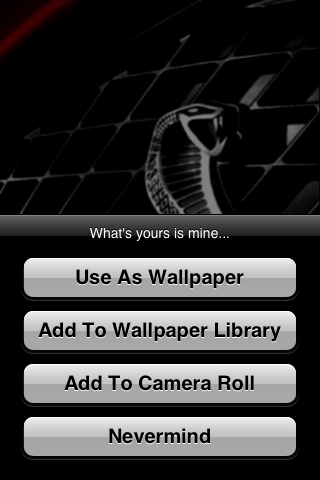
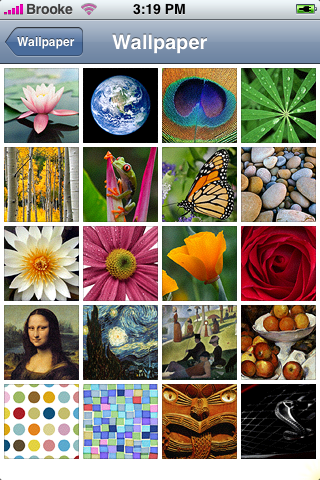
 When I saw an update to Wallpaper on the Installer.app…I took a double take!! We haven’t seen anything from Sean since his last iApp-a-day in November!! Welcome back Sean! Anyway…on with the update! The update adds a new option to the menu…you are now able to add the wallpaper to your Wallpaper Library instead of just your camera roll or setting it as your current wallpaper. You can then go into your stock Settings on your iPhone and the Wallpaper option and you will see the wallpaper you added from the app in the Wallpaper section! This keeps you from having to make a Wallpaper folder on your computer and syncing it with iTunes in order to add new Wallpapers! This is a SUPER sweet update…I love it! This app is available through the iApp-a-Day source. Below are the screenshots:


 Loading...


 Loading ...
FINALLY I HAVE A IPOD TOUCH AND CANT USE WALLPAPER BECAUSE I DONT HAVE A CAMERA ROLLL BUT NOW I CAN!!!!!!!!!!
Ps i LOVE This Site! five stars *****
oh YAYAYAY!! That is so exciting…I didn’t even think about that!! :)
any idea how you delete the wallpapers after they’ve been added to the wallpaper section?
deleting wallpapers is easy!!! All you need to do is this:
On your itouch or iphone, open your “photos” application.
All your wallpapers that you have downloaded should be in a file called “saved photos”.
Open a wallpaper photo and click on which ever one you want to delete.
At the bottom should be a trash can icon, click on that and it should delete just fine.
You will need to go into your iPhone via OpenSSH and the wallpapers are in the/Library/Wallpaper folder. If they are from the app Wallpaper they are listed as Wallpaper-import-1.png, Wallpaper-import-2.png and so on, just delete them from there. Make sure you delete the corresponding thumbnail too!!
root/Applications/WallpaperBrooke: Are you sure the Wallpapers are in root/Applications/Wallpaper???
I didn’t found anything but the app files there.
Did you select to add the Wallpaper to your Camera Roll or to your Wallpaper Library? If you added it to your Camera Roll…then it is in there. If you added it to your Wallpaper Library then it is in (oh crap..I’m sorry, I told you the wrong place) it is in the root/private/var/Wallpaper. Sorry about that! The files are still named the same as I said before…just in the/Library/Wallpaper folder.
How can you delete wallpapers? I already the wallpaper 1.7, but i still delete…Help please???
Thanks! I got it….is there a way that you can delete wallpapers by just using ur phone without connecting to a pc?
@Sam…if you choose to add the Wallpapers to your Wallpaper Library…then the only way to delete them is to SSH into your iPhone. Or, don’t add wallpapers you need to delete! :)
can someone please just give me instruction on how to delete them from my library after i have installed ssh
@Ben…You will need to go into your iPhone via OpenSSH and the wallpapers are in the/Library/Wallpaper folder. If they are from the app Wallpaper they are listed as Wallpaper-import-1.png, Wallpaper-import-2.png and so on, just delete them from there. Make sure you delete the corresponding thumbnail too!!
well i have an itouch does this change anything
Hey Guys i figured it out, ipod touch users.
if you have downloaded pics from the app wallpaper, then this is how you delete them.
1.ssh into your ipod
2.click the “up folder” button untill it doesnt go back any farther
3.click library
4.click wallpaper
5.delete the files named as wallpaper import. this worked for me.
I used Cute FTP Pro, by the way…
I have installed ssh on my itouch, but nothing shows up where is it once its installed
How can go into my iphone via openSSH if there is no icon for it
Look it up on youtube, i dont know exactly how to do it. i did all my stuff from youtube vids. type in ipodtouchmaster. he is one of the best at describing what to do. every youtube vid should have a description box on the right, they sometimes tell the steps in there as well as in the vid.
Dont worry about the icon, its still there, it doesnt install an icon
Look up IPODTOUCHMASTER on youtube hes the best, i got everything from him except how to delete wallpapers, i found that.
i have 1.1.3 iphone and when i add wallpaper to wallpaper library nothing appears
help
I have 1.1.3 … I am able to set the wallpaper but not able to save it to my lib … please help …
@Sheriff & has9…This app was created for versions 1.1.2 and below…I would assume that it is not working correctly with 1.1.3. Which would be weird because the Wallpaper folder has not relocated in version 1.1.3. Did you use BossTool before upgrading to 1.1.3?
Hi, how do i install SSH on my iPod touch?
i have a itouch and downloaded the wallpaper app ive now deleted it thinking the walpaper will go too but it hasnt how do i delete them please help x
I have installed this app but the wallpapers don’t seem to be saved anywhere. I’ve tried both save to camera roll and also save to wallpaper library.
Any ideas?
Thanks.
Are you on 1.1.3 or 1.1.4? If so, you will want to use version 1.8 or this app. However, if you are on 1.1.2 or lower you will not want to update to version 1.8 because it ONLY works with version 1.1.3 and higher. I have contacted the develoer about this. He says he is going to take a look at it. So, if you already updated to 1.8 an you are on a version 1.1.2 or lower let me know…I can get you version 1.7 of the app.
Hi Brooke, Thanks for your reply! I would love to have a copy of wallpaper in the 1.7 version. A quick blurb of how to install it manually would be great as well, unless I am lucky enough that there is a source out there that still has the old version available.
Thanks!
I have found a copy of Wallpaper 1.7. Can anyone give me some instructions or point me somewhere that explains how to install this manually? That would be greatly appreciated. Thanks!
Hi folks, any chance of pointing us in the direction of Wallpaper 1.7?
Like many peeps, 1.8 will not work for 1.1.2
Cheers
I found 1.7 here …
http://www.iappaday.com/install/zips/Wallpaper-1.7.zip