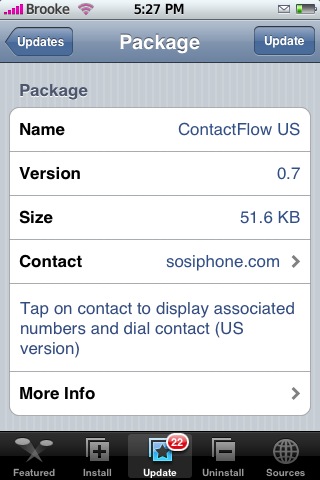
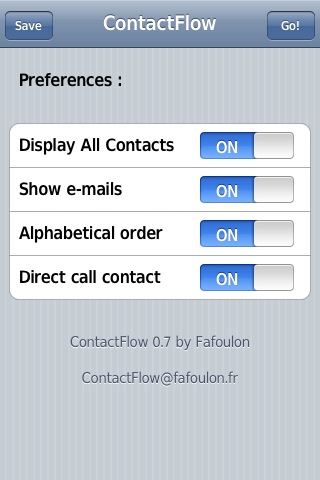
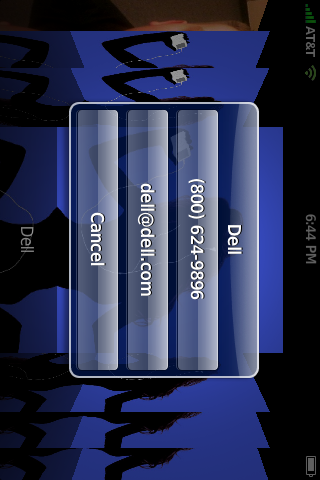
 Version 0.7 of ContactFlow brings some sweet new features and a new name! ContactFlow has now been renamed to ContactFlow US (remember this is from a French repo) there is also now a French version of ContactFlow called ContactFlow Fr. You can update to ContactFlow US without uninstalling your current ContacFlow…just update like normal! Ok…on to the new features. Now when you open the app you will get a main menu including the options to turn on/off; Displaying All Contacts, Showing the contacting emails, putting the contacts in Alphabetical order and direct dialing of contacts. If you turn on Display All contacts you will get a little an iPod Girl image for those contacts that do not have photos, if you turn on Show E-mails it will also dispaly any email addresses for the contact you select which you can then tap on and it will open a new email going to the email address you selected, if you turn on Alphabetical order…it will obviously put your contacts in alphabetical order and if you turn on Direct Call Contact it will call the contact without giving you the pop-up however, the contact can only have one phone number listed for them and no email address (if you have that option turned on in the settings). After you have changed everything to the way you would like it tap Save in the upper left corner…to get into the Contact List tap Go in the upper right corner. I think this is a great update to this app. I do think the app should open directly to the Cover Flow and then have some sort of button to get into the menu…so that you do not have to go through the menu every time. Also, this app still does not work on 1.1.1…it worked like the first two times I tried to call a contact from then on it just goes back to my SpringBoard…but, it still works great on a 1.1.3!! This app is available through the SOS iPhone source. Below are the screenshot:


 Loading...


 Loading ...
great update to my favorite app.
I have added SOPiPhone source successful, but I can not find this application, where is it? I want to use it.
It is in the SOS iPhone category in the Installer..actually for me it showed up as an update so it should be in the Recent Packages section too.
it’s a great app… a must have! great job devs. :D keep up the good work…
thx for ur reply Brooke, but I do not find SOS iPhone category in my Installer.
I find it in Sources-Uncategorized, why, I just add the source rep.sosiphone.com to sources, why it cuncategorized?
thx a lot, waiting for ur reply.
Just refresh your sources another time and it will be there.!
This source shows up under “Utils” in my sources in Installer and the app shows up under “SOS iPhone” in the install tab in Installer. I would remove it and try adding it again. http://rep.sosiphone.com
I have tried more than 5 times in the past 12 hours. it’s wired!
You have tried refreshing? Because Stefan is right…you just need to refresh your sources again and it should show up.
thx Douglas& Brooke so much.
I add the source http://rep.sosiphone.com correct and have refreshed so many times but still can not find it.
something must be wrong there.
Well…that is the correct source (make sure you spelled it correctly in your installer and that the capitalization in correct, it is case sensitive and this one has no capitals). But, other than that I would say that the source is down. Maybe try again tomorrow…they are probably getting a ton of hits today. Is it still in the uncategorized section in your Installer?
yes, it’s still in my uncategorized section, I spelling it correct.
let me try tomorrow…
thx again.
Yeah…I say give it a shot tomorrow…let me know if you get it to work.
Hi Brooke, sorry for being off topic (feel free to delete it, later on), but i have to ask.
I’m trying to find the native iphone-pedometer application (not the webap), which I’ve seen in a review on YouTube (www.youtube.com/watch?v=LQO5JLhQm1k&feature=related), however it doesn’t seem to appear in my installer list and I don’t know the source so that I can manually add it. Can you please help me?
Thanks in advance,
Jim
PS. Not sure, if this is the developer’s site http://code.google.com/p/iphone-pedometer/ ?
That app has actually been taken out of the Installer.app but, HERE is a zip file of the app. Use at your own risk.
I did used the provided zip file and put it on my iPhone (to see if it would work) and it worked fine (I’m on 1.1.1). Be sure to change the permissions of all the files to 0755…and restart your iPhone.
@Brooke
That was very quick! Thank you so much for your help! I really appreciate it for giving it a try, in order to see if it works first (I’m on 1.1.1, too). :-)
Now, I know that this may sound rather silly, but how do I install it manually and change permission? Among other applications, I have already installed ‘Finder’, ‘Term-vt100’ and ‘openSSH’, and I use ‘Iphonebrowser’ for browsing my iPhone, however would these apps be all I need? A link with instructions would help, too. Hope I’m not asking too much.
Thanks in advance,
Jim
PS. I’m running out of space on my main partition (currently, only 1MB!) and I’m hesitating to use BossTool to reallocate the ‘Application file’, do you have any suggestion, before I start deleting games?
Hi Brooke,
Are you really sure you get the source correctly spelled? I have tried a couple of days and it still didn’t show up. Thanks a lot!
vlepwnxeobiw