SummerBoard 3.1-2 Update 1.1.4 ZiPhone Jailbreak

SummerBoard 3.2

March 2, 2008 by Brooke  
Categories: AppTapp, SummerBoard, System, updates
Tags:

109 Comments
15,689 views

SummerBoard This is the version of SummerBoard Doug has been waiting for!! Version 3.2 fixes the issue where you were unable to install more than 80 apps on your 1.1.3 or 1.1.4 iPhone! So, upgrade and install away!
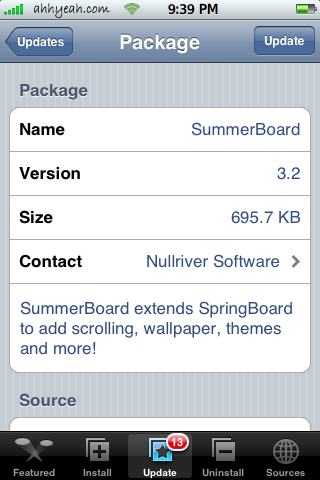
SummerBoard 3.2


Similar Articles:

SummerBoard Update 3.1-1 (2922 views)

MMiThemer 0.20Beta (718 views)

OpenSSH 4.6p1-2 (1893 views)

Restore Time :( (394 views)

WeatherIcon Updates – Fixes Status Bar Icons (3915 views)

Comments

109 Responses to “SummerBoard 3.2”

  1. Arcano17 on March 2nd, 2008 10:22 pm:

    When try to install, the message “ERROR. Package download failed!” appears. Any idea?….server too busy?….can be downloaded as an app and installed with Fugu?

    Salutes

    [Reply]

    Douglas on March 2nd, 2008 10:25 pm:

    I’m guessing server busy. Keep trying and let us know what happens :)

    arcano17 on March 3rd, 2008 6:35 am:

    no luck! The same message over and over again…anyone knows where can I download the app?. Thanks in advance.

  2. Yogev on March 3rd, 2008 12:42 am:

    You don’t need the SMB Fix anymore.
    You still need the Wether fix though…

    [Reply]

  3. Bige2333 on March 3rd, 2008 1:19 am:

    Sweet!!!! time to start the long “installing” journey! lets see how many apps i can fit lol

    [Reply]

  4. timeXway on March 3rd, 2008 2:21 am:

    i’m still getting this “ERROR. Package download failed!” is there anyway i can download it through my PC not the iPhone?

    [Reply]

    Ghawas on March 3rd, 2008 3:39 am:

    Wondering the same thing.

    Ryan on March 4th, 2008 11:31 pm:

    look on google for it and ssh it into your /application folder make sure you chmod it to 755 and then restart your phone (you may have to twice if it appears inactive after the first time. idk if its available for manual download tho if it is thats how.

    leo on March 16th, 2008 1:21 pm:

    just restart you ipone.
    when you get the error message, the phone hangs, and you will get the same message no matter what thing you try to install.

    whoever on March 30th, 2008 12:58 pm:

    don’t have to restart, but “clear queue” in installer

  5. bartb on March 3rd, 2008 4:02 am:

    I installed summerboard 3.2 on FW1.1.3 but my smbprefs says it’s inactive and i can’t change my themes anyone have’s an idea how to resolve this issue
    thx

    [Reply]

    Jacob on March 3rd, 2008 10:24 am:

    only do this if you know what you are doing

    ftp or ssh into your touch

    go to the root foler where applications folder is then go to: System/Library/CoreServices/Springboard.app

    scroll down to a file called springboard and change the chmod to 755 and reboot your ipod touch go back to summerboard and it should now say active

    shawn on March 3rd, 2008 12:48 pm:

    i get the same issue – 3.2 inactive. checked via ssh and springboard.app is set to 755. so is SMBPrefs in /Applications/SMBPrefs.app

    bartb on March 3rd, 2008 7:33 pm:

    do i have to change anything in the checkboxes and then put everything in
    755 because now it is on 0755 but i can’t change it to 755!i just don’t want
    to do it wrong
    thx

    Brooke on March 3rd, 2008 10:14 pm:

    No, you do not have to change anything in the boxes…it will do that automatically when you change the number. Also, 0755 is the same as 755…so that is ok! You could also try installing the fix for this app.

    “It is located in the ‘Tweaks 1.1.3′ category in Installer. It is called “Smb Themes Fix” (from the BigBos source), install it and it adds a symbolic link for you, so SMBPrefs can find all your themes correctly.”

    Ryan on March 4th, 2008 11:28 pm:

    restart the phone. much simpler then you guys are making it at least thats what i did. enjoy hope this works

    bartb on March 5th, 2008 7:09 am:

    I allready did everything that you told me but still my smbprefs are inactive all my themes are shown but when i try to use nothing happens.allready restarted my iphone several times but still nothing.installed every fix i could find.some other idea’s.
    thx from belgium

    Austin on March 5th, 2008 11:56 pm:

    thanks jacob… you really know your ipod stuff.
    -AC

    skechada on March 21st, 2008 8:58 pm:

    I installed SMB 3.2 and the SMB fix but still can’t get SummerBoard to be active. I tried SSHing to find that file with WinSCP but when I try to edit the file I just get some gibberish.

    Any ideas? Thanks for the help with this!

    Nelson on May 9th, 2008 7:25 pm:

    I follow the instructions of the user guide:
    1. Touch and hold any Home screen icon until all of the icons begin to wiggle.
    2. Arrange the icons by dragging them. I rearrange some of them.
    3. Press the Home button to save your arrangement.
    After that I reinitiate de Iphone and my smbprefs says it’s active and it is working OK.

  6. ismail on March 3rd, 2008 9:20 am:

    hi everybody! smb is working on my 1.1.4 phone but some icons dont change. for example the calender photo notes and phone icons. the other ones change in the correct theme version but i dont know how to fix this problem. any idea?

    best regards,
    isi

    [Reply]

    Jacob on March 3rd, 2008 10:22 am:

    The theme you are using probably doesnt have all the icons, if the theme doesnt include the icon, it uses the original one.

    Tori on March 9th, 2008 9:29 am:

    Hi! I’ve got the same prob.. and I know that all the icons are on the them..
    I have cheked it when I was making my own theme..
    pleace, if any one else have had the same prob and found out what was
    wrong.. Tell me!

  7. ismail on March 3rd, 2008 10:32 am:

    no, its on all themes…

    an antoher problem i found is, that my phone doesnt save the photos i take, after i upgrated to 1.1.4. :( this one really sux

    [Reply]

    Jacob on March 3rd, 2008 11:18 am:

    Can’t tell you what is wrong then. Never heard of that one before, uninstall SMBPrefs and reinstall maybe?

  8. Jacob on March 3rd, 2008 11:10 am:

    Yeah, and photos in your camera roll are gone after restoring. Sorry.

    [Reply]

    ismail on March 3rd, 2008 11:34 am:

    no the photos are still there… but i cant save new ones… :(

    Ali on March 4th, 2008 11:44 am:

    Got the solution for the camera roll not saving the photos.
    You can either Terminal in through or SSH connection and give the following command

    chmod -R 777 /var/mobile/Media/DCIM

    This worked for me. I am on 1.1.4 Jailbreak and unlocked.

  9. cartoon156 on March 3rd, 2008 11:15 am:

    If only I knew this yesterday… Heh.

    [Reply]

  10. likwidfuzion on March 3rd, 2008 12:45 pm:

    Downloaded/Installed fine for me just a a few moments ago.

    [Reply]

    Arcano17 on March 3rd, 2008 1:25 pm:

    do you have the same problem of “Error. Package download failed!”?…. how many times do you try?…Salutes

  11. Brian on March 3rd, 2008 2:28 pm:

    I got this update installed just fine. But I am still unable to get themes especially from nullriver to show up in smbprefs app. They are getting there but still not entirely fixed yet. So do I still need to apply the smb fix patch still? Or is there another patch I should use. Thanks for the help.

    [Reply]

    Brian on March 3rd, 2008 2:48 pm:

    ok figured it out. all I had to do was install the smb themes fix and everything is showing up now. whew.

  12. likwidfuzion on March 3rd, 2008 2:54 pm:

    @Arcano17, I only tried it once and worked the first time with no trouble. Make sure you have the latest version of Installer (v3.01) installed.

    [Reply]

    Arcano17 on March 3rd, 2008 3:24 pm:

    I have the latest….V3.01. I have Firmware 1.1.4, Installer V3.01, and I delete the SummerBoard 3.1-2 Update. Thanks, you have it luck downloading the app.

  13. sandro on March 3rd, 2008 3:42 pm:

    I installed summerboard on 1.1.3 and didn’t work same whit 1.1.4don’t understand why i tried everithing does anybody have the same problem?

    [Reply]

  14. Kurt on March 3rd, 2008 3:58 pm:

    Yes me too, don’t know what’s up been trying the whole day to get this app to download..

    [Reply]

  15. likwidfuzion on March 3rd, 2008 5:34 pm:

    I forgot to mention that I downloaded SummerBoard 3.2 over EDGE as I am at work. Maybe that is the difference, who knows.

    If it still doesn’t work for you, try Resetting your Network Settings in Settings > General > Reset

    [Reply]

  16. Ali on March 3rd, 2008 9:51 pm:

    Jacob, I am also facing the problem of photos not getting stored. My iPhone is 1.1.4 (restore) Jailbreak by ZiPhone JBL and unlocked with iClarified way. Got everything back from iTunes but now the photos are not getting saved.
    I am trying to find how to solve it. Help needed to fix it.

    [Reply]

  17. Heimlich on March 3rd, 2008 10:36 pm:

    been trying to download it for 2 days now but still no luck. The message “Package download failed” still pops out… what’s wrong?

    [Reply]

    Arcano17 on March 4th, 2008 2:06 pm:

    It seems a lot threads around with people who are having problems with Installer not being able to install any applications, and get the error “package download failed”.

    This possible fix is quite easy, and seems to have worked for a lot of people.

    • Open up Installer. Hold down your HOME BUTTON for 7 seconds until Installer quits.
    • Re-open Installer and try to install your package again.
    • IF you still encounter the error, hold down the HOME BUTTON for 7seconds again until Installer quits.
    • Restart iPhone this time, & try again.

    Ryan on March 4th, 2008 11:29 pm:

    try clearing the que first.

  18. Ali on March 4th, 2008 12:05 am:

    Hi Jacob,
    This problem is nothing to do with the SummerBoard. I found that this is not an isolated problem that only some are facing. See the following threads on apple site.
    http://discussions.apple.com/message.jspa?messageID=6313773
    http://discussions.apple.com/thread.jspa?messageID=6744462
    There are solutions posted there. I couldn’t try any of these. Will try after reacing home (with the PC with which I synced my iPhone).

    [Reply]

  19. Sherwin on March 4th, 2008 3:15 am:

    Hey guys, if you are getting the “Package Download Failed”, which I also got before, I tried installing other apps, but same error message occurs. What I did is I shut down my iphone, and open it (restart). Tried downloading and everything went ok. This might help. Let me know.

    [Reply]

    Heimlich on March 4th, 2008 3:29 am:

    i am only getting “package download failed” if i’m trying to install this summerboard and installer update, but other than that, everything’s fine…

    Arcano17 on March 4th, 2008 8:22 am:

    After 2 days to try over and over again in my WiFi, I go to the wireless of a friend of mine and try…the software download without problems….Try this, go to Starbucks or another WiFi and try….If you look closely, when you try to install SummerBoard over and over again, Installer don´t load the “presentation” screen…It go straight to the Install section or the download part…when I tried in another WiFi Network, the Installer show me the “presentation” screen….weird, but, may be a cache is somewhere…

  20. Stefan on March 4th, 2008 11:48 am:

    who needs 80 apps??? most of the apps are for little boys playing… ;)

    [Reply]

    Neil on March 4th, 2008 11:07 pm:

    Maybe, iPhone is designed for little boys playing …

  21. Neil on March 4th, 2008 11:04 pm:

    Hi dude,
    I haven’t wifi network here in my home. Do you have pxl file of smb 3.2? Thus I can install it locally.
    I searched on Google but didn’t found pxl file.

    Thanks and Best Regards.
    Neil

    [Reply]

  22. Brad on March 4th, 2008 11:56 pm:

    Hmm. I have an iPhone with 1.1.4 Broke it with ZiPhone 2.5. It worked and some themes work but others just install but don’t show up in SummerBoard 3.2
    How come some themes work and some don’t? I assume some of the themes are getting installed in the wrong directories? Anyone else having this issue and know how to resolve it?

    [Reply]

  23. Dman on March 5th, 2008 3:26 am:

    I got smbpref 3.2, but all themes I have downloaded wont show in under themes?!?!?

    I tried using boss’s smb fix, but it says that I need firmware 1.1.3 and above but Im using 1.1.4…

    I tried multiple fixes but none seem to work

    can someone please give me step my step instructions? My bootloader is 04.04.05_G, does that mean anything?

    [Reply]

    Sherwin on March 5th, 2008 7:03 am:

    your bootloader is correct. just go ahead in installing smb fix. it says 1.1.3 and above, which means you can install it in 1.1.4. also try the 1.1.3/4 theme fix from the ipod touch fans source after installing your themes. if its still not working.. try ssh the themes to /private/var/mobile/Library/Summerboard/Themes. It should now show under SMBPrefs. Hope this helps.

  24. Anonymous on March 5th, 2008 4:14 pm:

    seems to make my icons go underneath the dock while moving them around

    [Reply]

  25. Howard on March 5th, 2008 9:50 pm:

    I have 1.1.4 and have used the fixes all ways possible. I get the themes into root folder or mobile folder and even both if you use both smp theme fix and 1.1.3/4 theme fix but no materr which folder I get my themes into I can’t see any themes on the iphone.. any advice would be helpful new to the iphone.

    [Reply]

  26. Bob on March 6th, 2008 12:37 am:

    I tried everything, but still i cant install summerboard. still it will say “package download failed”. summerboard is the only software that you could use themes. please help me… and by the way, i already restore my iphone 10X just to install summerboard.

    [Reply]

  27. ramses on March 6th, 2008 3:47 pm:

    guys where is the skip last row option?

    [Reply]

  28. sgl21 on March 7th, 2008 4:42 pm:

    Hi, i have a problem with my iphone i just upgrade from 1.1.1 to 1.1.4 but i can’t downloaded anything from installer messege say ” Error main script execution failed! ” :( , anybody help me about this thing? thanks

    [Reply]

    marcel on April 8th, 2008 4:24 am:

    refresh sources about 3 times

  29. Bryant on March 7th, 2008 9:27 pm:

    I would love to add this but I don’t want to void my warrenty. My luck is if I add this and something happens to my iphone apple won’t fix it cause my iphone is modded. I wonder when 2.0 comes out if we will be able to change themes and be supported by apple still I hope so.

    [Reply]

  30. liuwj on March 8th, 2008 6:44 am:

    ok

    [Reply]

  31. Ajay on March 10th, 2008 3:15 am:

    i have summerboard 3.2 but it said ‘inactive’ i tried uninstalling the fixes and reinstall, but SMBPrefs disappeared from the start screen! and i cant find it in installer becuase i never uninstalled it.. what can i do to get it back?

    [Reply]

  32. Oscar on March 10th, 2008 7:54 am:

    Hi, I have a recursive issue when I try to install SummerBoard 3.2. on my iPhone 1.1.3 (ZiPhone2.5c) from 1.1.2 &1.1.1 BL3.9. All features of 1.1.3 work correctly. I can install other applications ok. I have tried all methods of restarting & clearing installer 3.01. I have installed & un-installed Community Sources 3.7, even deleted & added the community sources individually. I have BSD Subsystem 2.1 & OpenSSH 4.6p1-2 installed and can login to iPhone ok. I have tried 30-40 times over past few days to install SummerBoard without success. I would greatly appreciate any help with this if anyone else had an ideas? It seems annoying that all other apps install except SummerBoard 3.2. Thanks!

    [Reply]

    Vincus on March 13th, 2008 1:59 pm:

    Maybe you left an old Summerboard which u used before upgrading, so yuou need to delete that so SSH to your phone and:

    cd /var/root/Library
    rm -r SummerBoard

    Now you may install your SummerBoard 3.2 via Installer

  33. enrique on March 12th, 2008 6:24 pm:

    Somebody knows where i can put the themes via SSH?
    Thanks

    [Reply]

    Brooke on March 12th, 2008 7:35 pm:

    If you are on 1.1.3 or higher themes go in the var/mobile/Library/SummerBoard/Themes folder….if you are on 1.1.2 and below they go in the var/root/Library/SummerBoard/Themes folder.

  34. Oscar on March 13th, 2008 10:32 pm:

    Thanks for reply, Vincus. I have since done a clean, Shift+Restore to 1.1.4 in iTunes, then ziphoned 2.5c –>NOW is 1.1.4(4A102), BL3.9_M3S2, 04.04.05_G. No traces of SummerBoard as it was never able to install on 1.1.3 due to “Error Package download failed!” messages. This is also the same for 1.1.4.? I hope someone else has had and corrected this issue? If so please let me know…. Thanks!

    [Reply]

  35. FLO4ME on March 14th, 2008 7:01 am:

    Hi, i’m from Australia, a just got my iphone fw 1.1.3, i been had problem with the summerboard, i install summerboard 3.2 and some theme but the themes did not show in smbprefs, can someone help, please Thank..

    [Reply]

  36. FLO4ME on March 14th, 2008 9:30 pm:

    Hi, i just got a way to get the SummerBoard v3.2 to work on Iphone FW 1.1.3, and it so easy..

    Follow these steps exactly!
    Note: I used Transmit to SFTP to my iPhone
    - Login: root
    - Password: alpine

    1. Uninstall BOTH “1.3/4 Theme Fix” and/or “smb Themes Fix” if they’re already on your phone.
    2. Install or Reinstall Summerboard. (DO NOT RESTART YOUR IPHONE)
    3. Install “smb Themes Fix”.
    4. SFTP to your iPhone and navigate to -> “/private/var/mobile/Library”.
    5. Select the “SummerBoard” folder and use ‘Get Info’ to view its permissions.
    6. Set the permissions for the “SummerBoard” folder to 755.
    7. Click “Apply to enclosed items…”
    8. Exit the Installer app and restart your iPhone.

    Got this from JamSoft..

    [Reply]

    Brogollack on March 27th, 2008 12:00 am:

    Man. Thanks. It works just fine!

    Lilleskutt on June 4th, 2008 9:23 am:

    Thanks man, worked great!

  37. hamad on March 14th, 2008 10:05 pm:

    hey i have the iphone 1.1.4 and i install summerboard 3.2 and still it does not show any of the themes

    [Reply]

    Chris on March 15th, 2008 3:00 pm:

    same here..

    berhane on March 17th, 2008 12:16 pm:

    i have a 1.1.4 firmware, summerboard 3.2 but when i hit the themes tab it’s blank. i’ve tried to install smb themes fix and it says “error – this is only required for 1.1.3 FW or greater.”. But i know i got the 1.1.4 firmware. So please somebody help me. It’s really getting frustrating.

    help :S on June 19th, 2008 9:50 am:

    same problem!!

  38. mg713 on March 15th, 2008 5:41 pm:

    i have smb 3.2 when i dowloaded it it was on inactive and it wouldnt work. i downloaded the smb theme fix now all my themes show up in the list but only about half of them work. anyone has this problem as well?? anyone knows how to fix this?? please any help will be appreciated

    [Reply]

  39. mezajahjahbinks on March 16th, 2008 1:20 am:

    Hey mg713,

    I had this problem for a LONG time… I did two things.. I don’t know which worked, but I installed the 1.1.4 compatibility thing in tweaks for 1.1.4 folder as well as the 1.1.3 theme fix in the tweaks for 1.1.3 folder. This got about 90% of my themes working. ..

    Hope this helps!

    [Reply]

  40. Danielle on March 16th, 2008 7:50 pm:

    OK…I HAVE ONE FOR YA,
    I have 1.1.4 and I have installed SMB 3.2 and then I go to set it and it says 3.1 inactive. I have tried all the fixes here and some that aren’t…any idea why after installing one version it would list another as being inactive?

    [Reply]

  41. Chuckp33 on March 19th, 2008 4:19 am:

    I have done every thing to get my themes to work but no matter what i do they never shoe up in my themes. The show up in winscp but not when i click on themes. It’s emepty not even defalt is there. Tried changing the 755 thing and the tweaks. Both I did correctly I belive. Please help if you have some helpful information.

    [Reply]

  42. glazen on March 19th, 2008 4:37 am:

    Download fail –

    all u need to do is to clear the queue. u should be able to download.

    [Reply]

  43. Noreen on March 19th, 2008 8:31 am:

    I just upgraded my 1.1.3 to 1.1.4. All my installed app disapeared from my springboard also my summerboard 3.2 but still listed in uninstall files in my installer. When i want to uninstall, its say ” error Main script execution failed!. How i want to reinstall it??

    [Reply]

  44. Dman on March 21st, 2008 2:09 am:

    wow I still cant get it to work….

    can someone please give us directions on how to get this to work? All i want is the leopard theme installed….

    [Reply]

  45. Pudgeball on March 25th, 2008 9:10 pm:

    Ok I jailbroke my friend’s iPod Touch 16gb, and my iPod Touch 16gb in the same night and got my summerboard working, natively, but not on his and the only thing I can think of is that I bought mine at 1.1.4 and he bought his at 1.1.2 I believe. Also when I jailbreak mine I automatically have the “wiggle” feature but my friend doesn’t… Thoughts?

    [Reply]

  46. ricardo on March 27th, 2008 11:41 pm:

    just install summerboard fix and do a hard reset and ur ready to go

    [Reply]

  47. ricardo on March 28th, 2008 12:13 am:

    http://ipodtouchmaster.com/files/repo.xml add this source to the iphone and u would find summerboard fix , them install it , hard restar the iphone by holding the center botton and the top untill it restar and ur ready to enjoy ut thems

    [Reply]

  48. Harry on March 31st, 2008 3:19 am:

    ¿El SumerBoard 3.2 se puede usar para cambiar los temas al ipod touch o solo sirve para el iphone?

    [Reply]

  49. ricardo on March 31st, 2008 8:56 pm:

    pienso que puedes usarlo en los dos iphone y ipod

    [Reply]

  50. Aldentan on April 1st, 2008 1:17 pm:

    when i try to install the fix it says main script execution failure…can anyone help?

    [Reply]

  51. corey on April 12th, 2008 8:56 am:

    I have smb 3.2 for iPhone 1.1.4 got all themesvworking. Everything seems good, but I don’t have scroll features on springboard and cant change initial dock. All that I have is Appearance for themes and wallpaper and Advanced for icon labels and dock labels. Is this how its soppose to be or are therevother apps to apply to smb? Any help would be awesome. Thanks -

    [Reply]

  52. Eddie on April 12th, 2008 12:34 pm:

    Version 1.1.4
    Summerboard 3.2
    I have installed every fix availiable
    Did the SSH thing to change permissions
    Summerboard says (Active) and themes all show in the listing
    The problem is:
    I change themes..And nothing changes.
    Could someone please help. I would love to get this program running right.
    Thanks in advance

    [Reply]

  53. Matthew on April 16th, 2008 3:40 am:

    What irritates me is that it’s so difficult to just DL the Summerboard package for a manual install (or so it seems…). I need to do a manual install, since Installer is coming up with an error but without the app I can’t. Anyone know where this can be found?

    Thanks

    Matthew

    [Reply]

  54. larry on April 21st, 2008 6:15 am:

    somebody please tell me what SSH and SFTP stands for? how can i copy some files to my iphone something like… summerboard.framework -> /library/frameworks/summerboard.framework

    [Reply]

  55. Lilx on April 21st, 2008 4:30 pm:

    I have 1.1.4 iPhone and was struggling these days to get SummerBoard working after installed. For the guys who wants the secret: install SummerBoard > Press Home button (so it will restart) > After initialized, press and hold Home Button + Power until the phone boots and the Apple logo appears. Wait for it to initialize and SummerBoard will be active.
    No need to change chmod files or install fixes.

    [Reply]

  56. josh123 on April 24th, 2008 10:05 pm:

    i just downloaded summerboard 3.2 but now mail and you tube dont work ive used every fix nothing works plz help

    [Reply]

  57. thevinh on April 28th, 2008 2:44 am:

    very good

    [Reply]

  58. james on May 4th, 2008 5:56 am:

    ok SummerBoard 3.2 installed fine, but themes don’t show up in the themes list????

    [Reply]

    davdao on May 22nd, 2008 9:41 am:

    Only Power OFF iphone (push buton ON 2 sec) and slide, wait 10 sec and power ON and ready.
    test on 1.1.4
    working

  59. bob on June 1st, 2008 5:09 pm:

    I’ve tried everything to get themes on my phone, all with the same results,nothing. I’ve d/l two from this site, opened and logged onto winscp, drug the files into the themes folder and restarted phone, went into smb and checked the themes and it’s just a gret window any help out there

    [Reply]

  60. neal on June 3rd, 2008 1:17 am:

    i install summerboard 3.2 firmware 1.1.4…installs fine but when i try to change the wallpaper it does a soft restart to the slider and nothing happens….when uninstalled i get a wallpaper of the iphone factory installed ones…someone please help

    [Reply]

  61. steve anderson on June 14th, 2008 7:12 am:

    no summerboard on installer now its gone

    [Reply]

  62. zach on June 17th, 2008 4:15 pm:

    So i wan’t sure where else to post this question.
    Do you guys know if SummerBoard will work or be allowed on the the iPhone 3g?
    If so, will it be in the AppStore?

    [Reply]

  63. help :S on June 19th, 2008 9:49 am:

    after i downloaded themes and the springboard app. when i click themes no themes show up. why is that?
    help pleaseee

    [Reply]

  64. Floran on June 26th, 2008 2:28 am:

    My summerboard works fine on 1.1.4 but I got another App called Categories and when I go to a map it has other icons than when I put them on the springboard right-a-way :S Can somebody help?

    [Reply]

  65. Amar on July 11th, 2008 9:47 am:

    Im trying to download summerboard on my iPhone but it jus keeps on saying “error package download failure” what do i do!!!! ive tried refreshing the sources, restating the phone but nothin works

    [Reply]

    Chris on July 24th, 2008 6:28 am:

    Same problem here. Jailbraked iPod Touch 1.1.4. Tried to download Summerboard several times, restarted the iPod, cleared the queue, refreshed the sources…still getting the “error package download failure” message.

    alex on July 26th, 2008 4:08 pm:

    same…. Please help seems like nothing works

    Azurewind on July 30th, 2008 9:35 am:

    Apparently, I managed to get my SMB3.2 up and running.

    Coincidentally, I added the http://ipodtouchmaster.com/files/repo.xml source into my iPod, and let the sources refresh themselves.

    I tried installing SMB again, and found that SMB was already in the queue of apps to be installed. Naturally I tapped remove from queue. Lo’n'behold, SMB started to install when I prompted it again.

    Hope this helps.

  66. Larry D. Williams on February 24th, 2009 7:26 pm:

    My iphone keeps cutting off about every two to three days. It just shuts down and i would have to press the home and the off button for about 10 seconds and it would come back on. I took it to Apple and they wanted $199 to fix it. The phone is a 1st. generation iphone. What should i do?

    [Reply]

  67. KD on February 25th, 2009 12:13 am:

    THANKS

    [Reply]

  68. vinhhoa on March 2nd, 2009 8:21 pm:

    this good support !

    [Reply]

Please leave a comment below...
and if you want a pic to show with your comment, go get a gravatar!


SummerBoard 3.1-2 Update 1.1.4 ZiPhone Jailbreak