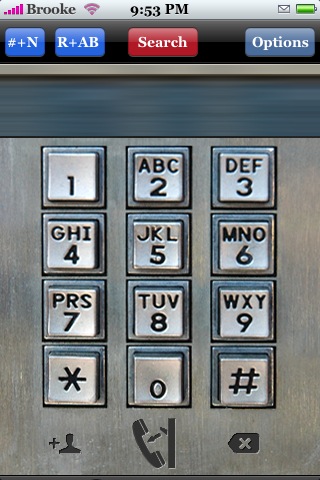
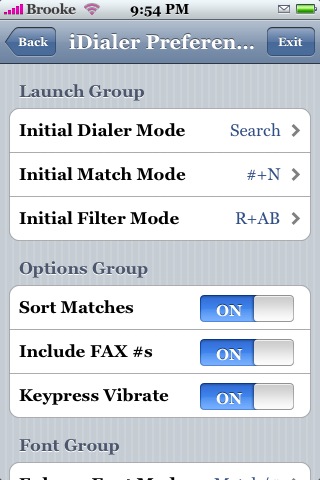
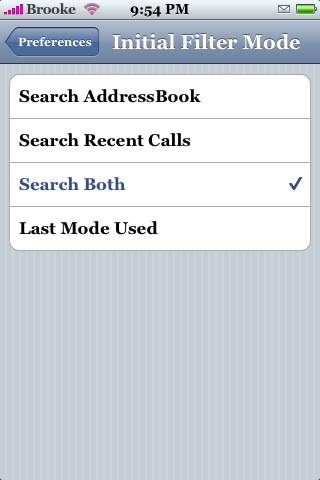
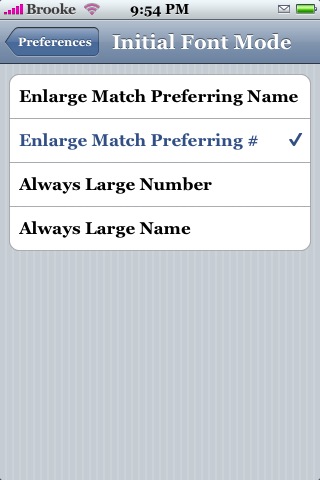
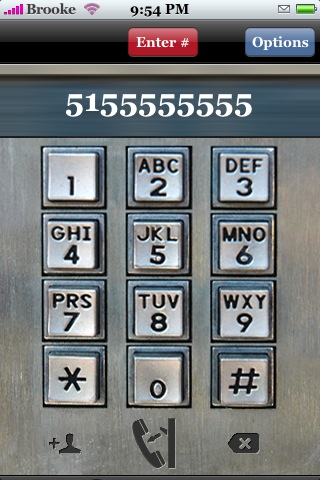
 There is quite a difference between iDialer version 1.0 and iDialer 3.0 (apparently I missed iDialer 2.0)…including a new icon! This version also makes iDialer compatible with version 1.1.3. iDialer is dialer option that allows you to quickly search through your contacts, a variety of ways, to find the number you would like to call. This app does not replace your stock dialer it is simply another options with more features. When you open the app you will see a very retro style dialer with a menu bar at the top. If you select the Option menu you will get a ton of options! The first group of Preference are the Launch preferences that allow you to choose what features the app will have each time you open it. The first preference is the Initial Dialer Mode which you can change to; Enter # Mode, Search Mode or Last Mode Used. This allows you to either search for a name or number as you type it in or to just enter a phone number and call it. The next option is Initial Match Mode which allows you to pick what the app searches by. You can choose from Match Phone #’s, Match Contact Names, Math Both or Last Mode Used. The last Launch preference you can change is the Initial Filter Mode which selects what the app will look through when it searches. The options are; Search AddressBook, Search Recent Calls, Search Both and Last Mode Used. The next block of options are the Options Group…this allows you to turn on/off different options such as; Sort Matches, Include FAX #’s and Keypress Vibrate. The last block of options are the Font options…you can choose the size of font you want and if you want the number format on or off. Your choices for Font size are; Enlarge Match Prefferring Name, Enlarge Match Preferring # , Always large Number and Always Large Name. Once you have set all of the options…just tap the Back button in the upper left corner.
Back on the main dialer…if you are in Search Mode…it will say Search in the middle red button. From here you can type in either and name or number (based on what you set in your settings) and it will find the most relevant contact…it will continue to update as you type in more letters/numbers. If you just want to type in a number instead of search your contacts…just tap the red button and it will change to Enter #. There are also quick change buttons at the top…if you tap the first blue button you get choose to search only by phone #’s, only by name (N) or by both (#+N). The next button over allows you to quickly change the search options through your AddressBook (AB), Recent calls (R) or both (R+AB). This app takes a little getting used to but, once you learn everything…it is really very handy! iDialer is available through the ModMyiFone.com source. Below are the screenshots.




 Loading...


 Loading ...
The icon does not show in my springboard…any clues?
BTW, very cool page which I follow daily :) Kepp it up :)
@teddy I got the same thing. Do you use 1.1.4?
No Sascha I’m in 1.1.3 …
Solved the problem… I gave the iDialer.app folder the right rights via cmod> 755 via ssh and even quickly made a new icon for my theme…
Can I do this directly in the iphone through termV100? If so pls let me know how pls :)
cd /Applications
chmod 755 iDialer.app
tried to change the rights via Terminal (like T Webb suggested) it said Operation not permitted. Tried it on MobileFinder.. and after i change it the changes do not get saved… can someone tell me how to get iDialer to work on 1.1.3? the app is there.. just doesnt show up.
I had the same problem as you but eventually got it to work by doing the following: 1. Install iDialer v3.0 2. Connect using WinSCP and navigate to /Applications 3. Change iDialer.app folder permissions by right mouse-clicking on iDialer.app, selecting Properties and typing 0755 into the field entitled Octal. I also ticked the option for ‘Set group, owner and permissions recursively’. Then switched off my iPhone and switched it back on … and the icon appeared and idialer v3 worked.
thanks Martin, this method worked for me also!
I don’t have a MAC, same problem as avove using 1.1.4 no icon appears on desktop. Any suggestions?
Install MobileFinder from Installer and modify the permissions. It´s very easy.
But, i don´t see the retro dialer :(
I did exactly what martin explained and now it works on 1.1.4
I also don’t get the retro dialer, but I like the original one better.
I would be awesome if this functionality could be added/overlaid to the original dialer.
Thanks for the help guys managed through mobile finder :)
I am so confused about this will it work on 1.1.4? Also how do I go about changing or finding the program there is no icon for it.
Thanks so much
Is that any possibility of adding a “Edit before call” feature to enable the Iphone user to enter prefix to replace “+” of a phone number before press “Call” button.
I was recommended this website by my cousin. I am not sure whether this post is written by him as
no one else know such detailed about my problem.
You are wonderful! Thanks!