 Lots of cool additions come with this update. This app is available from the RipDev source under the RipDev category. And this update includes a trial period! Check it out now! Below is the change log directly from the developer. If you would like to see a little more about Caterpillar…check out THIS video. Screenshots right after the break.
Change Log for version 1.1:
*All Components:
– Ability to request a trial to try out the product for a few days for free.
– Improved the installer.
– Small fixes and tweaks on all the components.
*µCalendar:
– Recurring events are now supported;
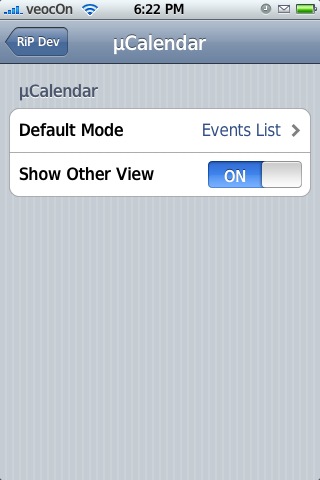
– Ability to select default mode: events or calendar;
– Ability to turn off mode switching by clicking, so you can only see events or calendar;
– The events for up to the next 7 days are displayed now (but no more than 7 on the screen);
– The events view is wider now;
– Fixed a visual glitch with a light line on the bottom of the calendar;
– Fixed a bug with the volume slider not functioning in the iPod control mode.
*FaceLift:
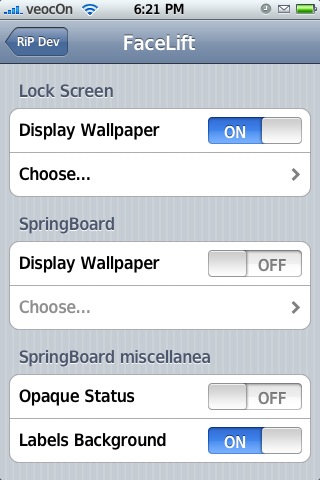
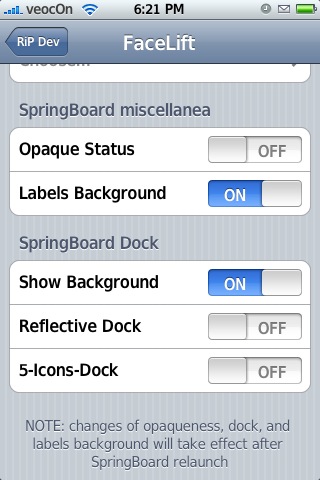
– 5-icons Dock support for firmware 1.1.3 and newer;
– Ability to turn enable Reflective Dock;
– Ability to turn off Dock background;
– Ability to make status bar opaque;
– Dark faceplates for the icon titles (nice for light backgrounds).
*Privacy:
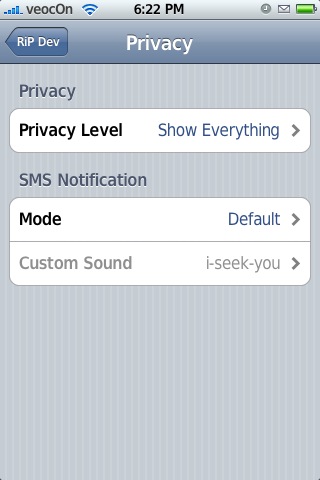
– Ability to hide only the message text or both the sender and the text in the addition to the “standard” options.
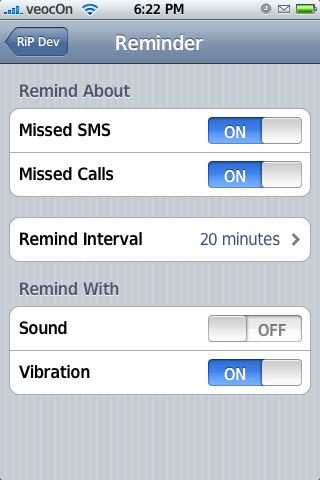
*Reminder:
– The phone is only waking up to make a notification to conserve the battery.
*Smart Dialer:
– Ability to dial a number from the Smart Dialer (including the plus sign, and */# symbols);
– Improved the search speed;
– Ability to choose the keypad language;
– Added an option to include the region code when searching for phone numbers;
– Added an option to delay the search until the designated number of characters is entered;
– Vibration is only done for 0.5 seconds per key press instead of the entire duration.


 Loading...


 Loading ...
has anyone outside of the US purchased this app? what is the payment method?
i’m outside of US, i’m using credit card payment.
You can also purchase through PayPal.
Dude that is sooo sweet that there is a free trial…you guys totally need to check it outl! I LOVE this app…it is by far one of my favorites!
does Caterpillar 1.1 work on version 1.1.4?? Thanks!!
Yes it does, I just installed it on my jailbroken 1.1.4 and it works great!!! I missed the 5 icon dock, but I only have the free trial. I don’t think I’m willing to spend the 20-40 dollars for a facelift installer might make free in the future.
No doubt…Doug totally misses his 5 icon dock!! He will be totally stoked when he gets back and the Caterpillar update not only allows a 5 icon dock but also the reflective dock!!
Thanks for the feedback!!
I boight an unlimited licence cause if it gets updates like these imagine what the Russian is prepairing. One of the best homebrew comercial apps i’ve ever used.
Hmmmm I guess I am the only person who has been having issues since and or when Cat is installed on my 1.1.4.
I lost all touch abilities when I updated. I get the home screen and can choose a app but nothing after that.
I restored and all is back but I am worried about installing this again, even through I paid for the unlimited license.
Maybe I will try again tomorrow.
Now I understand that it could have a problem with another app but it was only after I upgraded today.
i had the exact same problem and i was running 1.1.3. everything was fun except that you lose touch ability upon entering an application. had to restore as well and am now up to 1.1.4. not willing to take the risk. may ask for a refund
I had exact same problems on my 1.1.4 IPhone too, this happened when I installed the ‘trial version’.
I too had to do a total restore, lost all my previously installed apps(obviously!) & was soooooo totally bummed, especially after hearing how awesome this app is!
Have others had this problem with the 1.1.4 version? IS there anyway to avoid this happening?
I’m very sad to hear that this has happened to @ least 2 other people but am also glad to hear that I’m not the only one!!!
Does Caterpillar know why this is happening? R they doing anything about it to fix it?
Thanx so much for all ur info, u guyz sooooo rock! Just adore this site, I’ve spent hours on it, updating myself! I live in Northwestern Ontario & without embellishing, I have to say, I am probably one of only a very small handful of people who have an IPhone in this geographical area. So basically, if something goes wrong, I’m screwed!
Thanx again so much for all ur awesome info!
Luv u guys & this site, it’s been a GodSend!
Mystique :)
To be more specific I had no problem with this app both prior to and after version upgrade. I was only using calendar, reminder and dialer. After the upgrade I decided to install facelift, applied, restarted phone and that’s when I lost touch capability. I also had fontswap installed which I believe has been pulled by the source. Wonder if that has anything to do with it
2 day trial?!?!? Bit tight isn’t it?
I instaled facelift and everything is working perfect. I hade only problem with speeddialer. I have Polish language pack in my 1.1.4 Iphone and due to this I have to select ENGLISH as a dialer language.
the dialer didn’t work for me: back to homescreen.
no proper uninstalling of the whole package: took the uninstall-option in installer.app but a few thing were unerased. then I ssh’d and removed it step by step, because the caterpillar-uninstall-option within the preferences of the iphone wasn’t there due to the prior uninstall per installer.app … very buggy… have a clear iphone now. puh!
I Need Help: Second Page doesn´t work!
i have the same problem like you guys. But the main problem i have is that it´s not possible for me to dial any option. No button works on the second page.
I can´t remove. The second page is totally “locked”. I can´t select the uninstall button..
Can someone help me and tell me what to do now to make it work or uninstall?
I installed caterpillar, and applied only facelift, and it disabled all touch features in my iphone.
Beware…
I had to restore back to 1.1.4 and reinstall everything!!! :(
I installed caterpillar and i can’t uninstall it in my installer casue it disabled all touch features in my iphone. Then i delete the app. through iPhoneBrowser but my system font i had been changed and the µCalendar it was still on my screen.
Can anyone please help / tell me how to get rid of the µCalendar in my iPhone.
Thanks
Dear All,
I got e-mail reply from ripdev !
Here are the Full uninstall process provide by RidDev :
1. Remove all checks in Caterpillar
2. Reboot the phone
3. Uninstall from Installer app
4. If RipDev Settings still present delete CaterpillarPrefs.bundle folder in r/var/root/Library/RiPDev/PreferenceBundles/
from browser or use command line% rm -rf /var/root/Library/RiPDev/PreferenceBundles/CaterpillarPrefs.bundle
I also found out why after installing “Caterpillar” it will disabled all touch
features, this is caused by either Dock by Nate True or Screenshot
applications.
Info by MyTriniPhone.com
http://mytrini-iphone.blogspot.com/2008/02/caterpillar-for-iphone-adds-great-new.html
i’ve been doing some research on this as caterpillar has disabled my touch abilities upon entering an app, TWICE (had to restore twice). there’s been a solution talked about, which is install either killspring or respring so that when this problem occurs again, just activate one of the apps to restart your springboard and that supposedly would solve your problem. if you want to uninstall the application, make sure you uninstall all features you’ve applied with caterpillars first, then uninstall as an uninstall in installer leaves MANY things behind that can leave your phone in a very wacky state…
i’ve tried contacting ripdev twice, once last friday and again yesterday and they have yet to respond to me. they were really nice letters too just asking for a solution. i think for now, i’d recommend NOT installing this app although I do think that this is a great app…
Well this will be the 3rd attempt to add this comment:
If the touch screen is in/op how does one use Killspring or Respring?
Also I have been attempting to un-check Car and it will not allow me to.
Keeps going back to the homepage, and when I go back into Cat all is still checked…
NICE!
because using eithe rkillspring or respring requires no additional touch once activating the application and taht’s why it works. you don’t need to touch anything after you enter the application
Also why not delete all the RepDev folders in /var/root/Library if you have un-installed?
Should any be left?
Thanks
i’ve read in many places that ripdev have admitted to caterpillar not completely uninstalling even if you follow their directions. i personally think that the best/cleanest way to get rid of the enter app is to…restore…i know. it’s a pain.
the person i talked to at repdiv also claimed that the cause of the touch issue is due to either Dock.app and/or summerboard.app. he told me to uninstall both in order for Caterpillar to work properly. he claimed that those two apps are bad for the phone. i was annoyed to see him saying something like that. sure, those two apps could potentially be problematic but i’ve never had a problem until now and i haven’t seen anyone having problems with dock or summerboard, so i’d like to think that the problem resides more on caterpillar’s side. again. i do think this is an awesome app but…not thanks. i don’t want to pay for something this buggy.
decided to uninstall caterpillar after unchecking all options. I noticed I can no longer use Categories feature of placing apps in folders I created…
I checked the var/root/Library/Ripdev/preferences/caterpillar… deletion method ut couldn’t find anything that says caterpillar.
Would deleting the Ripde folder work?
1.1.1 (Mar 12, 2008)
* Installer:
o Caterpillar can now be uninstalled completely by unchecking all the components and hitting Apply in the Caterpillar.app
o Fixed an issue with the disappearing licenses under some jailbreaks.
o Added the license agreement.
* Smart Dialer:
o Fixed an issue with the keypad disappearing when some non-English languages are selected.
guys,
go to
/private/var/root/Library/RiPInstall/Uninstall
and run each uninstall.sh script within ssh/putty – afterwards the touch issue is gone. to clean out all related folder to caterpillar just ask google ;-)
peace out
critta
and run each uninstall.sh script within ssh/putty – afterwards the touch issue is gone
——————————–
ok but what we should do after running ?
I have the same problem, The touch screen is frozen. I can’t uncheck. None of the touch options is working. Can someone please help???
Also I am not very good at this. When you say run
uninstall sh etc..etc.. what does that mean?
hi i;m on version 1.1.3 and after installing caterpillar have lost the controls on touch can anyone help me to get rid of this problem. i don’t want to reset my phone. please help me..
mail me at : rinkuseth@yahoo.com
Nate True’s Dock.app is no good. Its an amazing application, but causes many problems for me. When I reboot, I lose touch inside an application, and when the sleep button is pressed, the screen doesn’t fully darken. All of these are fixed with a springboard restart, but sometimes, it causes the respring to crash. The only way to get out was to do a hard restart, and then my phone didn’t boot properly for a few times.
When I finally did get it to start correctly, I uninstalled the dock app, and everything was fine.