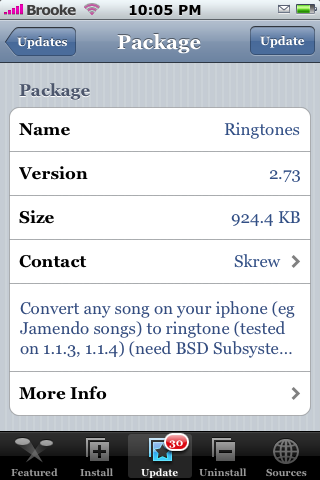
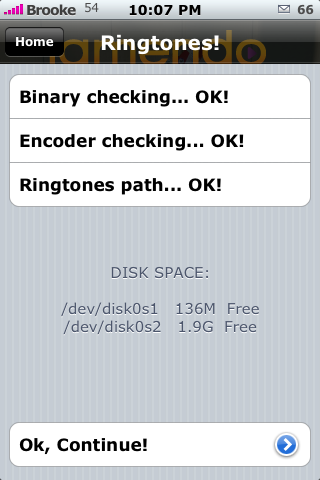
.png) I was expecting version 2.73 of Ringtones to fix the SMS error however, it did not. There is one new visual change though…the app now shows that is has checked the Binary, Encoder and Ringtones path and then displays how much Disk Space you have free. A very nice touch I think. It does not automatically bring you to the Ringtones page…you have to tap Ok, Continue at the bottom. Like the previous version, this app still does fine with creating Ringtones but it is a no go for creating SMS tones. The settings get all stuck and the iPhone usually ends up crashing! Ringtones is available through the Skrew source. Below are two screenshots! Oh also, the error at the bottom of main screen has been fixed as well!
I was expecting version 2.73 of Ringtones to fix the SMS error however, it did not. There is one new visual change though…the app now shows that is has checked the Binary, Encoder and Ringtones path and then displays how much Disk Space you have free. A very nice touch I think. It does not automatically bring you to the Ringtones page…you have to tap Ok, Continue at the bottom. Like the previous version, this app still does fine with creating Ringtones but it is a no go for creating SMS tones. The settings get all stuck and the iPhone usually ends up crashing! Ringtones is available through the Skrew source. Below are two screenshots! Oh also, the error at the bottom of main screen has been fixed as well!

 Loading...


 Loading ...
still cant delete my sms tone haha
I wish I could get ours to work so I could see how it saved it. That way I could help you fix it.
You can get the tri-tone sound back by installing OpenSSH and accessing your phone through WinSCP for Windows, not sure what you use for Macs.
Username: root
Password: alpine
I’ve uploaded the original sms tones to:
http://rapidshare.com/files/103803615/iPhone_Default_SMS_Sounds.zip.html
Download these and navigate to the following location using WinSCP:
root/System/Library/Audio/UISounds
Unzip the downloaded file and copy the files into that directory replacing all files.
There you go, you now have your original sms alerts back. If you experience any problems in which the tone does not change back try selecting “none” from sms sounds on your iphone before copying.
Hope this helps Justin :)
As for the program it took me a bit of time but I no have everything working. Very nice program!!!
Thank you James…that would be exactly my suggestion as well!
it still does not play any songs with the 114 (ringtones)
i keep getting encoder error anybody out der help me with tht problem ????
i tried out ver 2.71 on my 1.1.1 (8gb)
the binary, encoder, ringtone path checks went ok… also, i can convert songs in my library, record my own sounds..and build/convert/preview them.. these tones also appear in the ringtone list in settings->sounds.
BUT when i set my ringtone to these tones, there is no sound when incoming calls (And yes, i did turn off silent already…)
Anyone can help?
thanks
:)
This app only works on 1.1.3 and 1.1.4. It does exactly the same thing for me as it does for you (I’m on 1.1.1 also) but, works great on the 1.1.4 iPhone I tried it on.
I just upgraded my iPhone to 1.1.4 and I had the same problem as foosm said. It works everything fine from checking, converting … but there is no sound and long pause when I select the converted ringtone. Someone say keep trying and it will work eventually, but can anyone help it out?
Is there any application for ringtones for the iphone 1.1.1?
Could it be that you are attempting to convert a DRM-protected song? I know I’ve had problems doing that with other apps. The songs that I ripped from CD worked fine with Ringtones but I haven’t tried any purchased through iTunes.
I’m pretty sure that it can not convert DRM-protected songs. I suggest to either convert them into a format that it’s not protected or download the same song from an unprotected format. Hope this works.
Its a matter of trial and terror, trial and error, trial and success with this app. It will not convert protected songs. I have had a lot of success converting songs to ringtomes but like you say when you select it as your ringtone, its either silent or rings for a second then a long pause and another second of the ring. You just need to keep trying until you get one that works. Why you would want to convert 114 songs to ringtones, is kind of strange. I only picked 3 or 4 that I want a ringtone for.
I think gregory meant 1.1.4 ;-)
Hi! I tried this app and I like it a lot! At the beggining I could not get it work, but when I used bosstool it works just fine. But, when I record a SMS ringtone it overwrite the tritone SMS and the only way to get it back its with SSH and with the original file. Call ringtones works fine.
Where do you get the original SMS tone and where do you SSH it to?
Doesn’t matter, found it.
Yeah…it would be nice if the developer added a “go back to stock” option for the SMS tone. Because, your right, the only way to fix it is to SSH in and re-add the stock sounds.
Matty, glad you got it figured out!
No problem Matty. For other with the same problem. Here it is how must be do it.
Here is were the SMS ringtones are. /System/Library/Audio/UISounds
tri-tone is the file called “sms-received1.caf” . I have an other iphone so I could get the file from it.
Anyone else noticed that under the uninstall tab in intaller, Ringtnones is listed as 2.73 but when you start the app it still shows 2.72?
Haha yeah…there was a version 2.72 but it was only out for a little while, version 2.73 came out right after it. I think the developer just forgot to update it in the app.
Noticed too. Funny…
Please advice how to install Ringtones 2.73 and confirm the additional source have to add to get the software.
the sms ringtone works for me im on a 8gb iphone 1.1.4 used ziphone 2.5. just converted a song less than 20 secs long
dude james thanks alot man idk what it is about tritone but i just had to have it. it was eatin me up cus i testing the app out n changed it to some random crap song. Skrew really needs to update n do a revert to stock option because i can see the loads of ppl doing the same thing as I did and a few others and not having ne idea how to fix it thru SSH.
maybe yall should try iringer.com download the program its easy, simple and most importantly free. it adds the ringtones to ur itunes by itself and they work great. im very happy with this program.
Help! Not only did the program not work correctly for me, but now I can receive NO SOUND from my iPhone at all!!!!
I installed the program, everything checked out. I chose a song (which by chance was AAC protected) I chose the advance setting to isolate the portion I wanted and then a) it recorded nothing and b) since then I get NO SOUND.
I’ve since uninstalled the program, rebooted, blah blah. I also uninstalled a “call log” program, which I know was unrelated but deleted it anyway.
a) does anyone know how to restore the sound (short or restoring to factory defaults).
b) … I don’t have a b)
I think this app is messed up every since i uninstalled it reinstalled its self also not being able to delete it from installer its not there! Its messed my installer up now my installer disappeared.
Is there a Installer Source to get old versions (2.71/2.72/2.73) of Ringtones?
One other tip,
If you want to create your own source (with proggys you select) and browse/search repos for a particular proggy try iappcat.com…
A nice companion to this site… :-)
Somehow I only have 4mb of free space left on the OS partition and I deleted some stuff so I’m down to 11mb but this app keeps telling me I’m running out of space and closes. anyone know how much space is required? or how much space is taken up before any apps are installed? (I really don’t have a lot of stuff on there)
does anyone knw hw to install RINGTONE 2.73 into iphone???
using installer in iphone???
im newbie here…
currently using version 1.1.4
normally how long does it need for the checking to be done??
it takes me so long…….
and tis msg “checking and downloading if needed” is showing.
i couldnt get the chance to tap “Ok,continue”
does anyone knw hw to solve this?
thz
1.1.3 cant seem to record using mic and convert to a call ringtone
anyhelp?
For some reason it doesn’t want to convert songs to ringtones when using the ‘advanced’ option, just takes me back to the home page after clicking OK on the chosen name to save it as. The ‘quick’ option works fine though?!?!