Still Lines for the iPhone 3G Safari Adds .net, .edu and .org to .com Button

Fix for WiFi Problems

July 15, 2008 by Douglas  
Categories: Settings, troubleshooting
Tags: , ,

60 Comments
26,086 views

wifiWith my 1st Gen iPhone I had trouble with a few different WiFi hot spots. The iPhone would connect fine to the router or access point but it wasn’t getting to the internet; Safari, 3rd Party Apps, nothing could connect. All of these WiFi hot spots were at businesses: one was a grocery store, one was a coffee shop and one was a restaurant. I knew it wasn’t just my iPhone because when mine broke in Brazil I had to exchange it for another one. And of course Brooke’s didn’t work at these places either. When the new iPhone 3G came out I was hoping that it would connect but it didn’t. I was talking to Adam (our website programmer) and asked him if his iPod Touch had the same problems connecting. He said yes but that he fixed it. Sweet! He said there was some problem with the DNS information and that you can manually change it and it would fix the problem. So here are a couple of Free Public DNS options and the instructions on how to fix it:


1. Connect to the WiFi that is giving you the problem. You must be able to connect to it. If you can not connect then this won’t work for your problem.

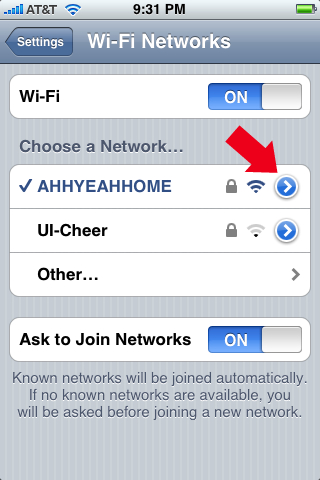
2. In your settings select WiFi and then tap the blue arrow next to the WiFi name you are connected to.
3. Erase the DNS info and add the following exactly like this: 67.138.54.100, 207.225.209.66
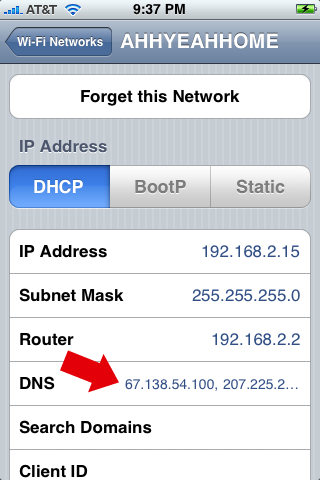
Note: In case the first two don’t work try this: 208.67.222.222, 208.67.220.220

I also tried this on my home network that was already working and it didn’t seem to effect anything. It still works fine and wasn’t any slower or faster. So give this a try and let me know how this works for you.

Similar Articles:

Free WiFi at AT&T Hotspots Including Starbucks! (2565 views)

PdaNet – iPhone Tethering Application (6391 views)

Advanced Preferences 0.6a (2834 views)

Jailbreak Firmware 3.0 Beta 5 (9774 views)

DropCopy 0.4b Update (295 views)

Comments

60 Responses to “Fix for WiFi Problems”

  1. shake controll on July 15th, 2008 10:41 pm:

    it works!! tahksa lot.!!

    [Reply]

    ko on July 15th, 2008 11:54 pm:

    is there a space between the comma and the 2nd dns

    Adam on July 16th, 2008 1:05 am:

    Nope, just a comma.

    ko on July 16th, 2008 2:39 pm:

    thanks man

    ko on July 16th, 2008 2:43 pm:

    is the 2nd set better or the first

    tommyboy on February 12th, 2009 6:20 pm:

    not surI’m e how you are able to make manual entries under. My iPhone’s DCHP settings prohibit me from making manual entries as they must be automatically acquired from the router itself. That is… the router issues the IP and DNS info once the WEP password has been input.

  2. Pete on July 15th, 2008 10:44 pm:

    Hey, thanks for this tip. I have this problem with my wireless router (Linksys WRT160N) at home where a page in Safari would load only half way or not at all. Twinkle wouldn’t connect either. I’ll try this out and see what happens.

    [Reply]

    Pete on July 16th, 2008 2:08 am:

    I used the opendns service along with those DNS id’s and it appears to be working very well now. Thanks!

  3. feross on July 15th, 2008 10:49 pm:

    yup muy muy muy perrrrrrfecto

    [Reply]

  4. jk111 on July 15th, 2008 11:14 pm:

    Just a general tip:

    The two IPs you mentioned above: 208.67.222.222, 208.67.220.220
    come from a service called OpenDNS. I would highly recommend using these at home and go to opendns.com for more info! It’s a free service and it is absolutely amazing. You can choose different options and it can block spam, etc.

    [Reply]

    Adam on July 16th, 2008 1:07 am:

    Thanks for the info. I saw those IPs mentioned several other places. I’m not sure where Doug found the first set, but the second set is what I had used.

  5. German on July 15th, 2008 11:47 pm:

    well, some routers provide no internet but local access only, iphone doesent tell you that. cant use wi fi at work cuz my new manager doesent want to share internet.

    [Reply]

  6. RogueSpear on July 16th, 2008 12:21 am:

    For years now I’ve been using 4.2.2.2 which is quite easy to remember.

    [Reply]

    hi on January 26th, 2009 5:05 pm:

    does that work for an IP? Does it automatically save when you enter it once or do you need to enter it every time you access it.

  7. rog on July 16th, 2008 2:48 am:

    Actually, the easiest fix for Linksys and most of the wifi AP’s is to modify the DNS entry in the iPhone to match the “Router” (default Gateway) IP Address. This is a minor DNS bug in the IP stack in the iPhone’s Mac OS. You don’t need to do this for all Linksys models. Only if you experience connection problems with the emails or Safari after you got the valid DHCP address from the AP. If you don’t have any problem browsing, you don’t need to fix it with this workaround.

    Cheers

    [Reply]

  8. Jash Sayani on July 16th, 2008 5:45 am:

    Fixed in 2.0 firmware !

    [Reply]

    ko on July 16th, 2008 2:40 pm:

    no its not

    Raghav on May 28th, 2009 8:04 pm:

    I have a iPhone 8gig purchased 18 months ago. I am in Indi. Everything was fine until i upgraded it to Firmware 2.0 :( now my iPhone doesn’t catch any Wifi signal and the battery doesn’t last for more than 8 hours ( Idle time ) if i use it, i bet only 3 hours would be the backup. I have tried a million restores and upgrades but no luck. I have noticed that there are many who has this problem. They are lucky bcos most of them got it replaced with Apple and few got brand new ones . As i live in India, no apple stores who repair 1 st generation iPhones. Recently iPhone 3g Was launched in India so, they repair only 3g. I am sure that my Wifi radio is fired

    Note: i also edited com.apple.wifi.plist but no luck
    you can ping me on Raghav_vicky23@yahoo.co.in

    Thanks in advance

  9. n0m0n on July 16th, 2008 7:45 am:

    I have a question sorta related:
    I am using a airport extreme and ever week I have to reset it because I loose the ability to SSH in.
    All I have to do is unplug the airport and plug it back in it sets itself.
    I have been on with Apple support for HOURS and they sent me another airport but its the same outcome.
    I have everything plugged into my UPS unit so I dont think its related to power.
    I never loose WiFi for my network but do loose the capability to print via the airport.
    The lose of printing capabilities is what alerts me that I need to unplug my station again and reset it, of course the lack of SSH also reveal this same thing.
    Anyone else hear of this or have this happen to them???
    I would really like to get tot he bottom of this and finally get this addressed…

    Thanks

    [Reply]

  10. Bill on July 16th, 2008 7:47 am:

    Thanks guys for this simple fix. I have been having problems with my home wifi. Though the fix was not immmediate, I woke up this morning and it was doing exactly what it was supposed to. This is why I tell everyone about Appleiphoneschool. Way to go guys.

    Bill
    Posted wrong first time.

    [Reply]

  11. Tim Aucoin on July 16th, 2008 7:58 am:

    Hey guys…
    Is this specific to the US or is it a “generic” thing that will work here in Canada also?
    Thanks :-)

    [Reply]

    Douglas on July 16th, 2008 8:59 am:

    I assume it will work worldwide. See http://www.opendns.com for more info.

  12. JuanKi on July 16th, 2008 9:42 am:

    Thanks a lot!! I’ve had this problem in a couple of malls and at my gf’s home, it would connect but nothing works!!

    I’ll try this next time!

    [Reply]

    JuanKi on August 28th, 2008 11:30 am:

    I just tried it with a couple of Wifi’s, it apparently connects but safari isn’t able to open any pages…
    Changed the DNS to the three options posted but none of them, work :(

  13. Dwight on July 16th, 2008 10:06 am:

    OpenDNS has been around for a bit and has always worked for me when I’ve had network/DNS/can’t connect to the internet but show an iP address on my machines at home. Glad to see it finally mentioned here. Cheers!

    [Reply]

  14. GeeBee on July 16th, 2008 2:16 pm:

    men! thnx alot, works like a charm

    [Reply]

  15. Fred on July 16th, 2008 3:14 pm:

    Hey guys, ok i have a question. when in the opendns website which one do I download. computer/router/or dns….the problem I’m getting is my iphone says its connected to wifi, but nothing works, even though everything else does work ie.my laptops and other iphone. 1.1.4 unlocked iphone with iLibirty+ thanx for your time

    [Reply]

  16. Frank on July 16th, 2008 3:16 pm:

    Had no idea why I could not connect to some WIFI hotspots. I tried this and it works!!!!!!!. Love you guys for this info. 1st gen 1.1.4. Jailbroken and still loving it.

    [Reply]

  17. Emmanuel on July 16th, 2008 6:57 pm:

    Gracias ,thanks a lot Doug, my iphone was showing it was connected to the wifi of my home or work but I couldn’t refresh sources or watch youtube or anything I was worry , I was thinking to jailbreak and unlock it to try to solve the problem, I am glad I saw your post before. I m glad you had same problem.
    Saludos

    [Reply]

  18. Ric on July 17th, 2008 12:54 am:

    Hello Douglas/everyone,
    I need a bit of your help…

    I can’t connect mine to any hot spots wifi.
    No Router & DNS show up, just the IP Address & Subnet Mask shown only. Any idea what’s wrong?
    But somehow while at home I had no problem connecting to my Airport extreme BS.

    Mine is a 1st gen 1.1.4 jailbroken iphone.

    [Reply]

  19. Kevin on July 24th, 2008 3:12 pm:

    I love you man … was about to go ape on this iPhone and now it is working perfect with my home router :-) Who wudda thunk DNS was the prob?

    [Reply]

  20. ricotong on July 28th, 2008 12:22 am:

    Hi,
    I just upgrade my iphone (2g) to v2.0 and do it by pwnage.
    Everything work ok except wifi, due to i click the wifi button to connect. Then the screen just shown me keep running but no any result even any network can detect.
    I used router in my room and normal before!!

    [Reply]

  21. Does anyone's WiFi sometimes not 'work'? - MacTalk Forums on August 1st, 2008 12:11 am:

    [...] this a go Fix for WiFi Problems | Apple iPhone School Its what fixed my [...]

  22. luis on August 1st, 2008 9:04 pm:

    hey men!! thanks! you really helped me!

    [Reply]

  23. jericho on August 6th, 2008 1:14 am:

    my wifi is not worked on my iphone firmware 2.0, somebody help me maybe?????

    [Reply]

  24. MacMacMac on August 23rd, 2008 8:04 am:

    Let me repeat what has been started:

    “There was some problem with the DNS information and that you can manually change it and it would fix the problem. So here are a couple of Free Public DNS options and the instructions on how to fix it:

    1. Connect to the WiFi that is giving you the problem. You must be able to connect to it. If you can not connect then this won’t work for your problem.

    2. In your settings select WiFi and then tap the blue arrow next to the WiFi name you are connected to.

    3. Erase the DNS info and add the following exactly like this: 67.138.54.100, 207.225.209.66

    Note: In case the first two don’t work try this: 208.67.222.222, 208.67.220.220

    I also tried this and already working and it didn’t seem to effect anything. It still works fine and wasn’t any slower or faster. So give this a try and let me know how this works for you.”

    [Reply]

  25. Michelle on September 9th, 2008 4:02 am:

    Hey sorry to bother you but, i have installer and whenever i try to install something it says, install package failed can’t find host. Please HELP!!!!!!!!!!!!!!!
    And the internet doesn’t work either!
    Please send a email to xxgmnexonxx@yahoo.com.au
    I would do anything!!!!!!!!!! Thxxxx

    [Reply]

  26. Rich on December 26th, 2008 10:59 am:

    Tried all DNS settings. iPhone just says it isn’t connected to the Internet. Any other ideas? This problem is very annoying! Help????!

    [Reply]

  27. Ruben on January 3rd, 2009 6:38 pm:

    Believe me, I have searched everywhere for a solution for the Iphone wifi problems, Im convinced it is a software issue, theres too much people having this problem, in many cases it begun with software update or a iphone restore after without it everything was working OK. And about the solution proposed in this article let me tell you this is te only advice that worked for me, I have only been testing it for about 20 minutes, but I was able to connect to wifi all the atempts. My question is, why couldnt apple realease a memo saying whats the solution for this problem, I couldnt even register to the apple website to post a comment on this. I tried everything before, even claiming warranty without success (excesive burocracy and greed from tech representatives) I hope once for all this solves all my Iphone Wifi’s problems. Thank you indeed.

    [Reply]

  28. Nouman on January 7th, 2009 4:43 am:

    i hv got a problem in my iphone that it finds the router but when i click on that router it says UNABLE TO CONNECT and it says for every router ,,, i entre the key code perfectly .. but no!!!!
    Will this DNS change help me out anyway??
    if not , can some one guide me a fulproof way out of it

    [Reply]

  29. ridz on January 11th, 2009 8:01 pm:

    Hi,

    i’m using iphone 3G 16gb. previously i’m using ver 2.1and turbosim. i’m having problem with the wifi. This happened when my wifi was abruptly disconnect while i was downloading an application from apple store. it leave a hollow application button. since then the wifi can only detect the network but unable to connect to any wifi network either the open network or secured wep or wpa.

    With the latest release of the jailbreak of 2.2 i managed to jailbreak my i phone, hoping the wifi will fix itself but to no avail. The yellowsn0w is install using the iphone pc suite(i was told). I obviously paid for this service. The guy who does this told me he can’t fix the wifi too.

    is the wifi fix in yr website is only for 2g iphone? I would really appreciate if you have a solution for this problem or at least lead me to a solution.

    I’m living in abu dhabi and bought the phone here from a third party shop.

    [Reply]

  30. Big Wave on January 17th, 2009 5:13 pm:

    Hello All:

    I have had this problem for three months. I tried everything listed on this page-still nothing. Changed routers-still didn’t work. Change from WEP,WPA,WPA2,back and forth, etc.-still nothing. Went to the Apple store-they tested it-said “it’s fine, it connects to our network open and with WPA, WEP, etc. We restored the software.” I went home-SAME PROBLEM. I knew it was the device the whole time because everybody else I know that has the same device, software, etc.-WORKS. So I went back to Apple-told them the whole story-again. They tried to turn me away-AGAIN. So…I read the “Genius” the riot act in the nicest way possible…and guess what-he warranty exchanged the device and IT WORKS FLAWLESSLY NOW. ***Apple has become harder and harder to deal with as time goes on, I am a data consultant in the wireless industry, and explained the issues to the Apple rep in terms he understood…but it didn’t matter. The only way I could get him to warranty the device was through verbal force…so go to Apple and use your words!

    [Reply]

  31. daniel on January 17th, 2009 8:15 pm:

    will this work at the free at&t hotspots? I get a “attwifi” signal at my school, and sometimes I can connect but lately all I can do is connect to the router, and I get a 169 IP address…..Ive tried to renew the lease and forgetting the network but still no help. I tried with that app from the AppStore too but nothing…please help!

    [Reply]

  32. Lammy on January 19th, 2009 5:37 am:

    mi wifi appears connected. but safari or youtube or nothing works. i dont know.. what shall i do? i just updated my iphone 2G to 2.2 version and i got this problem.. someone help please.

    [Reply]

  33. Deep on January 22nd, 2009 4:08 am:

    Hey sorry to bother you but, i have installer and whenever i try to install something it says, install package failed can’t find HOST. Please HELP!!!!!!!!!!!!!!!
    And the internet doesn’t work either!

    PLZ SEND YOUR MAIL 2 jallu501@ymail.in

    [Reply]

  34. Deep on January 22nd, 2009 4:12 am:

    Hey sorry to bother you but, i have installer and whenever i try to install something it says, install package failed can’t find host. Please HELP!!!!!!!!!!!!!!!
    And the internet doesn’t work either!
    plz send ur mail at
    dipesh501p@yahoo.in

    [Reply]

  35. Arcane on January 28th, 2009 11:52 pm:

    I hv an official unlocked 3G for almost 2months now. Running Firmware 2.2 with jailbreak. However, the WiFi + Bluetooth has stopped working since a week ago. I can’t detect any SSID on WiFi listing even when I use WiFiFoFum & WiFiTrak to scan at home and at places with known WiFi service.

    I’ve tried resetting network and even performed factory restore with no success. Also tried reading up on several forum/support/discussion and discovered this problem is quite common but all does not provide any solution.

    Everything else works perfectly and phone reception is usually optimum level. An inspection on the camera + headphone rings and chrome bazel, which Apple claim are the antennas, are perfectly intact as the phone has never been dropped or subjected to any physical abuse.

    Have I missed out anything or can anyone please provide a solution?

    Please email me at faizul.idrus@gmail.com
    Thanks!

    [Reply]

  36. Partho on March 8th, 2009 10:10 am:

    help!
    why wont my iphone pic up my wireless router?

    [Reply]

  37. Partho on March 8th, 2009 10:12 am:
  38. aliensom on April 4th, 2009 11:12 am:

    same problem as above here after jailbreak and couples days use cant detect any ssid i think wifi antenna is dead all other things are working
    if anyone has a clue??

    [Reply]

  39. nicolas on May 4th, 2009 9:13 pm:

    my wifi antenna it’s dead too.. nothing seams to weke it up again… :(

    [Reply]

  40. jane on June 6th, 2009 9:31 pm:

    same prob here too… my wifi says “not connected” even dont find any network even linksys. my husband’s iphone is working, my laptop etc. but my ipod touch isn’t. I already downgraded it and upgraded it again nothing works! even restoring it. if anyone find a solution for this kind of problem please let us know, or email me at janechua23@yahoo.com

    [Reply]

  41. SAJJ on July 2nd, 2009 5:15 am:

    having manual DNS servers worked for the most part.

    still get crap connectivity sometimes, but better now

    rocking: 2g 3.0 hactivated tmobile

    [Reply]

  42. OncDoc on August 17th, 2009 7:57 pm:

    Worked like a charm. Thank you, thank you!

    [Reply]

  43. Fatmiri on August 30th, 2009 8:54 am:

    On iphone 3G, Version 3.0.1 my wifi says “not connected” even dont find any network even linksys, my husband’s iphone is working, my laptop etc. I have instalet now, i have reset network now but don`t work!!!
    If anyone find a solution for this kind of problem please let us know, or email me at fatmiri@msn.com

    [Reply]

  44. Athena on September 6th, 2009 11:11 pm:

    hi guys.. im having same problem.. mine is version 3.0 iphone 2g and now my wifi cant detect my router.. its just keep on searching but nothing happens! any suggestion how to fix it?

    pls email me: athena.benin@gmail.com

    [Reply]

  45. Happy now on September 18th, 2009 7:42 pm:

    Dns trick worked after entering in my ip address and submask with the second string of dns numbers. Thanks!!!!

    [Reply]

    Chris on September 26th, 2009 8:49 am:

    Thank you for the great information.

    I thought my wifi was dead on my 2G running 3.1, but after I entered in the second set of numbers: 208.67.222.222, 208.67.220.220 Everything worked great for about 5 minutes. Then stopped working. If I use the first set of numbers: 67.138.54.100, 207.225.209.66 I get a solid wifi connection, stays on for a long time, but no with connection to the internet.

    Should the iPhone have the sam IP as my AirPort Extreme?

    This sucks, because everything was working perfectly and one night wifi just stopped working defaulting to EDGE.

  46. Rob on September 20th, 2009 12:57 pm:

    Hi guys. I used to have the 2g iPhone and I had excellent wifi connection at home. Just recently I bought the iPhone 3gs and upgraded to firmware 3.1 Now, however, my iPhone rarely detects a wifi connection at my home (even when it does connect, it is for a minute or so and it is bad and then it goes back to my AT&T 3g network). Can anyone please help me out here and what I can do to fix this… It would mean so much. Thank you.

    [Reply]

  47. kc on October 16th, 2009 6:28 am:

    thanks for your advise. this is work for my iphone. I had contacted with iphone’s cusomter servise, but they can’t solve this problem.

    [Reply]

Please leave a comment below...
and if you want a pic to show with your comment, go get a gravatar!


Still Lines for the iPhone 3G Safari Adds .net, .edu and .org to .com Button