 |
Available In: Cydia |  |
Price: Free |
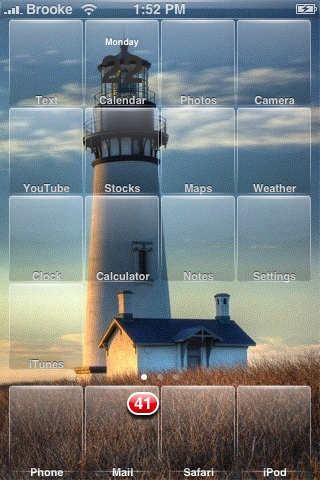
 As many of you know, I am a huge fan of clear icons. I love that I can change the wallpaper and feel like I have a whole new theme! One of my very favorite themes is Reveal via iSpazio. Well, this morning, I also ran across Lets See via modmyi. They are strikingly similar with just a small difference in placement of the icon label. So, if you are looking for a clear icon set…check out the two below. The first screenshot is Reveal the second is Lets See.
Note: Make sure you select User Wallpaper in Winterboard so that your wallpaper will display behind the icons.


 Loading...


 Loading ...
Thanks For The Love.
(Do you know what name to put for star wars the force unleashed mobile because my iPhone has to much text for app name and I can’t read it)
You can use the “Rename” app from Cydia to name it whatever you like.
Thats What i did personally but for everyone else i would like to know the default name is
IF THERE IS ANY OTHER ICONS ANYONE WANTS ADDED SEND ME A EMAIL AT TIZOCMAN@ME.COM AND I WILL RELEASE A ICON PACK SOON
Stupidly, the default name is: Star Wars: The Force Unleashed. I changed it to simply Star Wars, using Rename.
Those look pretty slick. I might just try them out! Thanks!
Hmmmm… I like the no icon look and that’s why I went with VIVID previously. It irritates me that for icons it does have in the cache, it will show the default icon which can wreck the look.
It looks like both of these simply use a clear/frosted placeholder and just display the text of the app. Is that true? If so, I think I’m sold.
Not quite the way I hoped. The both use a full icon cache. I’m back to using Vivid as I like to have a little visible on the icon.
You hip kids that like the see-through theme styles might also want to check out Gruppled in Cydia. It takes some fiddling/magic to use your own backround image in Winterboard but with the right wallpaper… very lickable.
Thanks. I’m checking that one out now
Nice. Like Vivid with more icons.
How did you fiddle to get your own wallpaper in use?
Download DimWallpaper in Cydia. Be sure to have that checked and above Gruppled in Winterboard. I have no idea how I figured that out… enjoy.
Thanks. It’s weird that Winterboard “User Wallpaper” doesn’t work with this theme.
I’ll play with it later.
Yeah. I thought that was weird as well. It might be some sort of bug in Winterboard but I’m more inclined to think Gruppled is the cuplrit with its fancy-pants changing wallpapers.
Thanks man!! I been trying to figure out how to get transparent icons with my personal background. That dim walpaper download worked like a charm!!
recruiter – you might want to do a search for Glasklart. I made the switch and it has a ton of icons to boot.
Star wars should be
Star Wars: The Force Unleashed
remember to put the colon in tnere
Thanks
My Mac Wont let me create a file with a “:” in the file name. Will Try To Work Around This.
I would like this icons please: iBlacklist,Swirlymms,Cameraswaproll,Starwars, please if u can please.
Sure i will add
once icon pack get enough i will add to mmi repo
why does mine show some as transparent and shows others as real icons? What did I do wrong.
The normal icons are the ones that aren’t included in the theme pack. Sometimes you can email the developer (tizocman graciously responded above: IF THERE IS ANY OTHER ICONS ANYONE WANTS ADDED SEND ME A EMAIL AT TIZOCMAN@ME.COM AND I WILL RELEASE A ICON PACK SOON)
For some reason i still prefer Reveal over Lets See. And Reveal is now available on Cydia.
If you wrote an article about life we’d all reach elngihtenmnet.
how can i change the wallpaper in “reveal transparent” to display my normal wallpaper ? ? ?
i dont like the fading but the icons look great…
thanks in advance
i need some help asap i installed the let see app from winter board but now i can restore none of my apps my phone looks like its been erased and all thats left is the wallpaper no icone at all how can i fix this
has this happened to anyoen that has used this theme????
Hey, love the theme. Quick question though, how were you able to remove the default text at the bottom of the icons?
Cory, you can remove the text in WinterBoard by selecting the “Transparent Icon Labels” option
Hi there.
Love your work.
Any chance of send me the raw PNG file with all the layers so I can edit them. I only have basic knowledge on photoshop, so I could do the text changes myself and create my own icons.
Thanks
Alessio
i installed reveal and it works great but my sms icon shows as the original and so do a few other basic apps. how do i fix this??
My sms icon stays the same too, how do I fix it?
I installed reveal transparent theme, none of my icons appear transparent, Plz help :(
Any chance of this being updated for iOS 6?
I used to love this theme it would be great to get it working again