WinterBoard Battery Mods AppStore Apps Free Today

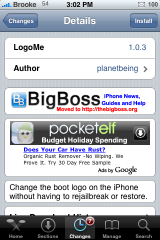
LogoMe 1.0.3

October 23, 2008 by Brooke  
Categories: Cydia, LogoMe, System
Tags: , , , , , ,

78 Comments
19,675 views

Available In: Cydia       Price: Free  

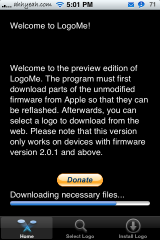
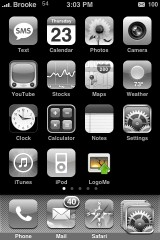
LogoMe LogoMe is an application that allows you to change your boot logo image right from your iPhone or iPod Touch (no need to restore, rejailbreak or use an application on your computer). When you install LogoMe, you will get the main screen. When you open the application it will download all the “necessary files.” Once it is finished, you can select the Select Logo option on the lower menu bar. From here you will need to enter a url in which the image is located (see screenshots below). Once you have entered the url, select Download.


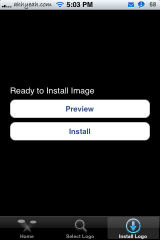
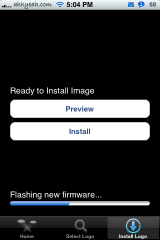
Once the image is downloaded, you can then select the Install Logo option on the lower menu bar. From here you can Preview your image or Install your image. If you select Preview, you will get a nice preview of what your boot screen will look like. If you select Install, it will flash your new firmware (this will take a minute or two so don’t panic!). Once it has finished flashing your new firmware all you need to do is close the application and restart your iPhone…you will see your new boot logo image. If you would like to change your boot logo again, you can just go into LogoMe and enter a new url and Install it. It really is a very simple and painless way to change your boot logo. Neither Doug nor I had any issues using this application. Though, we did find the images to be a little on the pixilated side but it was not too bad.
Similar Articles:

Changing your Boot Logo without Rejailbreaking (14862 views)

iTerminal 3.0 (762 views)

iReboot, PowerManager, Restart, Lock, Shutdown, Repring….what is the difference? (2090 views)

Restart/Respring apps available in Cydia (8305 views)

FontSwap – Change the Fonts on your iPhone or iPod Touch (6086 views)

Comments

78 Responses to “LogoMe 1.0.3”

  1. Misecia on October 23rd, 2008 4:06 pm:

    using this program is inadvisable as its possible to corrupt your phone with the only solution a full restore.

    [Reply]

    Ipwner on October 23rd, 2008 5:59 pm:

    No, it works fine it does not corrupt your phone. Don’t say a lie before experiencing it first

    mnnjr369 on October 24th, 2008 2:30 am:

    here here don’t bad mouth it till you try it!!!

    cool dude on November 30th, 2008 3:11 pm:

    qill it work on 2.2 firmware because mine is always saying downloading like when first installed it must get the files it wont get them please help

    SOLO on February 2nd, 2009 6:38 pm:

    Yes It totally locked my phoe with a white screen I have used several programs and apps no problems.
    Nothing worked hard restart DFU mode tryed to restore first time error could not be restored.
    The second time after hard restart it was recovered but have to be re-jailbroken and all apps reinstalled.
    This was a total Bummer.. .As I lost everything

    have several other words to discribe it but ill keepem to myself..lol

    Chris on May 6th, 2009 9:34 pm:

    IPOD TOUCH G2 8GB FW 2.2

    I CAN’T EVEN PUT MY IPOD IN DFU MODE!!
    IT WILL NOT BOOT!
    THE SCREEN WON’T TURN ON!
    I CAN’T CONNECT IT TO MY COMPUTER ANYMORE!

    no joke, sadly….
    please, help me!

    my email: evilfishy1p@gmail.com

  2. goonerlen on October 23rd, 2008 4:27 pm:

    where do i find URL s to download from?

    thanks

    [Reply]

    mnnjr369 on October 24th, 2008 2:29 am:

    ispazio has boot logos. And this program worked fine for me!

    ianc on December 6th, 2008 2:25 pm:

    try this you should find enough to go at

    http://www.spaziocellulare.com/ispazio/en/download-custom-boot-images-for-pwnage-tool-and-winpwn/

  3. Danny Thomson on October 23rd, 2008 4:45 pm:

    its worked great for me, I used pwnage to create one, and only could create black and white and under a certain file size. using LogoMe I now have a picture for my boot logo, LogoMe worked perfect and easily for me. Im also on the latest firmware

    [Reply]

  4. 14 on October 23rd, 2008 5:26 pm:

    u should stil use an image that pwnage would accept…

    [Reply]

    Ipwner on October 23rd, 2008 5:59 pm:

    It does not work if you have a image over 100K

    mnnjr369 on October 24th, 2008 2:32 am:

    mine was over 100k and is full screen color.

  5. LogoMe 1.0.3 - Change your boot logo image right from your iPhone | MyTriniPhone.com on October 23rd, 2008 6:37 pm:

    [...] (via AppleiPhoneSchool.com) [...]

  6. aalanskw on October 23rd, 2008 6:40 pm:

    it works. Perfect, been using it for a week or so

    [Reply]

  7. Zack Hébert on October 23rd, 2008 8:45 pm:

    I’ve tried a few different hostin’ sites to host my boot logo, and they’re all too big =| The file side on my computer says 76K…

    [Reply]

    Zack Hébert on October 23rd, 2008 8:46 pm:

    [Edit my grammar]

    I’ve tried a few different hostin’ sites to host my boot logo, and they all make the size “too big” =| The file size on my computer says 76K…

  8. Brandon on October 23rd, 2008 8:56 pm:

    OK, this one too… I can’t find this app in Cydia… I’ve searched for “Logo”, “LogoMe”… nothing! What the heck is going on?!? I can’t find the fire battery themes either!

    [Reply]

    Brandon on October 23rd, 2008 9:03 pm:

    Nevermind, I figured it out…

    For some reason my package list wasn’t being updated when I started Cydia. If you go to Changes then press the Refresh button, it should force a refresh of your packages.

  9. madison on October 24th, 2008 12:58 am:

    it crashed my iphone dont use this app you will have to restore

    [Reply]

    bengz on October 24th, 2008 2:42 am:

    yes, I can confirm that too, crash my ipod touch with fw2.1
    had to do a fw restore.

  10. Yogi on October 24th, 2008 3:07 am:

    is logome still beta or a final release?

    [Reply]

  11. Zimoxx on October 24th, 2008 4:33 am:

    Both the home- and powerbutton on my iPod Touch stopped working after changing the boot logo. I had to do a full restore.

    [Reply]

    dominickc on October 24th, 2008 6:25 pm:

    hard boot by holding them each for bout 10 seconds. It put my phone into what i assume was DUF, the boot fixed it.

  12. cihan on October 24th, 2008 8:03 am:

    İ’ve created a png file using photoshop. (2 layers, 1 is transparent second is the pic i want) then saved it. uploaded it to an imagehosting site (I’ve used imageshack). from the LogoMe i’ve typed it adress and bingo! it is working like a charm!

    [Reply]

  13. Michael on October 24th, 2008 3:28 pm:

    It also crashed my 2.0. I had to do a full restore to 2.1, and rejailbreak. Now I’m afraid to re-install it.

    [Reply]

    ianc on December 6th, 2008 1:43 pm:

    it says you have to be running 2.1 or above!!
    so now you are on 2.1 might be worth trying again

  14. Gigi on October 24th, 2008 4:33 pm:

    Worked fine for me EXCEPT I’ve lost my photos in the camera roll !

    [Reply]

  15. WaitWhat on October 24th, 2008 7:31 pm:

    Works great for me on my 1st gen phone running 2.1. I used a 320 x 480 png.

    [Reply]

  16. Rami on October 24th, 2008 8:02 pm:

    Hey guys, I think this is a really great app. Here’s a tip, basically if you’re not sure how to use the URL part, just make a boot logo on photoshop (could be anything you want), save as a jpeg file, and when you’re done, go to http://imageshack.us/. You can just host your image there and they will give you a URL that you can enter in the boot logo and there you have your custom logo =]
    Hope that helps !

    .rami

    [Reply]

    Mitch on November 4th, 2008 4:23 pm:

    Rami – awesome tip, thanks! Was having a hard time linking to my myspace photos!

  17. Ryan on October 24th, 2008 10:01 pm:

    honestly this application scares me…..one of those things that is too good to be true…..

    [Reply]

  18. mastuul on October 26th, 2008 10:30 am:

    I went to the ispazio sites, found the boot logos, but when I input the url, the app kept telling me it was “unsupported.” Any suggestions?

    [Reply]

    Mitch on November 4th, 2008 4:22 pm:

    You need to view the image full screen, not from the gallery or slide show. Then try copy/pasting it into tinyurl.

    Also, one irritating thing about logome – you HAVE to type in the http:// for each url or it wont recognize it. Hope that helps!

  19. baretta on October 27th, 2008 11:38 am:

    Use tinyurl or snurl too shortened your url… Already changed my boot logo more than 10 times with my iphone 3g. Worked great. No problem at all. All my logo converted to png.

    [Reply]

    mastuul on October 27th, 2008 7:58 pm:

    Thanks a lot! It works great using tinyurl.

  20. proDJuser on October 29th, 2008 5:44 pm:

    I don’t know what’s wrong with this app! First, it never asked to download all the necessary files after installing it. Second, my homescreen says “works on devices with firmware version 2.0.2. and above”, instead of 2.0.1. as shown in the example above! Now when I enter a url (both .png and .jpg, both normal sizes and very small sizes) in previewmode I just see a black screen with a white bar at the top! I tried to install it and while booting, it just shows this freaking black screen! Very Frustrating! I Use 16GB iPhone 3G with firmware 2.1 jailbrake.

    Can somebody please tell me what i’m doing wrong? Thank’s in advance!

    [Reply]

  21. robert on November 3rd, 2008 6:29 pm:

    I CANT FIND LOGOME!!!!!!!!!!!!!!!!!!!!!!!!!! this is realy annoying i want to change my boot logo but logome isnt showing up in installer or cydia as if it doesnt exsist!
    Can somone plzzzz help me?

    [Reply]

    Mitch on November 4th, 2008 4:18 pm:

    Its on cydia man, dunno what to tell you. Did you update cydia? All I did was went in, searched logome and voila, there it was.

  22. Bethany on November 3rd, 2008 7:55 pm:

    How do you change it back to the stock logo?

    [Reply]

    Mitch on November 4th, 2008 4:20 pm:

    Find an image of the stock logo and point logome to it – alternatively, could just quickpwn it again being sure to UNCHECK install cydia and installer app, and just restoring the logo. embarassing as this is, I dont remember what the stock logo looks like anymore, but I think it was something similar to this, no?
    http://www.spaziocellulare.com/ispazio/en/wp-content/gallery/boot-images/ispazio_original_apple.png

    If so, just point logome to that and off you go!
    Mitch

  23. Mitch on November 4th, 2008 4:17 pm:

    Only thing I wish they would add is the ability to change the restore logo as well, but this is SO much easier than going through futzing with quickpwn/winpwn – very nice app. Only problem I’ve run into is with images that are larger than normal iphone sized – unfortunately they wont work – it doesn’t even import part of the image, just gives a blank screen. But really, very, VERY awesome app.

    [Reply]

  24. january on November 5th, 2008 1:40 am:

    Can I have some example of logo?

    All logo that i can find can not be used (show black background only)

    Thankyou

    [Reply]

  25. Dam on November 20th, 2008 12:10 pm:

    I just tried that dam application. My iphone crashed and i am only having a blank screen. How do i do the full restore? Please help

    [Reply]

  26. NEW IPHONE 2.2 UPDATE on November 26th, 2008 8:36 pm:

    LOGOME Doesnot works with IPHONE 2.2
    Can you fix it Please

    [Reply]

    Raspa on November 30th, 2008 11:06 am:

    Yes, I confirmed mine stuck in (Downloading necessary files…) and I waited and tried so many times. ***DOES NOT WORK WITH IPHONE 2.2***

  27. MTNK on December 1st, 2008 9:02 am:

    Here you can find LogoMe images:

    iphone.wiredcore.at

    It is easier to type in the URL because it is shorter then the URLs of iSpazio.

    A description is on the site!

    Have fun!

    [Reply]

  28. january on December 2nd, 2008 6:52 am:

    Thanks MTNK

    [Reply]

  29. peter lank on December 2nd, 2008 12:13 pm:
  30. Cretu on January 2nd, 2009 12:23 am:

    Ok, this program works on any firmware, all you need is Logome and FWChanger (which can be found in Cydia). FWChanger enables you to virtually change the firmware so Apps think you have a difference FW. Just change it to 2.0.2 if you want, or 2.1 and LogoMe will work fine.
    Dont know why ppl think it doesnt work, try a little patience :)

    [Reply]

    Tyler on March 16th, 2009 9:00 pm:

    this dosnt work for me, no matter what i change my firmware too

  31. Aaron on January 28th, 2009 3:42 am:

    Sorry don’t like it and it does not work for me any way. Why can’t it just be a full blown app where you pick out your image and then the app does the rest for you, that way I/we can pick our own image’s right off our iPods/iPhones without the hassle of the internet.

    [Reply]

  32. Nighthawk on February 16th, 2009 5:23 am:

    FW 2.2.1. First use of LogoMe did what the first user commented… white screen of death. Had to DFU.

    Checked the png file. It was 8bit depth. Tried again with a 24 bit depth png and no problems. Guess you have to check what you download carefully.

    I -did- find that the first time around, after selecting “FLASH”, I was able to go back to preview almost immediately despite an empty progress bar. Perhaps the interruption corrupted the flash? This time I pressed Flash and left it alone until it was finished.

    [Reply]

  33. Jigglywiggly on February 16th, 2009 11:23 pm:

    On all of my pictures when I just get a black screen…

    [Reply]

  34. Bricky on February 19th, 2009 3:02 pm:

    This application is very useful if you wish to learn how
    to brick your iPhone.

    Super! Thanks a lot for that.

    [Reply]

  35. Aaron on February 22nd, 2009 5:09 pm:

    locked my 3G 2.2.1 white screen, nice program!!!!!!!

    [Reply]

  36. David on March 2nd, 2009 6:23 am:

    I have tried this application with 2.2 and 2.2.1 multiple times and I think 2 out of 10 tries it actually worked.. All other times I have been stuck restoring the phone… Not worth Having this program in my opinion..

    [Reply]

  37. Anonymous on March 24th, 2009 7:57 pm:

    I have a jailbroken 2.2 ipod touch 1g.

    I think the picture has to be a certain type.
    .PNG and .jpg did NOT work, all I saw was a black screen. But I used a picture that was a .gif and it WORKED.
    Never had it crash at all.

    I think people THINK it crashes because they aren’t using the correct image type.

    [Reply]

  38. jax on April 3rd, 2009 5:44 pm:

    PNG-24 PEOPLE!!!!!

    [Reply]

  39. Mak on April 15th, 2009 9:47 pm:

    Don’t use the most current version. I’m on a 1G, and after some playing around with it (desperately trying to get the Death Bat from Avenged Sevenfold as the logo), I flashed it to try to get it to display. It didn’t display it on preview, so I thought it might help. It wouldn’t turn back on after that. I had to restore it. Don’t mess around with this app, you’ll regret it.

    [Reply]

  40. maddse on April 18th, 2009 5:42 am:

    i have to say, Im very unhappy.

    tried this program, now I cant even start my ipod touch 2g
    can only get into DFU mode, but itunes will not restore my ipod…

    what should I do now? nothing is working, I need this ipod…
    :( very unhappy,, please i need help, i cant afford another ipod…

    [Reply]

    Chris on May 7th, 2009 4:30 pm:

    same here…..

    Quote:
    “IPOD TOUCH G2 8GB FW 2.2

    I CAN’T EVEN PUT MY IPOD IN DFU MODE!!
    IT WILL NOT BOOT!
    THE SCREEN WON’T TURN ON!
    I CAN’T CONNECT IT TO MY COMPUTER ANYMORE!”

    no joke, sadly….
    please, help me!

    my email: evilfishy1p@gmail.com

    Chris on May 7th, 2009 5:39 pm:

    its me again…

    HOOOOORAAAAAAAAAAAA!!!!!!! keep trying different hold times.
    you CAN still enter DFU!
    your iPod is not dead.
    …trust me, i thought mine was…

    if this helped, shoot me an email
    evilfishy1p@gmail.com

  41. Chris on May 7th, 2009 4:37 pm:

    well since it seems everyone is having problems, i would like to know if anyone has a solution….?
    how do you restore an ipod without DFU?

    evilfishy1p@gmail.com

    [Reply]

  42. Daniel on May 13th, 2009 8:25 am:

    This messed up my iPod, and it required a full restore, how ever, since it’s so easy to fix, I suggest everyone to try this to see if they are compatible.
    I am not compatible :P

    [Reply]

  43. some guy on May 16th, 2009 5:09 pm:

    this thing sucks so badly same happened to me when i reboot my ipod nothing happened it wont turn on i tried to put it in dfu mode and after like 3 tries it worked but it cant be restore or anything.

    but after i found out how to solve this just rejail break it ( i used red snow) then leave it in dfu mod after about 5mins it automaticly goes but to normal without dmging any of apps and stuff

    [Reply]

    NAME KIMER on August 15th, 2009 9:17 am:

    PLEAZZ TELL ME WHAT U SAID WAS WRITE DO YOU STILL GET TO KEEP YOUR APPS AND STUUF AND NOT DAMAGE BECUZ IDONT WANA ANY THING DAMAGED RITE NOW

  44. Ipod Lover on May 18th, 2009 3:34 am:

    OMG THIS PROGRAM HAS FULLY CRASHED MY IPOD IT’S BLACK SCREEN CAN NOT BE REGINISED BY MY COMPUTER AND CAN’T RESTORE!!
    HOW CAN I FIX THIS ???
    PLZ NEED HELP BAD

    [Reply]

  45. Ipod Lover on May 18th, 2009 3:54 am:

    Everybody Everybody i got solution!!!!!!!!!!!!!!!!!!!!!!!!!!!!!!
    1st DO NOT DOWNLAOD AND USE THIS APP
    2. if u have gotten any trouble with it.
    *nothing displaying on ur screen,computer does not resotre it.
    3.now u have to go back to ur jailer breaker and rejail break from the DFU step
    4.the screen will turne white right after u have started jail breaking
    5.follow the steps of ur jailbreaker
    6.restore with itunes
    7.it iwll work..(it should work)
    i have tested my self. my ipod screwed up bad! like the discreaptions above^
    so follow my steps it will be fixed.*.*
    TY
    Jason Email @ jason.the.best@live.com for anymore helps

    [Reply]

  46. Superman on May 18th, 2009 3:55 am:

    wow THAT WORKED TY JASON !!!!!!!!!!!!!!!!!!!!!!!
    u the best

    [Reply]

  47. mukhritz on May 19th, 2009 2:29 am:

    my ipod wont boot

    [Reply]

  48. Ben Campbell on May 24th, 2009 5:37 pm:

    IPOD TOUCH G2 16GB FW 2.2
    I’VE GOT IN DFU MODE BUT IT WON’T RESTORE!!
    IT WILL NOT BOOT!
    THE SCREEN WON’T TURN ON!
    I CAN CONNECT IT TO MY COMPUTER BUT ITUNES WON’T RESTORE!!!!!!!!!!!

    no joke, sadly….
    please, help me

    EMAIL ME PLEASE:bennnywenny11@hotmail.co.uk

    [Reply]

  49. Ben Campbell on May 24th, 2009 5:38 pm:

    IPOD TOUCH G2 16GB FW 2.2.1
    I’VE GOT IN DFU MODE BUT IT WON’T RESTORE!!
    IT WILL NOT BOOT!
    THE SCREEN WON’T TURN ON!
    I CAN CONNECT IT TO MY COMPUTER BUT ITUNES WON’T RESTORE!!!!!!!!!!!

    no joke, sadly….
    please, help me

    EMAIL ME PLEASE:bennnywenny11@hotmail.co.uk

    [Reply]

  50. john on June 22nd, 2009 11:56 am:

    my 2g 16 gig totaly wont turn on it doesnt say the usb device malfunctioned on my computer anymore it is totaly dead and im scared its not taking any charge. if this is the case i have to explain to my mom and take it back to store and try and get a new one i dont wanna do this so please help. ive tried dfu many times and ive also tried redsnow many times

    [Reply]

  51. Sameer India on June 22nd, 2009 4:59 pm:

    I had the same issue with my Ipod touch after installing this application n faced lot of trouble in restoring the ipod ….lost all my apps n files from ipod…my suggestion do not change any logo’s using such application bcoz logo stays only for few seconds…so for sake of that few seconds don’t risk ur ipod if atall it worked for few peple.

    [Reply]

  52. Fazyk on June 25th, 2009 1:03 pm:

    this there is some problem installin this app to FW 3.0. and its not even flashin the image. Hope the creator wil rectify this issue and update it to cydia soon

    [Reply]

  53. Aljohn on July 10th, 2009 10:25 pm:

    i’ve installed it to my ipod touch 2g and now my ipod touch doesn’t turn on, reboot, recharge, nor does my computer recognize it. Can i have some assistance here?

    [Reply]

  54. Somebody on September 22nd, 2009 6:53 am:

    Haha Thats what you guys get for jailbreaking.

    [Reply]

Please leave a comment below...
and if you want a pic to show with your comment, go get a gravatar!


WinterBoard Battery Mods AppStore Apps Free Today