 |
Available In: Cydia |  |
Price: Free |
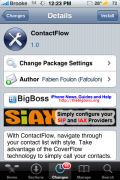
 ContactFlow is not a new application…we had ContactFlow back in the day (firmware 1.1.4 and below). I’m not sure if this is the same app by the same developer with a slightly new interface or if it is a completely different application! Either way, we have had a similar application in the past (with the exact same title!).
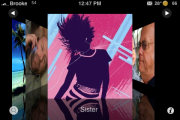
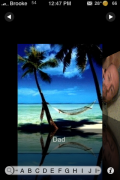
ContactFlow is basically another way to view your contacts. When you open ContactFlow you will get a Cover Flow style list of all your contacts that have images. Note: It will only display contacts that have images assigned to them (see instruction below on how to add images to contacts). You can then scroll through your contacts by swiping your finger on your iPhone or iPod Touch’s screen. You can also jump to a certain letter by selecting the little magnifying glass icon…which will then bring up the alphabet and you can select a letter. The two arrows at the top of the screen allow you to quickly go to either your first or your last contact.
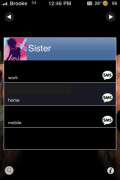
To view a contact’s information, you can either tap on the contact or you can select the “i” icon at the bottom of the screen. When you select a contact, the image will flip over and display the phone numbers available for that contact. You can then either call one of the phone numbers or send it a text message. Both features worked flawlessly when I tested them.
I also noticed that when you end a call, it will bring you back into the ContactFlow application. Overall, a simple application but, it is nicely designed. I also found it to be a sturdy app…I had no issues with crashing, all the features worked quickly and correctly and I did not experience any glitching while scrolling through contacts (though, I do not have a ton of them). You will have to let me know in the comment how it works for you.
How to add Photos to your Contacts:
1. Go into your stock Phone application
2. Go into Contacts
3. Select a Contact
4. Select Edit
5. Tap on Add Photo in the upper left corner
6. You can then choose to take a photo or choose an existing photo
*If you choose to take a photo…it will open your Camera…you can take the picture…then move and scale it and then set it as your Photo.
*If you choose to choose an existing photo…it will bring you to your Photo Albums where you can choose a photo and then select Set Photo.
7. Now you will see the added photo and it will show up in ContactFlow.



 Loading...


 Loading ...
Mine won’t launch… It just keeps crashing.
Really…that is wierd…I did not have any problem at all with the app. I didn’t even restart my iPhone after I install it (though, I probably should have).
That was a really fast reply! Thanks. I am reinstalling it now and hopefully it will work. I’ll reboot this time too just to be sure…
mine won’t launch to even when i reinstall and reboot the iphone..
i want to try it
Mine keeps crashing also. Reinstalled, rebooted, still not working. Tried changing some of the apps settings in the preferences…no luck.
same here guys…no luck!ur lucky it started for u brooke
worked for me with 4 photos then added more and it stopped working
finally i was wating for contact flow had it on 1.1.4 mines work perfect but it change a bit before you just tap on the picture and would call the number know you touch the picture/contact then tap on the phonenumber or sms i like the old way tap on contact then it would dial it..other than that I’am happy is back..
Update has been released for it. I too had the same problem (before the update) and i just fiddled around with the settings options and that did the trick…
It describe that we can change in setting that we can display it by name or by photo in coverflow, but i could not find any such setting inside setting. if u guys found it let me know.
hey i have downloaded the update instald it reboor the phone. and still not working for me! try to do some sittings chance and stil not working.
this program want to have it. but i dont think i can!
It’s the same (french) dev who updated his App.
Works fine for me, but then I just have 10 or so contacts :-)
Only thing I noticed, the “flow” seems to bit a bit slow, much slower at least than coverflow (with tons of album art..)!?
No problems at all with my install of the app. Works great!
Works fine for me but I only have a few contacts on my phone (installing this reminded me I still need to port my contacts from my old phone). My only thing is that it’s yet another separate app. Is there a way to have the regular links to contacts go to this program? I like the idea of it but when I’m in my phone menu and hit contacts, it takes me to the old contacts app. I don’t want to have to exit that first, and then go to this program.
I also tried a nice contact manager that I really liked but it was the same thing, a separate program that I have to go into. If there was some setting somewhere that told the phone what to open when you push contacts from within the phone app, that would be sweet.
weird… when i first installed it, i was able to launch the app and it worked fine. then the second time i tried to launch the app (and everytime thereafter) it will not launch. it just crashes, or quits back to the home screen. i’ve tried reinstalling/removing it, but nothing.
I have installed it several times and I get the same results, I get the splash screen then it crashes.
Same thing for me. When I first installed it, I could launch it and did work fine. After that I added a couple of more photos to my contacts, and then it started crashing. I tried reinstalling it, remove it, installing again, reboot, and never worked for me again.
Somebody has more information?
I found a solution. I too had problems with Contactflow and was at the brink of rejailbreaking my phone just to have this app. But first i tried unistalling certain apps to see if was conflicting wit something else. What I found out is that if you have DockPrefs or any thing similar that uses a type of flow type movement activated it will prevent Contactflow from functioning properly.
Try that and see if it helps. And Good Luck
Me personally I dont feel like Contactflow is good enough for me to loose my DockPref functionality. I you have DockPrefs just turn off the first toggle and Contactflow should work just fine.
I had the same problem. I have about 150 contacts but only about 30 have photos.
To fix I just went into settings > Contact flow and enabled “Display without Photo”. Dont ask me why but that did the trick, I disabled it to be sure and it started crashing again.
Well it did work… then I added more contact pictures and now its pooched again.
My iPhone is not jailbroken. Is there a similar app like this in the app store?
good good