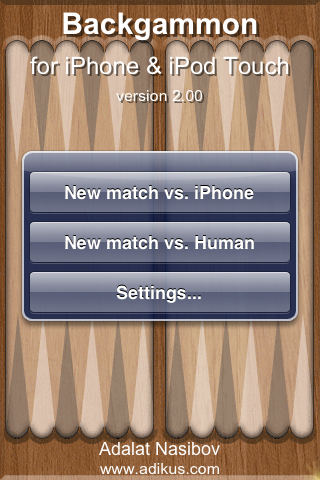
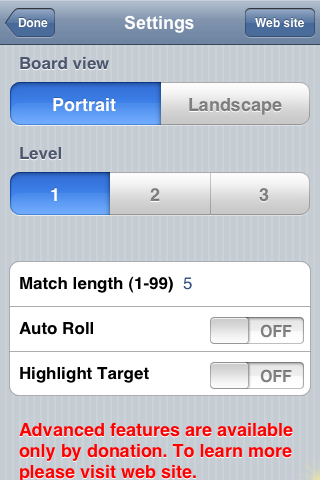
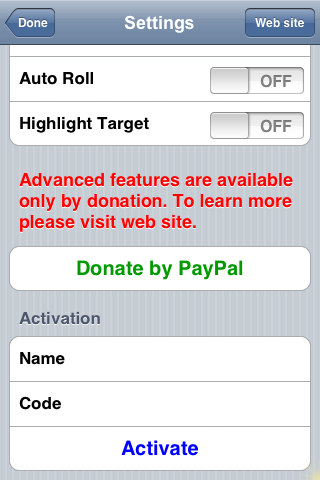
 With the update to Backgammon 2.0 you will find some changes in the main menu when you first open the app…the options have been changed to New match vs. iPhone and New match vs. Human, they are still the same options as before, just worded a little different and the Donate by PayPal option has been removed from the main menu. If you tap on Settings…you will notice a few changes here as well however, not all of them are available with the free version. If you donate…you will get the ability to choose a level; 1, 2 or 3, the option to turn on/off the Auto Roll and the Highlight Target, you will get the “dynamic touch area adjustment technology.” and the game will auto save when you exit it. So, all the chances made to the settings are technically only for people who donate. If you decide to donate…you can activate your account in the Settings menu under Activation. You can still play the game like normal with out donating! So, other than that, I think the actual game itself is pretty much the same! This app is available in the Installer.app through the Ste Packaging source. Below are some screenshots:


 Loading...


 Loading ...
You guys should check out the PocketGuitar app. It looks stinkin sweet and you could make great post about it. The only thing is that the app doesn’t seem to work with my iPod Touch… but it’s supposed to according to the creator. I’m using 1.1.1 firmware, so maybe that’s why. Let me know if you hear anything about PocketGuitar app on iPod Touches, because I’m a musician and I would love to be able to use this app. Thanks! You’re the bomb!
Tim
I actually finally got PocketGuitar app to work on my Touch. I still think ya’ll should post it!
Thanks Tim, I will! What did you have to do to make it work on the Touch?
Well, I downloaded the app, then it restarted the springboard… so I launched the app and I couldn’t hear anything I was playing. So I shut down the Touch and turned it back on, then it worked fine for me. But who knows… that could just be mine for some reason. I wouldn’t put it in the post unless people start asking.