It seems a little to deep for me to try just yet but if you’re brave enough to try it you might want to see this tutorial first. And if you’re wanting to use winpwn for firmware 2.0 it’s been disabled for now. This isn’t just a jailbreak, this allows you to install completely custom firmware. So you’ll want to check the official site for all the details and warnings but here’s the main one: WARNING THIS IS ONLY FOR BETA TESTERS
Now you’re probably wanting to know in plain english what winpwn is or does… well I’m going to try to translate. Basically it lets you load pre-jailbroke firmware onto your iPhone. And not just pre-jailbroke, but with apps already installed making restoring an even quicker process. And even more, it lets you load even deeper software onto your iPhone for example, letting you change your boot icon or recovery mode screen. Let us know your experience in the comments or forum if you attempt winpwn :)


 Loading...


 Loading ...
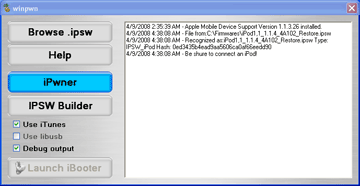
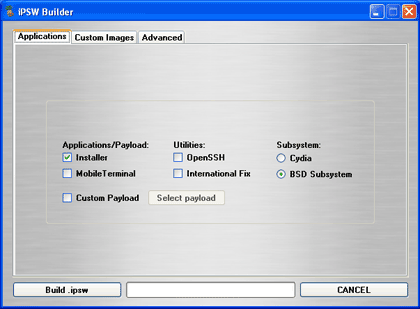
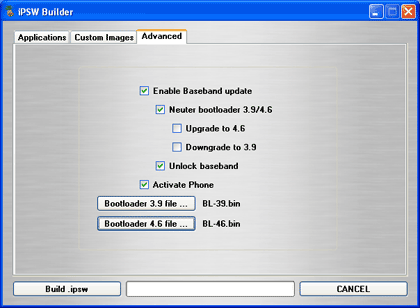
first of all you over simplified things. winpwn patchs the bootloader allowing it to run unsigned firmware. it will also allow other operating systems and/or multiple firmwares to run on the iphone at the same time. also those pics are of the pwnage app, winpwns brother on mac. cmw’s version has a diff interface and most of those options are grayed out. please fix that
Yes, I did over simplify things for now. Yes, the pics are for the mac version. I’ll change them as to not confuse anyone but if you notice the screenshots are taken from the tutorial linked to on the winpwn site.
your screenahots are of the fully functional gui. As of now most features are disabled
also check out ipsw tool over at http://www.theiphoneproject.com this allows furthur customization of the firmware allowing you to put on apps and manage partitions in the ipsw. iphonelinux.com is the working site of cmw and his linux for iphone port
The correct URL is http://theiphoneproject.org
ma bad :(
For those wanting to try this, first off know that Winpwn and Ipwn(Mac) jailbreak your phones the safest out of all the programs out there, such as Ziphone and ILiberty. Note though that to fully unlock your phone after you have pwned it, than installed custom firmware, you must use installer to place the BootNeuter app on your phone. Than use this app to flash your baseband, unlock and neuter your BL. If you had a 4.6BL that had been downgraded to 3.9 this will allow to go back to 4.6 with no issues.
ok you seem pretty knowledgeable. Can you please explain to me what the difference between 3.9 and 4.6 is???
yea sure np. the difference between a 3.9 bl and a 4.6 with bootnueter “the dev teams tool which allows the bootloader to run any firmware” is virtually nothing. although i do know that 3.9 is easier to hack and has been from that start and the 4.6 bl is what was giving so many people trouble when trying to jailbreak 1.1.2 1.1.3 phones ootb. hwoever it has been cracked and provides little or no resistance to hackers these days.
the only reason to stay on a 4.6 bootloader is for warranty. if you downgrade your bl, yourwarranty is voided. the good news is with bottnueter its all changeable and reversable. happy pwning :)
thanks for the info.
just one more quick question then
lets just say something did happen to my iphone….what would i have to do in order to send it back into apple and have them not know i hacked and unlocked it.
thx doug appreciate it. hpefully we’ll see iphone OS’ now. personally i cant wait ^_^
Why would the average person like me want to upgrade from 1.1.4 to 2.0? I am not a developer and I really have no use for the SDK. So I am confused, what benefits or differnces will there be? Do I need firmware 2.0 to buy apps from the coming App Store because I expect to see hacks that circumvent App Store, just as there are now “jail breaks” that let users install unsanctioned software onto current iPhones. If anyone can help me, I’m confused. Thnaks.
That is correct. You should not upgrade to 2.0 yet. Having firmware 2.0 is illegal unless you are a developer registered with Apple.
So it is ILLEGAL? to have 2.0? or just against warranty?
I wouldn’t think it illegal to use if they put it out there for everyone to use. I’ve recieved the SDK notifications and all that, but I don’t have an apple to play with it…so I haven’t downloaded it. If I am correct, the 2.0 comes with the SDK, which they published for just about anyone to use.
ya i tried 2.0 but i was not that impressed. it had alot of glitches and THERE WAS NO INSTALLER!!!!! which sux
sooooo a few hours later i went back to 1.1.4
Well, I have to say that I am either brave enough or stupid enough to try this tonight. I’m definatly looking forward to it! After losing a year’s worth of apps when Skype destroyed my Bluetooth, I really really want to Restore to preinstalled apps that I specify… I’ll let you guys know how it works because it sounds that nobody here is willing to try it…
i have pwned mine. Havent restored to the custom ipsw. Ill also post my results wjmhen i get home, im currently in school
I completely understand that it is illegal right now and that wouldn’t deter me from changing to firmware 2.0. I don’t plan on doing it at all unless I see benefits, but I still don’t see any reason to do it. Quite happy with 1.1.4
is there any program that can just back up an Iphone? I tried copying everything using WinSCP, but it wouldn’t work. I want to back up all my programs AND all the info I put into them. Even if Winpwn was a full version and backed-up all of my programs, it still might not get all of my to-do lists, sources, categories, etc.. Any suggestions?
I have the iphonelinux penguin and cant get it off. Apple says my phone has a virus. I used ipwn and now when the phone boots on, all I have is that penguin. Ive tried restoring it, apple has tried restoring it, but nothing. Any suggestions?