 |
Available In: Cydia |  |
Price: Free |
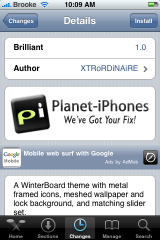
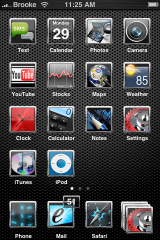
 Ok, DJContagious has been writing about a few of his themes so, I thought I would write about the one that I am using right now. I have been using since it was released a few days ago. The name of the theme is Brilliant. It has a decent amount of icons. It also mods the slider bars, wallpaper, lock screen wallpaper and badges. It is a little on the boyish side for me! :) But, other than that, I think it is a decent theme!

 Loading...


 Loading ...
nice one!
:D
What I don’t like about this theme it’s that u cannot change the lockscreen (at least I couldn’t) let me know if it’s possible, other than that it’s nice.
yeah i lost my wallpaper on the lockscreen also…
you just have to move the option for the “User Lock screen” or “User Wallpaper” above the theme you are trying to use, Winterboard uses the list order for priority, hope this helps
i like it “but” how can they not have icons for swapBT and WiFiToggle….these are two gotta have real handy apps
Hey nice theme. Can I ask how you got 3 apps on the dock while you have stacks on?
Matt says:
September 29th, 2008 at 10:29 pm
just a side trick you guys could use to make stack work w/ 3 icons on dock…. put 4 icons on dock, but the one that is overlapped u can put IN stack so the other three are out of the way and u can still access the app that is covered by the stack icon :)
Easiest way is to install a blank app (there are a bunch of steffwiz’s cydia repo) and place it under stack.
Yeah, I just installed a blank icon from Cydia and then moved it under the stack. That way it is not an app that I am trying to use…sometimes it is hard to launch the app that is under the stack.
Brooke, what about the kinda film u have ur phone it looks like a film covering the icons which I think is cool. Can I please have that info , I would like to have it on mine also. Thks!!
?
just install the brilliant theme
i got the same one! love it
Hi there: Did u try Leaf??
Oh yes, Leaf is a classic from back in the day. I have definitely tried it though, I have to be in the right mood to use it. But, I do like it!
The only 2 icons missing are now:
– AirSharing
– dTunes
would be awesome if you can manage to add them!
Any plans to add eWallet and SpeakEasy Icons? or maybe some games like Asphalt and RSoccer? =)
Even though I know you are a Windows person, I noticed you mentioning you liked the Leopard theme you recently downloaded on Cydia.
Well, I have released my own and I thought you might like to give it a try: http://planet-iphones.com/forums/index.php?topic=6159
It is on Cydia under the name ‘LeopardUI’ and was released today.
Hope you like it.
Here is a link to a lot of icons that I have updated to work with Brilliant. Using the themes Calendar icon as a template, they look good with the theme
http://s237.photobucket.com/albums/ff22/KrynnDragon/iPhone%20Brilliant%20Icons/
Hope you like them.