 |
Available In: Cydia |  |
Price: Free |
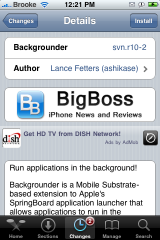
 Backgrounder is “A Mobile Substrate-based extension that allows applications to run in the background.” Basically it is an application (similar to Insomnia) that allows applications to run in the background…meaning after you close the application it will continue to run.
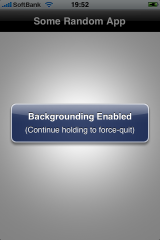
When you install Backgrounder, you will not get an icon on your SpringBoard…it is just a code application. To enable Backgrounder, open the application that you would like to run in the background then press and hold the Home Button. You will get a quick pop-up saying, “Backgrounding Enabled. (Continue holding to force-quit).” Then the application will automatically close. That’s it!
I tested Backgrounder on a few applications. The first was MobileCast. I started downloading some podcasts, enabled Backgrounder and then went back into Mobilecast a few minutes later to see if they had continued to download even after the application closed…they had! It worked great. The other application I tried was Pandora. I opened Pandora, started the application, enabled backgrounder and Pandora continued to play after it closed…sooooooo sweet!!! You are able to use your iPhone and other applications on your iPhone while the apps continue to run in the background. I was able to listen to Pandora while I creating a shopping list with another application. However, if you use an application that resprings your SpringBoard, it will disable Backgrounder. So, you do not want to set a new WinterBoard theme while you have an application running in the background.
To disable Backgrounder on any application, you will need to reopen the app and then press and hold the Home Button until you get a pop-up that says, “Backgrounding Disabled. (Continue holding to force-quit).” Overall, a very cool application.
Remember running applications in the background will wear your iPhone or iPod Touch’s battery down faster and it will also make your iPhone or iPod Touch run slower (which it definitely did with my iPhone).

 Loading...


 Loading ...
This means I can run BeeJive and still browse other stuff?!! :D
Beejive doesn’t need this since you can set the log out time in the setting menu.
this mean that I can be doing ANYthing with an AppStore app, get out, browse my music, select the CD or playlist that I want, and go back to my app and don’t loose anything in the process
i smell a battery-killer!!!
If only we had SysInfo ported to 2.1……..
well, theres still “holding the home button for 6 seconds”!
:)
What happens then……..?
If i Have this installed, but no apps are running in the backround, will it still drain the battery.
works great! great for Trailguru so you can go back to changing your music while hiking or running while keeping the GPS active. I also received a call while running Pandora in the background and it faded out the music for the call to come in, then went right back to the music after the call like the ipod function.
This is good for Pandora.
do u get alerts though from like palringo, aim, beejive
Now THIS is the application that I have been waiting for!
Does it work on aim?
and does it notify you when you get an im when your in another app like safari?
this is flawless…… Wait a sec….
How to re-enable this once the I re-spring my spring board?
Reinstall ? ….lame!!! What it needs is a GUI with a list of background apps ….. Better still a badge “on” the app(s) which is/are running in the background …..lower left corner please.
to reenable you just need to start the application again and press and hold the home button again. the function itself stays available even after respring i would presume…
FINALLY!
works well with Pandora & Palrigo (IM-client)
awesome software.
Thank You.
works awesome with beejive, you get a badge icon and everything, just like zeiedfirdaus said a badge icon would be perfect.
so what happen if i open beejive and activate the backgrounder then i open another 3 apps, will the beejive and other 3 apps run in the background?
what will happen is that your battery will be dead in 1/4 of the usual time :D
i think the app that will only run in the background is the app where you enabled the backgrounder. even if you open multiple apps but didn’t enable the backgrounder, it will not run in the background.
how is this app different/better from/than insomnia?
also with backgrounder, what if i start an app and just press the home button for 2-3secs? will it quit the app without enabling it in the background?
Please, everyone, understand this.
Insomnia DOES NOT let apps run in the background! It simply keeps wifi from switching off when the screen turns off. Backgrounder is completely different than Insomnia.
I wish everyone would get that Insomnia doesn’t do anything setting your auto lock to to never wouldn’t do.
this by far is the best, it makes u just want to slap the people who makes the iphone/itouch like why do it take outside people to make the phone the best phone ever now i can use… i have pandora,beejive,facebook and myspace all in the background and i love it to know when i get something as soon as i get it…. THANK U
Works great with my apps i use palringo andvisual radio and last.fm and work amazing, just have a question since i install the program i see in palringo and mobile chat a number zero (0) in the icon is a red zero like the notification when you have a a missed call or a text message. Any idea why is that?
I prefer iAwake. Its the best app. When will iAwake 2.0 be released ?
According to this site:
http://www.modmyi.com/forums/native-iphone-ipod-touch-app-launches/178561-release-iawake-2-0-a.html
… iAwake was apparently a rip-off of the application Insomnia.
Insomnia is available via Cydia on jailbroken phones.
This is perfect. I’m really glad someone finally did this right.
Restored my iphone install it again and after i install the app i used the facebook app and now shows a red zero again still is only me?
this was a known error on initial release which has since been patched. Ensure you are running the latest version and all should be fine
CAN SOMEONE HELP ?
I have had mcleaner running perfectly for a few months, I recently upgrade the categories folder and i think it also installed the backgrounder.
The problem is when i load mcleaner it show the start page and then disappers i cannot use the application, i have removed/reinestalled and factory reset adn jailbroken !! but yet the same problem ….ANY SUGGESTIONS AND HELP IS MUCH APPRECIATED AS THIS APPLCIATION IS VERY IMPORTANT TO ME !!! also intelliscreen seems to be persistently locking up and not running, contacted the developers no reponse, any one else experience this ?
thanks
insomnia is already available in cydia for 2.x , how is this different ?
so you have to reinstall after respring/rebooting the iphone ?
@mark broyce
I installed and rebooted my phone and it works after a reboot
I used backgrounder with AIM and used Insomnia at the same time to keep it on with wifi after locking my iphone. It worked for a while – as long as there is a wifi connection it will keep me logged on, but recently it just doesn’t work anymore.
If it’s true this what i need
=))))))
=))))))
I have use this for a while mainly for skype. It works for a while but then it will just stop working and skype closes. (the badge disapears).
I have tried re installing and re flashing the phone same problem. Any tips ?