 |
Available In: Cydia |  |
Price: Free |
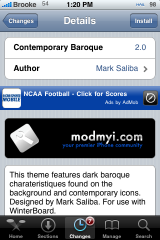
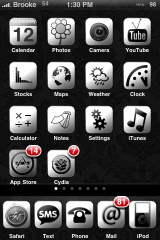
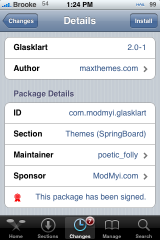
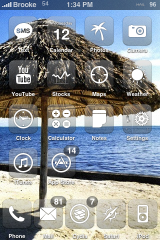
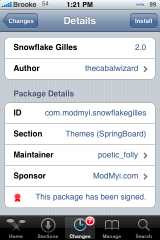
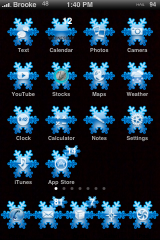
 Below are some unique themes I found recently in Cydia. The first, Contemporary Baroque (via modmyi) is a simple and clean black and white theme. It contains only the basic icons but, if you are only looking to mod your first page…this theme will do that. The second theme, Glasklart (via modmyi) is another option for clear icons. I personally love clear icons! I can change my wallpaper every day or so and feel like I have a whole new theme. The third theme, SnowFlake Gilles (via modmyi) is one to get you into the Holiday spirit. There is a little too much going on for me and I had to take off the background image. But, if you are feeling festive…you might want to check out this theme. All of these themes are used via WinterBoard. Screenshots below.

 Loading...


 Loading ...
have u tried the vistalix theme its awsome except for the walpaper imagine can you tell me how to change my wallppaer image?
I think the theme you are referring to is spelled VistLiX (that way people can search for it easier). Also, you can select User Wallpaper in WinterBoard and that will allow you to set your wallpaper to whatever you would like it to be using images from your Photos. You might need to move User Wallpaper up in WinterBoard so that it is above your VistLiX theme. Let me know if that works!
it is quite tricky. first you have to ssh into your iphone/ipod. go to the folder var/stash/themes.ZaUaZc for there select the folder with your theme in it. (same name as Theme). open it up and the wallpaper isin there. you cand delete it or replace it with another
The only issue I have with that Glasklart (and any other theme for this matter) is the fact that I have around 5 pages of apps on my iphone and surely this theme doesn’t have icons for all of those apps so although I would love to use this theme, I would hate to have only a few of my icons in actual sync with the theme, while the rest are normal icons.
Does anyone else feel this is a problem? Or does anyone have any solutions?
I honestly don’t know of a theme that has all the icons. I think that would be extremely difficult or even impossible! But, I totally understand what it is like to have a half modded iPhone because a theme doesn’t have all the icons! I think the only way to get around this is to make your own theme.
You should check out iWood. It has a couple of cool icons, but the theme is based on a bookshelf so even your normal icons look great. I think it is the best theme so far. I was using Crump for a while since it had a ton of icons, but the updates stopped coming and new apps didn’t match.
Yeh I think I know which theme you’re talking about (iWood) – I always wondered what it was called, I’ll be sure to check it out. Thanks.
Hi Praj,
I think it’s impossible to cover all the applications. What you can do is move the ones that aren’t skinned to the last page on your iPhone.
Or even better, you can help contribute by making you own icons and post them in this thread:
http://macthemes2.net/forum/viewtopic.php?id=16790588
Hi Max,
I wouldn’t have the faintest idea on how to create my own logo’s for apps. I don’t even know how to change the icons on my iphone even if I could manage to get a hold of some updates.
I’ve ended up using iwood for now, which I quite like :)
heyy, you gusy should look for the Black Label themes and the TheOne theme on cydia..they’re pretty sweeetttttttttt!!!!!!!!!!
I hav Mobile Vista on my ipod. it is a truley legit theme. it skins almost everything and i can use “User Wallpaper” to get rid of the lag caused by HTML wallpaper. you guys should review it!
Picnic & Tenuis FTW (not just beacuse I’ve contributed more than a couple of Icons to both themes :)
im going crazy because i dont know how to get to my themes i just broke my phone out of jail
I using the Ed Hardy theme.
I’ve been an iphone owner for over a year. I just jailbroke my 3G after procrastinating and I must say, I don’t regret it one bit. I-complete theme is my favorite themes of all. I also enjoy the mods made by the different sources. Totally Awesome Dude! Keep up the excellent work.