 |
Available In: Cydia |  |
Price: Free |
 We are finally getting closer to how copy and paste should work!! Clippy Beta is a very cool copy and paste application available through the iSpazio source. When you install Clippy Beta, it will automatically add the copy and paste features to your iPhone or iPod Touch’s keyboard.
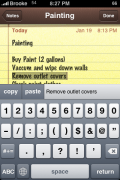
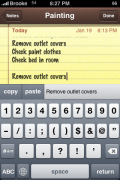
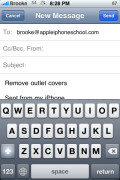
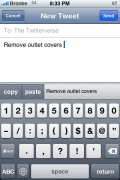
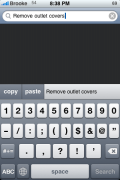
Now, how to use copy and paste! Once the application is installed and your SpringBoard has respring, you can go into an application in which you use your keyboard (Notes, Safari, Email….). To enable the copy and paste options, select the 123 icon on your keyboard. This will bring you to your numeric keyboard and will also add the options copy and paste to the top of the keyboard. To copy text, just tap at the beginning of where you would like to copy and drag your finger to the end of where you would like to copy. This will highlight the text in grey. You can then select copy. The text you have copied will display in the blank area next to the paste button on your keyboard. Now, you can paste the text into almost any application in which the keyboard is used. For example, I was able to copy text from a note I created on my iPhone and paste it into an email, a Twitter application, Google search in Safari, search in the iTunes app….etc. One cool feature of the application is that it keeps your most recent copied text available to be pasted. So, you can copy something and then paste it mulitple places without having to go back and recopy it!
I have found that this application does not always work (hence being in Beta). There are times when the copy and paste options do not show up on the keyboard (some Twitter clients, Cydia..). I’m guessing that any application that modifies the keyboard will have issues displaying the copy and paste features. Also, I have found that I cannot paste within a website. For example, the search options in AppleiPhoneSchool.com, Wikipedia, Google, etc. However, you are able to paste copied text into the Google quick search at the top of Safari just not Google.com itself. Another issue is that you can only copy text from anywhere the keyboard can be displayed. So, if you find text in an article that you would like to paste, you are unable to do so because you cannot get the keyboard to launch in the middle of an article in order to use the copy feature.
Overall, by far the easiest to use and most versatile copy and paste application so far!! We are getting closer!!
Screenshots:




 Loading...


 Loading ...
Another problem is when you are trying to delete just a letter or two. You can’t scroll to it using the magnify glass as it highlights it all which you may not want to delete
sick
hi brooke, tomorrow i will release tips about how to copy the text from a webpage, text from a received sms message etc :)
it will require an additional step, but works great
I managed to copy any part from my SMS text messages (sent & received) through the use of iRealSMS. You can select the SMS part that you want to have access to, anmd then click the ‘forward’ button. This will make the text edittable so you can now bring the keyboard on and select any part of the message to copy it :))
it works EXCELLENT with Fast Notes from Sbsetting !!! nice !!!! all we need now is the MMS and the iphone should be COMPLETE !!! nice nice nice
There is a great MMS application called SwirlyMMS. Works great. I know it isn’t free but I paid the price and is well worth it.
SwirlyMMS.
Just install SwirlyMMS, and now the iPhone will be complete!!
SwirlyMMS doesn’t work for iphone users in the UK though.. does it?!
SwirlyMMS is being updated regulary, maybe it works now on UK. Here in Spain is working perfectly with Movistar, Vodafone and the other mobile company, as far as I know.
doesnt work for at&t users in the states though
SwirlyMMS works fine in the UK on O2 contract. I have that and the MMS app, I use Swirly to send, and MMS app to receive! Once you have that password from the SMS notification the MMS app will be able to pick them up, but it doesnt seem to be able to send – I did have MMS enabled, until I phoned O2 and they they promptly disabled it…fools. I can still send and recieve MMS using these apps tho :o)
I really wish I could copy text from email and paste it into websites. I believe it cannot do so yet……correct me if I am wrong
Not sure what you mean by paste into a website. But you can copy the text and place into a text field in a website.
Or if you are talking about the address bar or search bar this works fine also.
Just click on forward button to make any text part of the email message becomes possible to be editted. Unless the text is part of a frame or picture then unfortunately we can do nothing about it.
doesnt seem to work for sms or am i doing something wrong?
Not sure what you are doing wrong but works fine and all my SMS applications including the native SMS, iRealSMS and MySMS.
Works anywhere you can use the Apple Keyboard I think.
Just check out my reply at entry no. 3
If u’re using irealsms 2.0.6.x… try upgrade to 2.0.7.x…
worked fine for me after upgrade. :)
i can paste in the iphones native sms but wont let me copy or would i need ireal sms or some others on cydia to get it to work?
Is it just me or why can’t I find this in cydia. I even went through the ispazio source app lost but nada. Anybody else?
I’m seeing something called CopierciN from the BugBoss source. Looks to be the same thing though.
Nope, thats different app.
I can’t find it either! :(
how can i copy something from sms i received to email?
Please check out my reply at entry no. 3
how can i copy and paste within native sms i would appreciate it
i know its beta but it has yet to pop up on my keyboard is there certain applications that interfer. I removed my custom keyboard as well still no luck.
hello!
for me it only(!) works in the SBSettings fast notes! does anybody know something about this? thx
Ditto – I have tried uninstalling, rebooting and then reinstalling the Clippy app and again it ONLY works in Fast Notes via SBSettings.
FWIW version .91 of the Clippy Beta is installed.
I also turned off any keyboard mods in case this made any difference and it did not. ;-(
Got installed OK but keeps crashing after highlighting of text.
2G iPhone/2.1
same here..
Works great with iPhone 3G and 2.2
Today there is an update to v0.91 available.
works with biteSMS to, but first you have to “forward” the message, then you can copy it.
or is there another workaround for biteSMS??
great extension and it runs very stable
As noted; forward an e-mail to make it “live” to copy from.
On an SMS add a carriage return after the “paste”
I am so happy; I could poop myself!
we don’t want that do we ? :d
We only need to find a solution to copy text from websites that have no box entries to bring the keyboard.
Not working for me. When I attempt to copy text, I get booted into safe mode. I’m not sure if there’s a conflict or not but here’s whats in my /Library/MobileSubstrate/DynamicLibraries/ directory.
Backgrounder.dylib
Clippy.dylib
Clippy.plist
FiveIconDock.dylib
Snapture.dylib
Snapture.plist
Lockdown.dylib
MCallEng.dylib
MServer.bylib
PwnPlayer.dylib
SBSettings.dylib
SBSettings.plist
StatusNotifier.dylib
UAFaker.dylib
UAFAker.plist
Veency.dylib
Veency.plist
VoIPover3G.dylib
VoIPover3G.plist
WinterBoard.dylib
Winterboard.plist
iRealSMS.dylib
iblacklist.bylib
my_sms_hook.dylib
my_sms_hook.plist
TWebb,
It works fine for me. I have almost the exact setup as you except I have mcleaner where as you have Iblacklist. You might want to check into Irealsms there are a few updates out for it to make it more mobilesubstrate friendly.
I’ve uninstalled irealsms as well as mysms. Clippy is still crashing on me and putting me into safe mode. Thanks for the suggestion though,
Yeah home come it’s only working for my SBsettings fast notes?, It’s not showing ANYWHERE else
Can somebody tell us what’s wrong??
What firmware are you running?
Anybody else w/ 3G 2.2 same issues?
Same situation here (3G / 2.2):
Clippy is only visible in Fast Notes from SBSetting. All other Keyboard-Situation won’t show Clippy on top after “123”. Maybe there’s something which is disturbing Clippy. Hopeful the further releases of this GREAT feature will be better…
change the preference – app boost to Clippy in Intelliscreen and it solves the problem!!!!!! now shows it everywhere not only in SBSettings!
I GOT IT, ITS NOT WORKING ITS CUZ OF INTELLISCREEN
GO TURN PERFORMANCE BOOST ON
*cheers*
Whenever I go to use this on my 3G v2.1, it crashes the app I’m trying to use it with. I reinstalled it from Cydia and restarted my iPhone a couple of times with the same results. What can I do to fix this?
The same problem here and the intelliscreen isnt not causing the problem because i turn that off to try it ou… PLEASE HELP US GUYS… thanks a lot!
try the 0.92 update. Had the same problem and now seems to work OK
I upgraded it and the app works perfectly now! Thanks for the tip!!
Works great on my 2G 8GB FW 2.2
Works in Contacts just fine….
Anyone know how to get something copied from a webpage?
@RKG: Thanx 4 the solution with App Boost under Intelliscreen Settings. I always forget this part of Intelliscreen. I changed it and of course :-) now I can see the Clippy-Feature anywhere else – GREAT and COOL!
Just in installed 0.92 and now seems to work without crashing the app it’s in. C/P works between different apps.
I don’t think intelliscreen was an issue as I had switched to “lock screen”.
Thanks for a speedy update/fix!
make that “Lock Calendar” not “Lock Screen”
i don’t like having the copy/paste menu showing up every time i hit the 123 button. hard to type numbers in the sms app, y’know? maybe have it pop up after holding the 123 button down for a couple seconds? kinda like the .net/.edu/.org/.com popup when you hold the . key down? i know absolutely nothing about iphone development, so i don’t have any idea how attainable that is…
it’s not there on the cydia repo anymore!
this app isnt working for me. very faulty. lets hope the new clipboard will be better
Ok I have a few suggestions for this application!
1) When Browser is open and I click the address bar it is already highlighted but if I want to deselect and pick a part I want to highlight to copy I cannot do this as once its unselected I cannot re highlight the editable text.
2) There is a great Safari bookmarklet I found that turns webpages into editable text in a really cool way you just select an area you want to copy and it turns it into editable text without opening it into a new page does it right on the current page! Though heres the problem I noticed with Clippy it will not let me highlight the selected editable text even though I see COPY/PASTE right there in front of me and sliding my finger across the text I see the magnifying glass but nothing is getting highlighted!
The link to this add on can be found here http://code.google.com/p/networkpx/wiki/CopyingTextFromSafari
3) Maybe making the Copy/Paste menu bar a little bit transparent to see the text behind it would be nice as well.
Alright those are my suggestions the first 2 are very critical and I hope they can be fixed!
The highlighting does not work for me any longer.
The Copy|Paste|Stack|Close buttons are all there, but it wont allow me to select anything specific. You can still use the copy button, which copies everything and puts it into the stack and you can use the stack and paste buttons. They all work, however, you cannot highlight anything specific.
I found MY problem….
You need to Double tap…after second tap, keep your finger down and begin dragging your finger in order to select specific text.
So…now we have TWO copy and paste functionalities for APPLE to choose from. Will they hurry up and pay one of these guys for doing THEIR job for them and steal their development and include Copy Paste functionality already.
its not the best song but its pretty cool
I can only copy & paste all of a segment-I can’t select what I want-
is there some kind of trick
I went to mail-tried to select a small portion of text-went to notes/pasted-but it was whole thing-tried for like an hour before I wrote this
(the little magnifier popped up for cursor placement & after I held 123 for a few-selected copy-put cursor where I wanted-held it-dragged it-no highlight no select- almost nothing
-it does copy the whole thing though)
also it isn’t or doesn’t become part of my keyboard-it’s a little pop up thing that shows itself when I hold 123 for a few
-help if you can being able to paste all is still cool (like select all on pc) but I would love to be able to select
Why is it that everytime i download and install clippy, it doesnt show up. And i Tried to hold onto the .?123 thing and still nothing happens. Now when i use the magnifying glass thing, it crashes on me! I unstalled it, and the magnifying glass works again. But i want Clippy, and it doesnt seem to copy anything. am i doing something wrong? I have an IOS 4.0 iPod Touch. Please help me!!!
Very great post. I just stumbled upon your weblog and wished
to say that I’ve truly loved browsing your blog posts.
After all I’ll be subscribing in your feed and I am hoping you write once
more very soon!