 Well, I still have a few more QuickTips for safari so, I will be sticking to my Safari theme again this week! If you have a QuickTip you would like to submit you can email it to QuickTip@appleiphoneschool.com.
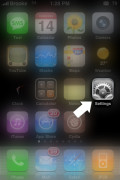
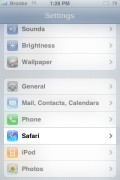
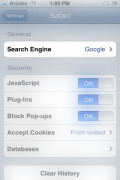
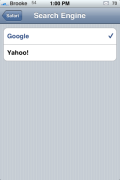
QuickTip – When in Safari, it automatically defaults to the Google search engine. Meaning, it uses Google when you search for things within Safari. However, this can be changed so that it defaults to the Yahoo search engine. If you go into the stock Settings application on your iPhone or iPod Touch, you can select the Safari option. Once in the Safari option, there is a Search Engine option. When selected, you have the ability to choose between Google and Yahoo. If you would like to switch the default search engine to Yahoo….just tap on Yahoo! You can then open Safari and you will notice that the quick search is now Yahoo instead of Google. See screenshots below.
Personally, I’m all about Google but I know some of you do prefer Yahoo! So, happy surfing!


 Loading...


 Loading ...
Why would anyone want to use yahoo? :-)
how do you change it to MSN?
I really don’t like the mobile look of yahoo search engine but it came in handy when google labeled the entire Internet as unsafe.
So here’s one for ya – For some reason, when I’m on my home wifi, my Google searches come up in some Asian language. I’m in the US, and the phone is set up for here too!
Any help?
I tried the Yahoo Search, but there is one thing that is annoying me especially when I’m using GPRS: The Google Search unfortunately don’t have a mobile view yet, but it does load pretty much faster than the Yahoo Search :)
I tried to make Yahoo as search provider (defult) instade off Google ,but I don’t know how to do that . So please can you help me in that matter? thank you
Can you change to element search + win as defult search provider?:(
Oh nevermind I just discovered you can add an application bookmark to the hompage where all the apps are by clicking the + button at the bottom of the iPod then click add to homescreen
Is it possible to set a custom search engine… i.e. Bing?
I want to set default google country from .uk to .ng since I live in NIGERIA
Thanks a lot, i mean i dont know how but somehow my search engine became yahoo all of a sudden (kids, probably) but i had no idea how to go back to google. And with the first click i found the answer. Thank you :)))
On my blog I post coupons, promo codes, sweepstakes, or just discounts that stores are
offering. I opened the site about 9 months ago but didn’t do anything with it until less than a month ago. Some of the things I have struggled with is just making the page look nice. I’m not real artistic and don’t have a good feel for pretty so that has been a struggle on the plus side even with few backlinks google has been sending me over some traffic. I am really only about 20 days in and already have 60 and growing unique hits daily. I have yet to do anything to monetize this site though. Any suggestions?
You need to take part in a contest for one of the best websites on the
net. I most certainly will recommend this blog!
I like the helpful info you provide in your articles.
I’ll bookmark your weblog and check again here frequently.
I am quite sure I will learn plenty of new stuff right here!
Good luck for the next!