 |
Available In: Cydia |  |
Price: Free |
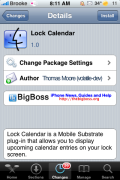
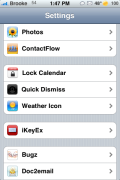
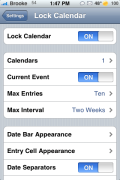
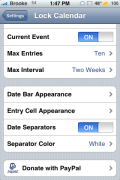
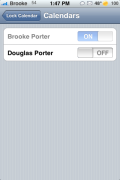
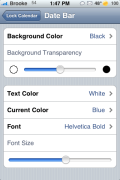
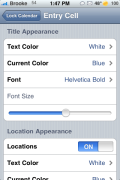
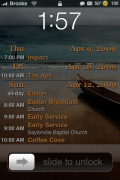
 It looks like Lock Calendarversion 1.0 has been released. I’m not sure if it has been a while since I have done a review of Lock Calendar or just a while since they have updated it! Either way…there are some new features in the app. In the settings for Lock Calendar (which is location in your stock Settings applicaiton) you now have the ability to choose a specific calendar to display on your lock screen (which is a great faeture) and the ability to do a lot more customizing of the app. You are able to select the seperator color, the background color and transpaency and the text color, current color, font type and font size for the Date Bar, Title, Location and Time. You can pretty much customize the app to look however you want now! I will say that it is not the most user friendly interface but, after a little time…you will get the hang of it.

 Loading...


 Loading ...
This app also installed something called Rock which I can’t seem to get off of my iPhone. What a bummer. I was hoping Lock Calendar would be useful, but it isn’t if it’s going to also install crap along with it.
It didn’t install Rock on mine….
Rock is a new App Store type of app like Cydia….as far as I know.
GREAT Review Brooke, thank you.
Happy Easter to you and the family!
@Daniel – I just installed it and didn’t get Rock installed. I don’t know where yours came from…
Hey Brooke,
Do you know of any better calender options that what comes default on the iPhone?
Anyone know of a calendar app that shows a month at a time on the lockscreen and no more? Like a normal calendar.
I know of two in Cydia, but they are either U.S. and the first day of the week is sunday, OR it’s french and the letters are all screwed.
I want an english version with monday as the first day of the week xD
whats the lockscreen backround you have? been searching it for a while now… and could you do like top 10 winterboard themes every month or so? it would be great and wery fun to see what you think!
Does it still slow down the phone?
This app is truly the best thing since….the iPhone. I love having all my upcoming events in my face every time I turn on the phone. And all the extra customizations makes it that much better. It does not slow down my phone at all. I highly recommend it.
So when you slide to unlock your phone, you don’t notice a slower transition into the springboard? Maybe this version is improved…
As far as I can tell, there is no delay moving into the Springboard from the Unlock Screen. It appears very quick and smooth to me.
Great App! I don’t need IntelliScreen anymore..
Will this new version also work under firmware 3.0 (beta2)? Are there testers that confirm this, please.
I tested it myself and it works with firmware 3.0 beta2 :)
It also works on firmware 3.1.2!!!
The applications it’s very very great !
But, i have problems with my springboards…
When i respring after use categories app. to add o remove some application from one folder my iphone start on safe mode and all my icons was shuffled.
I use five column and five row.
Without uninstall and only turn off lock calendar, the problem dissapears.
: (
Sorry for my bad english.
If any can help me to use it without problems i’m very happy.
Now, i have it “Off “.
Bye
I installed it yesterday on the 3.0 firmware. My lockscreen says unfortunately “No Calendar Entries”. So I googled this problem and learned that i am not the only person having this problem. On the other hand, there are a lot of people who confirm that it works on 3.0. Solution?
??? After I hooked up my 3G on my laptop en synced it with itunes, Lock Calender is working. :-D
Exactly the same problem here. Only mine worked fine at first , its only when I clicked on Calendars in the Lock Calendar settings it return with “No Calendar Entries”. When you try to go in again there is Calendar on/off option but its de-highlighted. Nothing you can do.
I have uninstalled and re-installed several times but it seems the settings are stuck once you have used it.
Again, Solution?
same problem here, it only works on the original iphone on 3.0 firmware, but not on iphone 3G with 3.0 firmware, the option to turn on/off each calender is greyed out and it only shows calender events from my PC but not from my exchange server and not both. on the original iphone the option for calender on/off is selectable and it will properly display both my pc and exchange calender. when you disable sync with your pc calender your exchange will display properly. The software does not like the 3G
hi ken
i am running an original iphone 2g, but it would seem synching up the calendar via itunes has done the trick. i now have two calendars to sync to, so i switched them both on via Lock Calendar settings and everything seems to be working fine.
so thanks for the heads up on this
Dan
figured out why the calender on/off was greyed out. if your already had set up your exchange server before installing lock calender the on/off would not be selectable so what i did was delete my exchange account, sync with itunes with my pc calendar then add my exchange account back, this brought back the on/off switch.
whats an exchange account? how can i delete or add one?
Lock Calender is buggy for 3.0… for me it only displays tomorrows events.
Actually I take that back, it was displaying tomorrows events, but now it isn’t displaying any events. Just says, “No Calender Entries”
This is not working for me atm. Using 3.1 and all I get is “No Calendar Entries”. And in the settings for Calendars I get “0”. Hmm, tried repooting, uninstall/reinstall, nothing helping.
Any info on what’s this about? Any news from the developer?