 I so got this to work. Just go to this site: http://help.benm.at and follow the steps. Pretty sure AT&T, O2 and others are not going to like it so I’d be careful. We only have AT&T EDGE here so it was pretty slow but it worked with a Macbook over bluetooth!
Tethering Early on 3.0 Without Jailbreak
June 18, 2009 by
 (No Ratings Yet)
 Loading...
Comments
Trackbacks
-
[…] More here: Tethering Early on 3.0 Without Jailbreak […]
-
[…] Tethering Early on 3.0 Without Jailbreak […]


 Loading ...
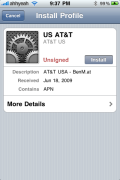
How do I get to the ” intstall profile screen” , Ive been to the “help.benm.at” website and still cannot figure out if Im to jailbreak my iphone then download their program.
FYI. I’m using my iphone’s 3G connection to send this !!
help.benm… does not have Mexico on it’s list, so i used
http://www.iphone-notes.de/mobileconfig
So far it’s working great, i hope it stays that way.
oye yo tambien baje la config de ahi pero a la hora que reinicio el telefono no me sale por ningun lado la opcion de tether entonces no se donde activarla… a que s ele tiene que picar una ves instalado???
osea ya aparece en los settings – general un “profile” enable tethering pero no lo puedo usar…
que firmware tiene tu iphone ??
esto funcionaba hasta el 3.0, si es mas nuevo ya no funciona
sorry
its in german? how can i read it doug/brooke?
HELP!!!!!!!!!
didn’t work for me on iphone 2g with t-mobile. it installed but i can find where to turn on tethering ( i though it was under settings>general>network). Whats wrong?
only available for 3g phones :/
That sucks, i mean theres no hardware problem thats not allowing tethering or MMS, or stereo bluetooth. Hopefully someone in the jailbreak community will unlock this feature! Come on apple!!!!
I would like to know how also? Wife and I are going to WY next month and she need to connect to work sometimes to get small files. She is work at home full time (IBM is cool for that). We could make our vaction a little longer if she could use her laptop from time to time.
I got it installed, but when try to enable tethering it said contact AT&T. What up with that?
have a look at this,,
http://www.iphonehacks.com/2009/06/simple-hack-to-enable-tethering-on-iphone-os-30.html
should help everyone ;-)
I also had the “Contact your ISP” (in my case T-Mobile), after clicking the message away something like 10 times, the option to enable tethering suddenly appeared.
Works liks a charm, using USB Cable.
sorry – i must be very stupid. I cant tell what I am meant to do! I also went to http://www.iphone-notes.de/mobileconfig and got a congig file sent to me, but i havnt a clue what to do with it! any help!
scratch that – i was trying to open it in mbox mail – worked a treat in normal mail app
I tried it, got stuck on Edge, restoring the device. Careful with trying this.
this works on iphone 2G? I have installed this and the one at the iphone-notes, but i have nothing on my network settings about tethering :(
Couldn’t get it to work with bluetooth, but it is working great with USB. THANKS FOR POSTING THIS!!!!!!
I guess AT&T already blocked it…its telling to contact AT&T
Nevermind…it works..
Works great! Had no trouble with it at all!!!
Benm.at web site said something about mms when you download tewering file and reboot it should work anybody else see this?
Got my 3GS this morning in L.A. Works great. Tethering is go with this workaround. Nice job finding this Doug.
From Softsailor.com
How to enable tethering on iPhone 3.0 the easy way 1:
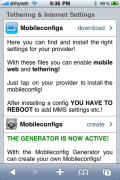
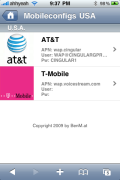
Step 1: Go to http://help.benm.at using your iPhone.
Step 2: Download the file which will reconfigure your career profile.
Step 3: Install your profile.
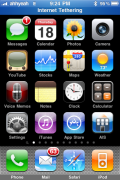
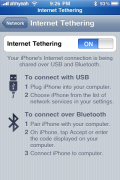
Step 4: Go to: Settings -> General -> Network -> Internet Tethering and switch to “ON”.
Step 5: Turn Bluetooth “OFF” and use the USB data cable, and plug in the iPhone to your PC.
Step 6: After you plug in the iPhone, you will receive a message which says that a new network interface has been detected. Go to Network Preferences, click “Apply”, turn WiFi “OFF” and you’re set to use Internet Tethering on your iPhone for free without jailbreaking.
How to enable tethering on iPhone 3.0 the easy way 2:
Step 1: Go to your service provider to enable tethering.
Step 2: Manually download the MobileConfig file from here for AT&T, from here for O2 UK, from here for other European carriers, then email it to yourself, and open it as an attachment using your email app.
Step 3: From now on you can follow the Step 3 from above as it’s the same thing. Install your career profile, then see Step 4, Step 5, and Step 6.
It wasn’t that hard wasn’t it? Now you can use Internet Tethering on your iPhone 3G or iPhone 3G S as of tomorrow thanks to the new iPhone OS 3.0. Enjoy!
8lias,
Tried the softsailor.com direction, but at Step 4: Go to: Settings -> General -> Network -> (there is no) Internet Tethering (to) switch to “ON”. DId I do something wong or has AT&T blocked?
I am not sure Marty, I got locked on Edge only when I tried it so I dare not touch that hack again…Good luck.
yeah i got that contact att message at first.. but later when i checked it was ready to go.
Maybye it was a restart that did it.. try it..
I know i did get this to work thru my apple dock which is connected by USB
Thank for this ,I think it best and i will get idea.Your website is look good design.
Nice mark out of things – Interesting – one could think this way also . Thanks for the post
Does anyone know if this works for iPhone 2Gs (1st gen)? If so, please contact me at ncanduci@msn.com
Thanks you!
shopping kindle by amazon.com
Check your visual voicemail after installing this. It definitely causes a conflict in the US with AT&T. VM no longer shows up on the phone, but if you dial in (hold down 1), youve got msgs…
This works fine for me….unlimited data mean no problems with the bill right??
hi douglas, i still have this sucessfully working, i think its because i restored my jailbroken 3.0 so i still have MMS (doesnt work but it in the phone) and tethering, i just tried tethering for the first time, do you know if its charging anyone on their bill??
I tried doing this but it’s asking for a password what do I do?