 |
Available In: Cydia |  |
Price: Free |

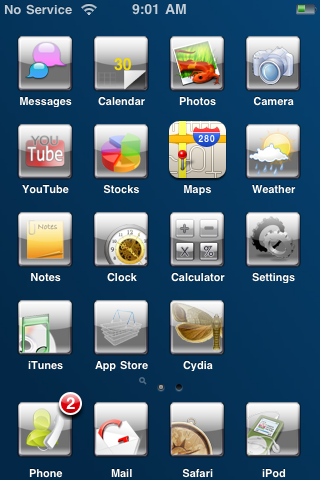 iFall Theme is a theme that contains 35 gray icons, a wallpaper, dock, slider, page dots and status bar. The theme is missing a Maps icon. I checked the file for the theme and it doesn’t seem to include one which is kind of a bummer. The More Info for the theme says that there is a .psd file (template) but, I could find one. Besides the missing icon, it is a pretty decent theme. Not too busy, sleek and simple. You can get iFall Theme via the BigBoss source.
How to Install
1. Your device must be jailbroken. (how?)
2. Make sure you have WinterBoard installed via Cydia.
2. Make sure you have the BigBoss source installed in Cydia.
3. Search for iFall Theme in Cydia, run the install.
4. Open WinterBoard and activate the iFall Theme.


 Loading...


 Loading ...